






Definition and Meaning
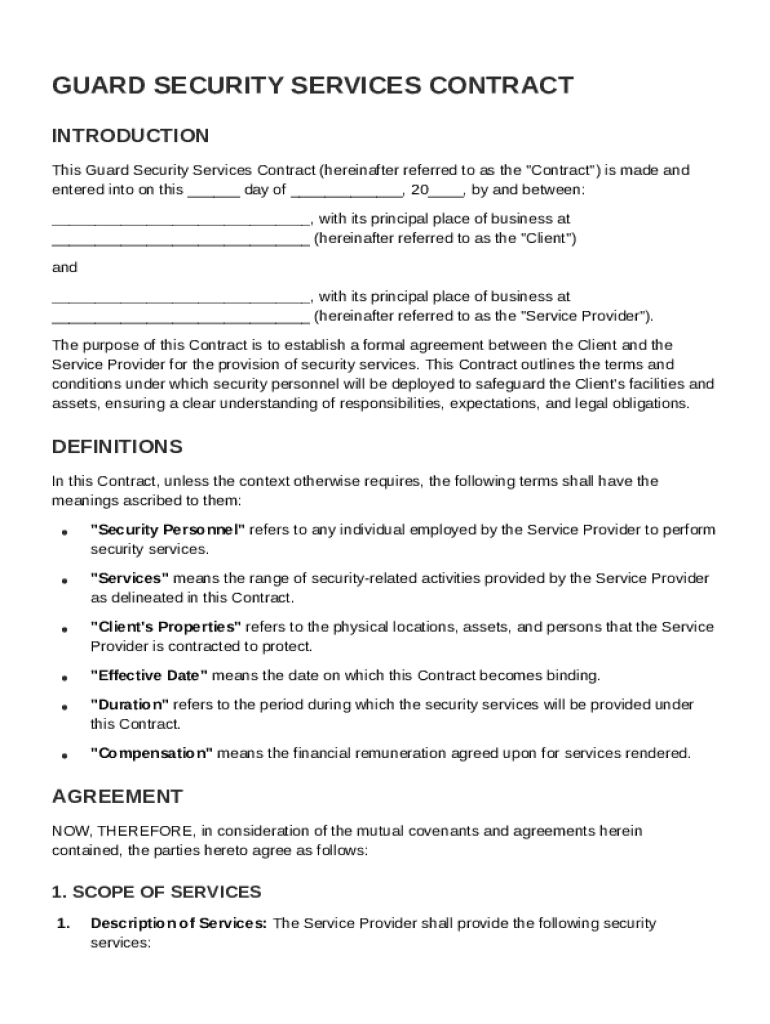
A Guard Security Contract Template formalizes the agreement between a client and a security service provider. This template specifies various obligations, including the types of security services rendered, the personnel requirements, the duration of the contract, and the compensation terms. It ensures clarity in roles, establishes responsibilities, and protects the client's assets. Such contracts form the backbone of security arrangements by laying down comprehensive terms that both parties must adhere to. The contract is pivotal in preventing disputes by having clear, written expectations and deliverables.
How to Use the Guard Security Contract Template
Using the Guard Security Contract Template involves several key steps to align it with specific needs. First, review the contents of the template to understand its structure and requirements. Next, customize essential fields, such as service scope and personnel involved, to befit your context. Make adjustments to duration clauses and compensation structures in accordance with the agreed terms. Finally, ensure that both parties review the modified contract to confirm that it accurately reflects their understanding, prior to signing.
Steps to Complete the Guard Security Contract Template
- Review the Template: Begin by reading through the entire contract to familiarize yourself with its components.
- Customize Service Details: Specify the type of security services required, whether it involves on-site guards, patrol services, or surveillance.
- Personnel Requirements: Detail any specific personnel requirements, such as certifications or clearances needed by the security staff.
- Define Duration: Clearly specify the start and end dates of the contract.
- Determine Compensation: Outline payment terms, including any retainer fees or periodic billing arrangements.
- Add Confidentiality Clauses: Include clauses that safeguard sensitive information from being disclosed.
- Review and Sign: Ensure all parties understand the terms, make any necessary adjustments, and finalize with signatures from authorized personnel.
Key Elements of the Guard Security Contract Template
Guard Security Contract Templates consist of several core components, ensuring that all aspects of the security service engagement are covered:
- Scope of Services: Defines the specific security tasks and duties to be performed.
- Personnel Requirements: Details any unique qualifications or credentials required of the security personnel.
- Duration and Termination: Specifies the contract length and conditions under which either party may terminate the agreement.
- Compensation Details: Lays out the payment terms, conditions, and schedule.
- Confidentiality: Ensures the protection of sensitive information throughout the duration of the contract.
- Insurance and Liability: Outlines responsibility and coverage in the event of an incident.
- Dispute Resolution: Provides mechanisms for resolving disagreements without resorting to litigation.
Who Typically Uses the Guard Security Contract Template
The Guard Security Contract Template is commonly used by organizations that need professional security services, such as corporations, government agencies, and event organizers. It is also utilized by private security firms to formalize service agreements. Typically, facilities requiring heightened security measures, such as warehouses, corporate offices, and public event venues, engage these templates to outline service scope and ensure aligned expectations between themselves and security providers.


State-Specific Rules for the Guard Security Contract Template
Security contracts may be subject to state-specific regulations that impact the terms and execution of the agreement. For example, different states might have varying requirements regarding licensing for security personnel or specific liabilities. Clients and service providers must verify that the contract aligns with pertinent state laws. This ensures compliance with mandatory certification, insurance minimums, and clauses related to employee rights. When interstate operations are involved, understanding each jurisdiction's rules is essential for avoiding legal complications.
Legal Use of the Guard Security Contract Template
For a Guard Security Contract Template to be legally binding, it must comply with applicable laws and regulations. Ensure all service terms, obligations, and liabilities are clearly spelled out and that both parties have the legal capacity to enter into a contract. The contract should include clear language about ownership rights, indemnification, and legal recourse in case of contract breaches. Legal consultation may be necessary to adapt the template to meet distinct laws in your state or industry.
Examples of Using the Guard Security Contract Template
Real-world scenarios demonstrate the versatility of the Guard Security Contract Template:
- Corporate Security: A corporation hires a security firm to provide around-the-clock guard services for its headquarters. The contract specifies personnel rotations, emergency protocols, and confidentiality to protect sensitive corporate data.
- Event Security: An event organizer contracts a security provider for an upcoming concert, detailing entry screenings, crowd control measures, and immediate reporting practices for incidents.
- Retail Security: A retail chain uses the template to procure security patrols during off-hours. It defines rotational duties, response strategies for theft incidences, and compensation per patrol shift.
These examples highlight how customized templates facilitate varying security needs across different settings, ensuring all stakeholder interests are properly addressed.