




Here's how it works

01. Edit your form online
Type text, add images, blackout confidential details, add comments, highlights and more.

02. Sign it in a few clicks
Draw your signature, type it, upload its image, or use your mobile device as a signature pad.

03. Share your form with others
Send it via email, link, or fax. You can also download it, export it or print it out.
How to use or fill out Virginia IT Agency with our platform

- Click ‘Get Form’ to open the Virginia IT Agency document in the editor.
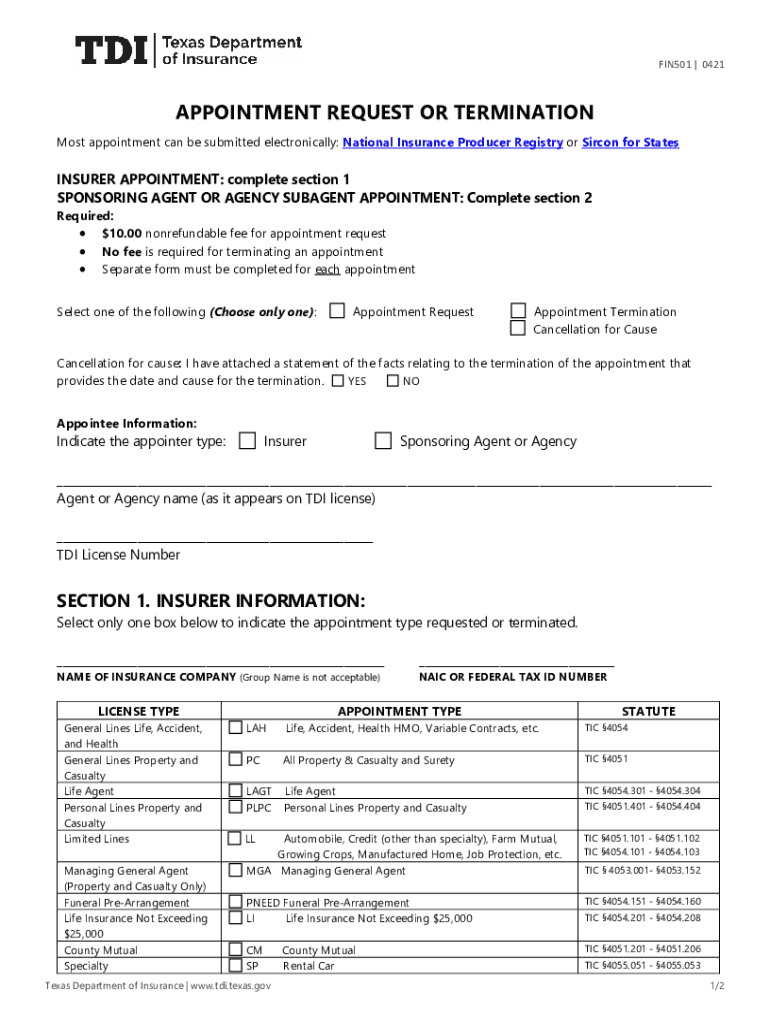
- Begin by selecting either 'Appointment Request' or 'Appointment Termination' at the top of the form. Ensure you choose only one option.
- In Section 1, provide the Insurer Information. Fill in the name of the insurance company and select the appropriate license type from the options provided.
- Enter your NAIC or Federal Tax ID number and specify the appointment type along with its corresponding statute.
- If applicable, complete Section 2 for Sponsoring Agent or Agency details, including their TDI License Number and authorized lines for subagent appointment.
- Finally, ensure all required fields are filled out accurately, sign where indicated, and provide your mailing address before submitting.
Start using our platform today to streamline your Virginia IT Agency form completion for free!
Fill out Virginia IT Agency online
It's free
See more Virginia IT Agency versions
We've got more versions of the Virginia IT Agency form. Select the right Virginia IT Agency version from the list and start editing it straight away!
Security and compliance
At DocHub, your data security is our priority. We follow HIPAA, SOC2, GDPR, and other standards, so you can work on your documents with confidence.
Learn more


Related forms

REVIEW OF ACTIVECHINESE: CHINESE LANGUAGE SKILLS FOR THE
The document is a review of ActiveChinese, an online platform designed for teaching Chinese language skills, particularl ...

Volcanism and Geochemistry in Central America: Progress and - geo mtu
The document discusses the volcanism and geochemistry of Central America, focusing on the volcanic front formed by the s ...

TURFGRSS TRENDS
The document is a research digest focused on the importance of mowing in turf management, discussing its impact on turfg ...

Michigan laws relating to economic development and housing - pzcenter msu
The document outlines the availability and details of the 2nd edition of 'Michigan Laws Relating to Economic Development ...

SPEECH WATERMARKING BY PARAMETRIC EMBEDDING - egr msu
The document presents a research paper on a novel technique for speech watermarking using parametric embedding with a fo ...

FORM 2-2003 NATIONAL ASSOCIATION OF COUNTY
The document is an approval sheet from the National Association of County Agricultural Agents, recommending nominees for ...

Nursing Knowledge Development
The document outlines the course NUR 901, focused on the development of nursing knowledge through middle range theories ...

Flag Request Form - mnsu
The document outlines the flag check-out policy at the Kearney International Center, detailing the process for borrowing ...