




Here's how it works

01. Edit your da form 7666 online
Type text, add images, blackout confidential details, add comments, highlights and more.

02. Sign it in a few clicks
Draw your signature, type it, upload its image, or use your mobile device as a signature pad.

03. Share your form with others
Send army parental consent form via email, link, or fax. You can also download it, export it or print it out.
How to use or fill out army parental consent form with our platform

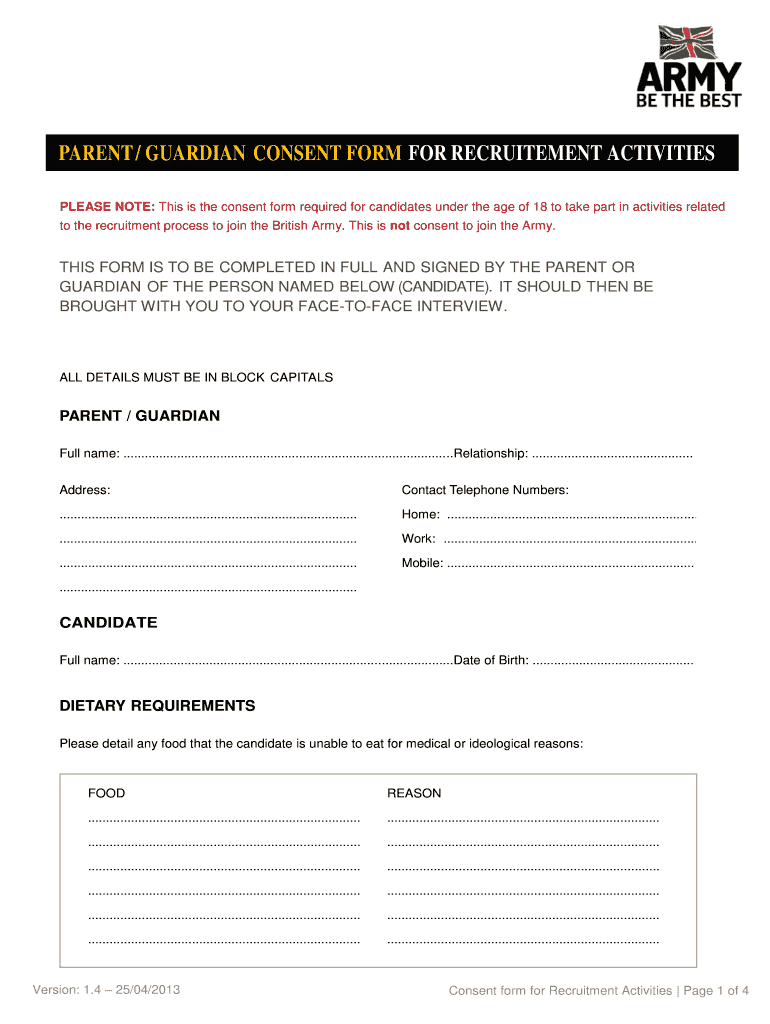
- Click ‘Get Form’ to open the army parental consent form in the editor.
- Begin by filling in the parent or guardian's full name and relationship to the candidate. Ensure all details are in block capitals as specified.
- Provide the address and contact telephone numbers for the parent or guardian, including home, work, and mobile numbers.
- Next, enter the candidate's full name and date of birth. This information is crucial for identification during recruitment activities.
- Detail any dietary requirements of the candidate, specifying food items they cannot eat along with reasons for these restrictions.
- Fill out emergency contact details for a suitable adult who can take responsibility for the candidate. Include both first and second contact information.
- Complete the registered doctor's contact details to ensure medical support is accessible if needed during recruitment activities.
- Review the public liability statement carefully before signing. Ensure you understand your responsibilities regarding your child's participation.
- Finally, sign and date the declaration section to confirm your consent for your child to participate in recruitment activities.
Start using our platform today to easily complete your army parental consent form online for free!
Fill out army parental consent form online
It's free
See more army parental consent form versions
We've got more versions of the army parental consent form form. Select the right army parental consent form version from the list and start editing it straight away!
| Versions | Form popularity | Fillable & printable |
|---|---|---|
| 2013 | 4.8 Satisfied (120 Votes) |
Security and compliance
At DocHub, your data security is our priority. We follow HIPAA, SOC2, GDPR, and other standards, so you can work on your documents with confidence.
Learn more


Related forms

On the Local Form and Transitions of Symmetry Sets, Medial Axes
The document appears to be a complex and encoded text, possibly containing various data formats or programming code. It ...

Paper - Modeling Web Interactions and Errors Shriram - Course Hero
The document discusses the challenges of designing interactive Web programs, highlighting issues caused by user navigati ...

David H Laidlaw - Brown University - cs brown
David H. Laidlaw is a professor at Brown University specializing in interdisciplinary research that combines computer sc ...

Mining Feature-Opinion Pairs and Their Reliability Scores
The document presents a text mining approach for extracting product features and opinions from user-generated reviews on ...

The CRA-E White Paper: - Brown University
The Fall 2010 issue of Conduit, the alumni news magazine from the Department of Computer Science at Brown University, hi ...

Nonverbal Cues and Deception, 1 Running Head - Triceratops Home - triceratops brynmawr
The document explores the use of nonverbal cues, specifically response latency and speech rate accommodation, in detecti ...

AND ELIMINATION
The document discusses nucleophilic substitution and elimination reactions, focusing on the mechanisms, classifications ...

The Garden Party with Newman (All Day I Dream) Tickets, Sat
The document is a newsletter from California Institute of Technology dated April 28, 1949, covering various campus event ...