




Here's how it works



How to use or fill out Fiber Optic Final Acceptance Test - Very Long Baseline Array - aoc nrao with our platform

- Click ‘Get Form’ to open the Fiber Optic Final Acceptance Test document in the editor.
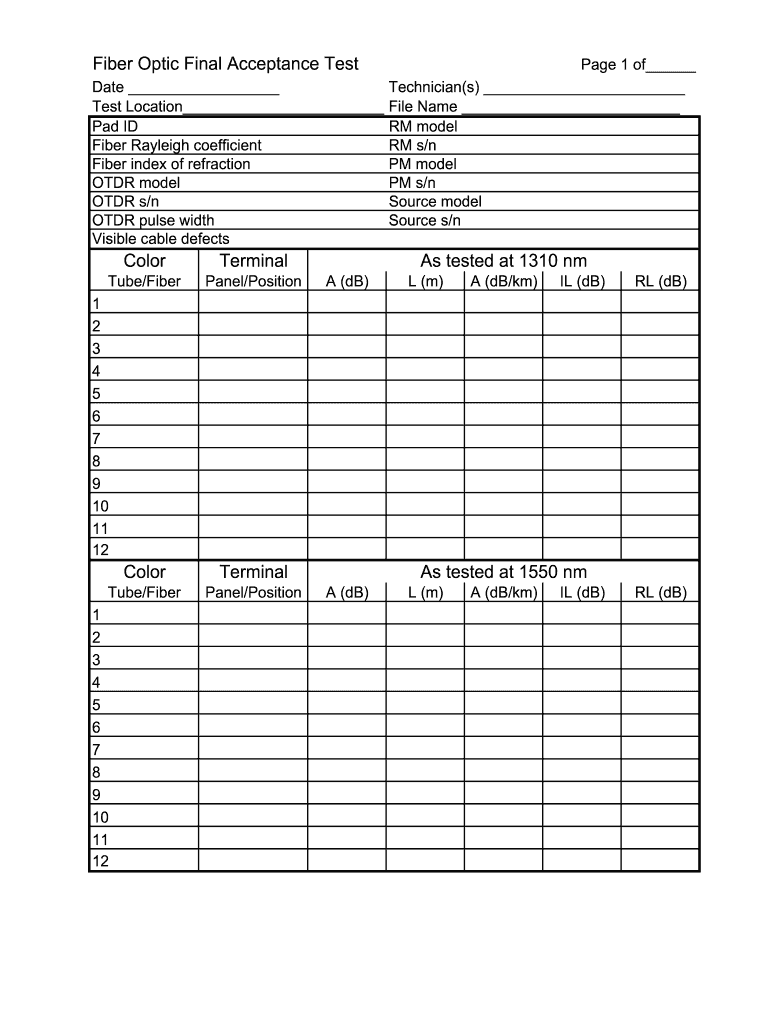
- Begin by entering the date at the top of the form. This is crucial for record-keeping and tracking purposes.
- Fill in the technician(s) name(s) responsible for conducting the test, ensuring accountability.
- Input the test location to provide context for where the acceptance test is being performed.
- Complete the fields for Pad ID, RM model, Fiber Rayleigh coefficient, and other technical specifications as required.
- For each fiber tested, enter details such as color, terminal, tube/fiber, panel/position, and measurements at both 1310 nm and 1550 nm wavelengths in their respective sections.
- Review all entries for accuracy before finalizing your document. Utilize our platform’s features to make any necessary edits easily.
Start using our platform today to streamline your document editing and ensure a smooth completion of your Fiber Optic Final Acceptance Test!
It's free
See more Fiber Optic Final Acceptance Test - Very Long Baseline Array - aoc nrao versions
| Versions | Form popularity | Fillable & printable |
|---|---|---|
| 2002 | 4 Satisfied (35 Votes) |
Got questions?
Can I draw my electronic signature to approve my fiber acceptance testing?
Of course, electronically drawing your signature is acceptable, but only if you use a tool that complies with industry regulations and policies. Try DocHub, which ensures eSignature validity under ESIGN and UETA requirements. All you need to approve your fiber acceptance testing electronically is an account with DocHub and an internet connection. When you open your paperwork in our editor, click Sign and choose the Draw option.
How do you edit final acceptance in Chrome?
If you use Chrome, there are two straightforward ways to modify your final acceptance online. First, visit the DocHub site, add your file, and modify it using our toolbar. You may also set up our Chrome extension and modify any document by dragging and dropping it in your browser window.
Security and compliance
At DocHub, your data security is our priority. We follow HIPAA, SOC2, GDPR, and other standards, so you can work on your documents with confidence.
Learn more


