




Here's how it works

01. Edit your amway ibo registration form online
Type text, add images, blackout confidential details, add comments, highlights and more.

02. Sign it in a few clicks
Draw your signature, type it, upload its image, or use your mobile device as a signature pad.

03. Share your form with others
Send amway registration form via email, link, or fax. You can also download it, export it or print it out.
How to use or fill out amway information agree online with our platform

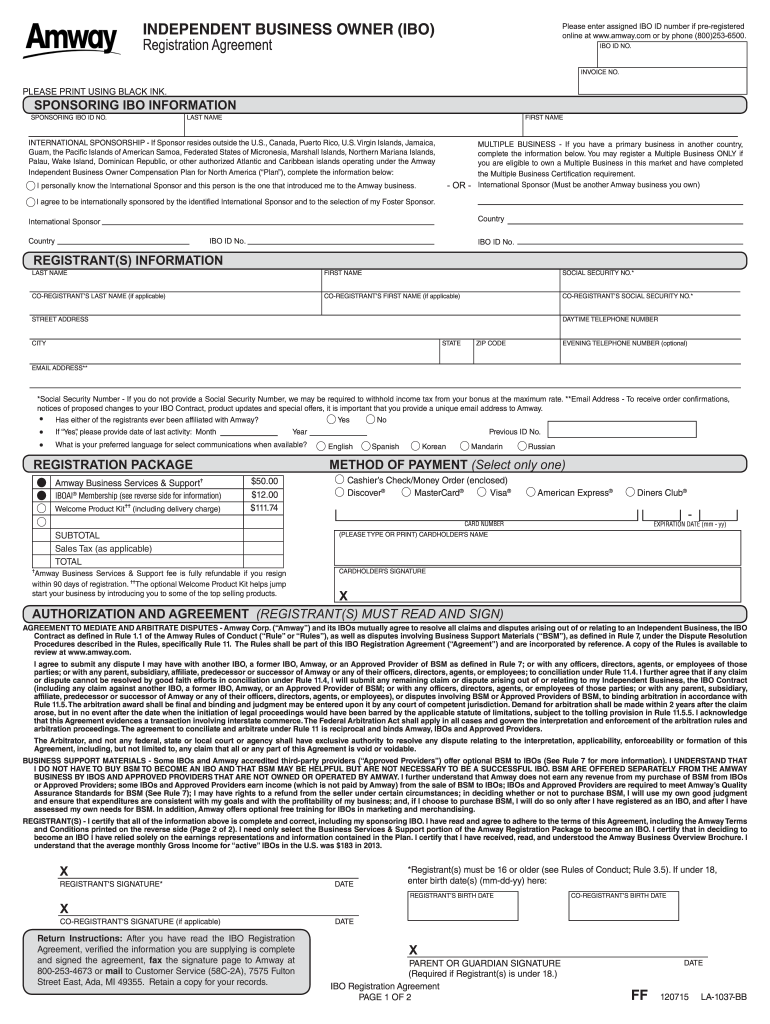
- Click ‘Get Form’ to open the Amway Information Agreement in the editor.
- Begin by entering your assigned IBO ID number if you are pre-registered. This is essential for identification.
- Fill in the sponsoring IBO's information, including their last name and IBO ID number. Ensure accuracy as this links you to your sponsor.
- Complete the registrant's information section, including both primary and co-registrant details if applicable. Pay special attention to the Social Security Number field, as it is crucial for processing.
- Select your preferred method of payment from the options provided. Make sure to enter all necessary card details accurately.
- Read through the Authorization and Agreement section carefully. Once understood, sign digitally within the editor to confirm your agreement.
- Finally, review all entered information for completeness and accuracy before submitting your form through our platform.
Start filling out your Amway Information Agreement online today for free using our platform!
Fill out amway information agree online online
It's free
See more amway information agree online versions
We've got more versions of the amway information agree online form. Select the right amway information agree online version from the list and start editing it straight away!
| Versions | Form popularity | Fillable & printable |
|---|---|---|
| 2013 | 4.9 Satisfied (473 Votes) |
Security and compliance
At DocHub, your data security is our priority. We follow HIPAA, SOC2, GDPR, and other standards, so you can work on your documents with confidence.
Learn more


Related forms

Ph: 360-886-5700
The document is a Solicitors License Application for the City of Black Diamond, detailing the application process, requi ...

Fillable Online New England Inspection Service, Inc Fax
The document outlines the mandatory registration process for contractors with the Lyndhurst Building Department for the ...

$ La Corporation Income Tax Return for 2017 La Corporation
The document is a tax form (CIFT-620) for Louisiana corporations, detailing the requirements for filing income and franc ...

Lern la wp-contentuploadsSTATEWIDE TRAUMA SYSTEM PLAN - Louisiana Emergency Response
The Louisiana Statewide Trauma System Plan, developed by the Louisiana Emergency Response Network (LERN), outlines a com ...

APPLICATION FOR USING THE GROUNDS
The document is an application form for organizing events at the National Battlefields Park, requiring detailed informat ...
Skilled-home-pdn-precertification-request-form Accessible skilled-home-pdn-precertification-request-
Skilled-home-pdn-precertification-request-form Accessible skilled-home-pdn-precertification-request-
The document is a Precertification Information Request Form for Skilled Home Private Duty Nursing Care, applicable to va ...

Guardian dependent eligibility certification form
The document is a Dependent Eligibility Certification Form used to verify the eligibility of dependents for insurance co ...

SOENOTARYTOBESIGNED
The document outlines the verification process required by the Department of Education for students selected for verific ...