




Here's how it works



How to use or fill out cs 4171 with our platform

- Click ‘Get Form’ to open the cs 4171 in the editor.
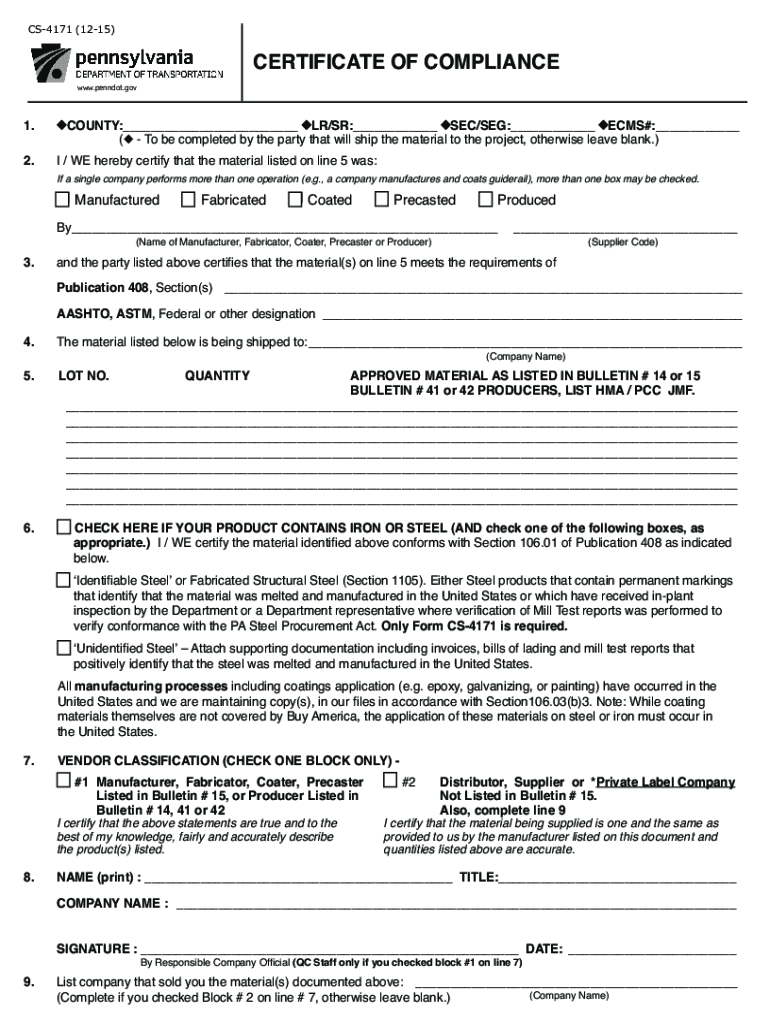
- Begin by filling in the COUNTY, LR/SR, SEC/SEG, and ECMS# fields. This information should be completed by the party shipping the material; if not applicable, leave it blank.
- In the NAME OF MANUFACTURER section, check all relevant boxes for operations performed (manufactured, fabricated, etc.) and provide the supplier code.
- Complete the MEETS SPECIFICATION REQUIREMENTS section to confirm that materials meet necessary standards before shipment.
- List the SHIPPED TO company name where materials are being sent.
- Fill in LOT NUMBER, QUANTITY, and DESCRIPTION OF MATERIAL as required for accurate documentation.
- If applicable, check the block indicating your product contains iron or steel and complete vendor classification by selecting either Manufacturer or Distributor.
- Finally, enter your NAME, TITLE, COMPANY NAME, and SIGNATURE to certify compliance before submitting.
Start using our platform today to easily fill out your cs 4171 form online for free!
It's free
Got questions?
How do I sign my cs4171 free of charge?
Most eSignature services require users to have a paid subscription. With DocHub, there are two ways for you to create an electronic signature to your cs4171 free of charge:
- You can do it during a 7-day trial period;
- You can subscribe to a free plan.
The second option, however, has limitations on the number of signatures, sign requests, emails, and forms for adjusting available per month. You can check for full details here.
How do you fill out penndot cs 4171 on iOS?
You need only a web connection and a web browser to fill out your penndot cs 4171 on an iOS phone. Open the DocHub website and authenticate. Then, add your file or select it from the list in your dashboard. Then use our editing instruments to fill out your form and preserve all your changes. You can also send it to a specified recipient immediately.
Is CS 111 hard?
What is the 42 PA CS 725?
Is CS 303e hard?
Security and compliance
At DocHub, your data security is our priority. We follow HIPAA, SOC2, GDPR, and other standards, so you can work on your documents with confidence.
Learn more


