




Here's how it works



How to use or fill out Pro Se Electronic Notice Registration (7/03/2013) CCG 0126 A IN ... - 12 218 239 with our platform

- Click ‘Get Form’ to open it in the editor.
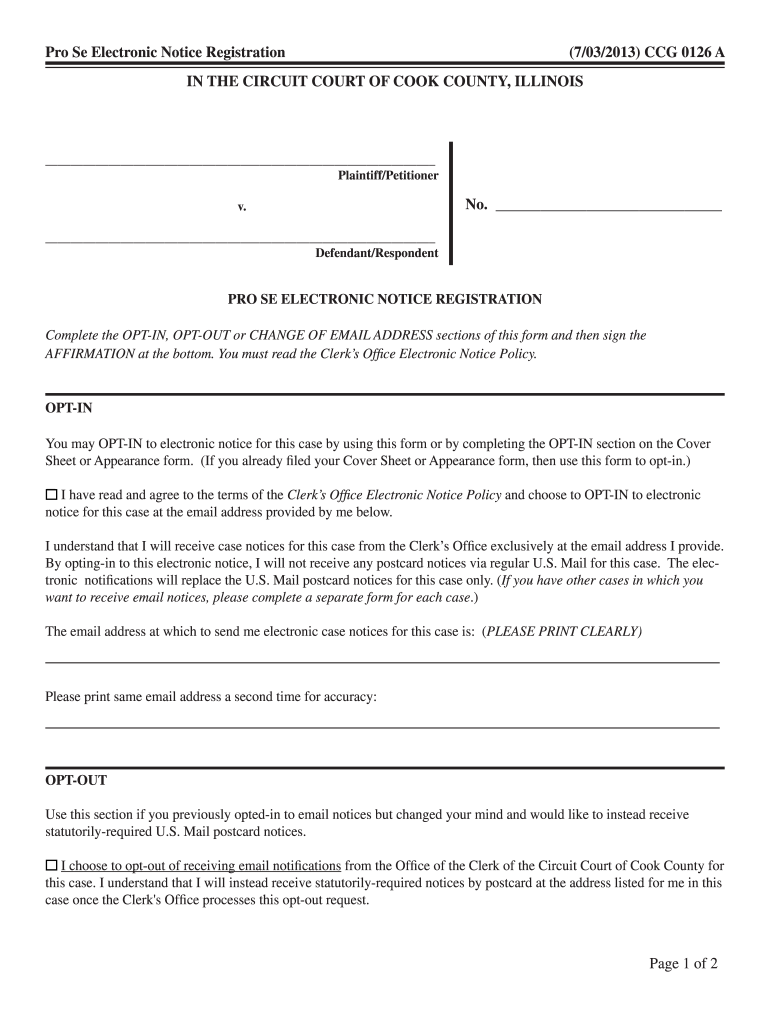
- Begin by completing the OPT-IN section if you wish to receive electronic notices. Clearly print your email address twice for accuracy.
- If you previously opted-in and want to opt-out, fill out the OPT-OUT section, indicating your choice to receive notices via U.S. Mail instead.
- For changing your email address, complete the CHANGE OF EMAIL ADDRESS section, providing both your old and new email addresses clearly.
- Finally, sign the AFFIRMATION at the bottom of the form, confirming that all information is accurate and that you agree to the Clerk’s Office Electronic Notice Policy.
Start filling out your Pro Se Electronic Notice Registration form online for free today!
It's free
See more Pro Se Electronic Notice Registration (7/03/2013) CCG 0126 A IN ... - 12 218 239 versions
| Versions | Form popularity | Fillable & printable |
|---|---|---|
| 2013 | 4.8 Satisfied (140 Votes) |
Got questions?
How do I sign my Pro Se Electronic Notice Registration (7/03/2013) CCG 0126 A IN ... - 12 218 239 without printing?
Electronic signatures are a perfect replacement for traditional signing, as they save time, effort, and money people spend on printing, scanning, and paper delivery. You can eSign your Pro Se Electronic Notice Registration (7/03/2013) CCG 0126 A IN ... - 12 218 239 utilizing a reliable and robust online document management services like DocHub. It complies with main eSignature standards (ESIGN and UETA), so all documents approved there are legally binding and have the same validity as physically signed ones.
Do I need to set up software to edit my Pro Se Electronic Notice Registration (7/03/2013) CCG 0126 A IN ... - 12 218 239?
When you edit your Pro Se Electronic Notice Registration (7/03/2013) CCG 0126 A IN ... - 12 218 239 with DocHub, you merely need a stable web connection and virtually any browser installed on your device. No need to set up any third-party software or research guides. Simply open a tab with DocHub, drag and drop your file, and edit it immediately.
Security and compliance
At DocHub, your data security is our priority. We follow HIPAA, SOC2, GDPR, and other standards, so you can work on your documents with confidence.
Learn more


