




Here's how it works



How to use or fill out BUDDY_POPPY_ORDER_FORM.pdf 57.5 KB - vfwdeptla.org with Our Platform

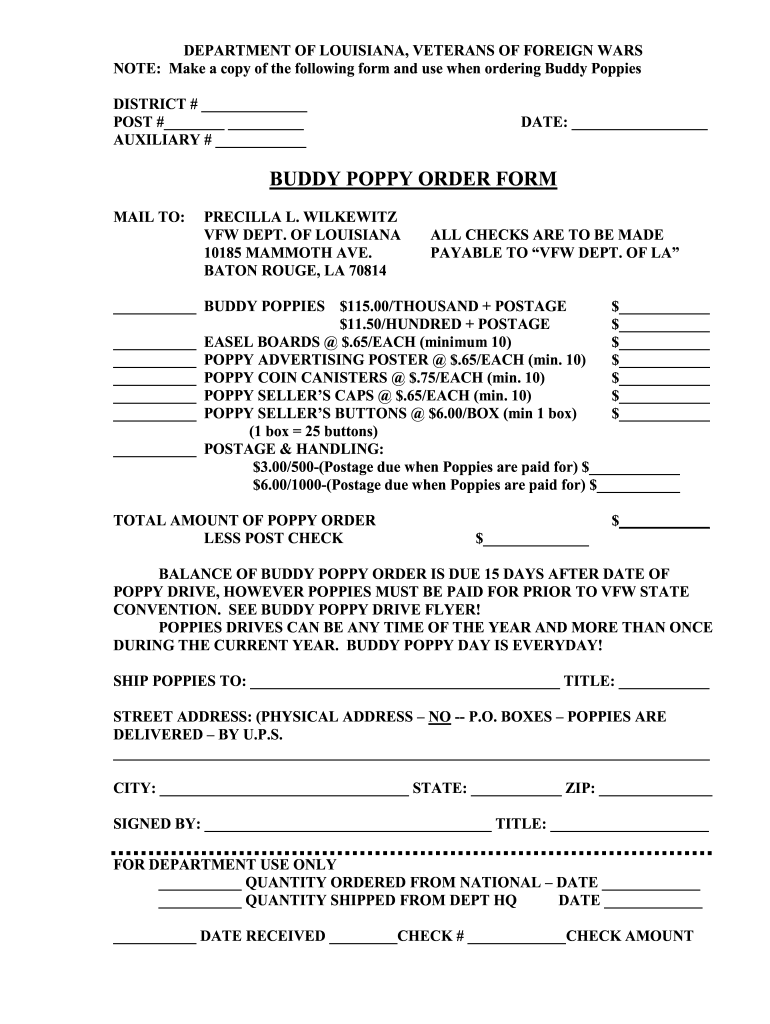
- Click ‘Get Form’ to open the Buddy Poppy Order Form in the editor.
- Begin by filling in your District, Post, and Auxiliary numbers at the top of the form. This information is essential for processing your order correctly.
- Enter the date of your order in the designated field to ensure timely processing.
- Specify the quantity of Buddy Poppies you wish to order, selecting either $115.00 per thousand or $11.50 per hundred, and input the corresponding total amount.
- Continue filling out quantities for Easel Boards, Advertising Posters, Coin Canisters, Seller’s Caps, and Buttons as needed, ensuring you meet minimum order requirements where applicable.
- Calculate and enter your postage and handling fees based on your total order quantity.
- Complete the shipping information section with a physical address (no P.O. Boxes) for delivery via UPS.
- Sign and date the form at the bottom to authorize your order before submission.
Start using our platform today to streamline your Buddy Poppy Order process effortlessly!
It's free
See more BUDDY_POPPY_ORDER_FORM.pdf 57.5 KB - vfwdeptla.org versions
| Versions | Form popularity | Fillable & printable |
|---|---|---|
| 2012 | 4.1 Satisfied (37 Votes) |
Got questions?
How can I sign my BUDDY_POPPY_ORDER_FORM.pdf 57.5 KB - vfwdeptla.org on iOS?
With DocHub, you can rapidly sign your BUDDY_POPPY_ORDER_FORM.pdf 57.5 KB - vfwdeptla.org or any other document on iOS, even without setting up extra programs. You can access your DocHub account from any internet-connected browser and fill out and sign your document in any way you like with just a few clicks.
How do you edit BUDDY_POPPY_ORDER_FORM.pdf 57.5 KB - vfwdeptla.org on iOS?
You can easily edit fill out your BUDDY_POPPY_ORDER_FORM.pdf 57.5 KB - vfwdeptla.org on any iOS device. Open an internet browser of your choice, visit the DocHub website, authorize or create a new account, add your file for editing, and make your desired alterations. Our service is mobile-friendly, so using its functions on your smartphone will be a no-brainer, even on the first try.
Security and compliance
At DocHub, your data security is our priority. We follow HIPAA, SOC2, GDPR, and other standards, so you can work on your documents with confidence.
Learn more


