




Here's how it works



How to use or fill out DOH-2973(f) - Wadsworth Center - wadsworth with our platform

- Click ‘Get Form’ to open the DOH-2973(f) in the editor.
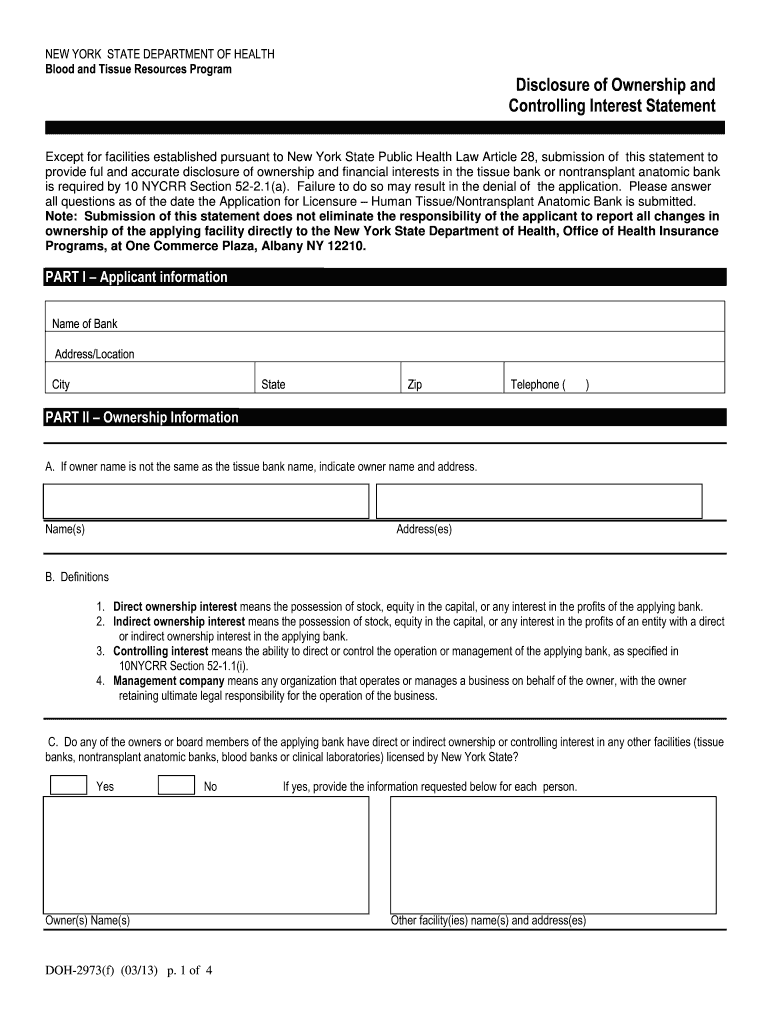
- Begin with Part I, entering the name of the bank, address, city, state, zip code, and telephone number. Ensure all information is accurate as it is crucial for your application.
- Move to Part II – Ownership Information. If the owner’s name differs from the tissue bank name, provide the owner's name and address. Define direct and indirect ownership interests as outlined in the form.
- Answer whether any owners or board members have ownership interests in other licensed facilities. If yes, list their names and addresses.
- In Part III – Declaration, indicate if any individuals have been convicted of healthcare fraud or related charges. Provide details if applicable.
- Complete Part IV by signing and dating the form. Include your title and contact information before submission.
Start using our platform today to fill out your DOH-2973(f) form easily and for free!
It's free
See more DOH-2973(f) - Wadsworth Center - wadsworth versions
| Versions | Form popularity | Fillable & printable |
|---|---|---|
| 2013 | 4.8 Satisfied (165 Votes) |
Got questions?
How do I sign my DOH-2973(f) - Wadsworth Center - wadsworth without printing?
Electronic signatures are a great alternative to traditional signing, as they save time, effort, and costs people spend on printing, scanning, and paper delivery. You can electronically sign your DOH-2973(f) - Wadsworth Center - wadsworth using a reliable and robust online document processing tool like DocHub. It complies with primary eSignature regulations (ESIGN and UETA), so all documents approved there are legally binding and have the same validity as physically signed ones.
How do you edit DOH-2973(f) - Wadsworth Center - wadsworth online?
With DocHub, there are several convenient ways to edit your DOH-2973(f) - Wadsworth Center - wadsworth online. You can drag and drop the form and modify it straight at the DocHub website or use our browser extension to fill out your form right away. On top of that, you can modify your PDF on your smartphone, as DocHub works with all the available mobile platforms.
Security and compliance
At DocHub, your data security is our priority. We follow HIPAA, SOC2, GDPR, and other standards, so you can work on your documents with confidence.
Learn more


