




Here's how it works



How to use or fill out bmtkygov form with our platform

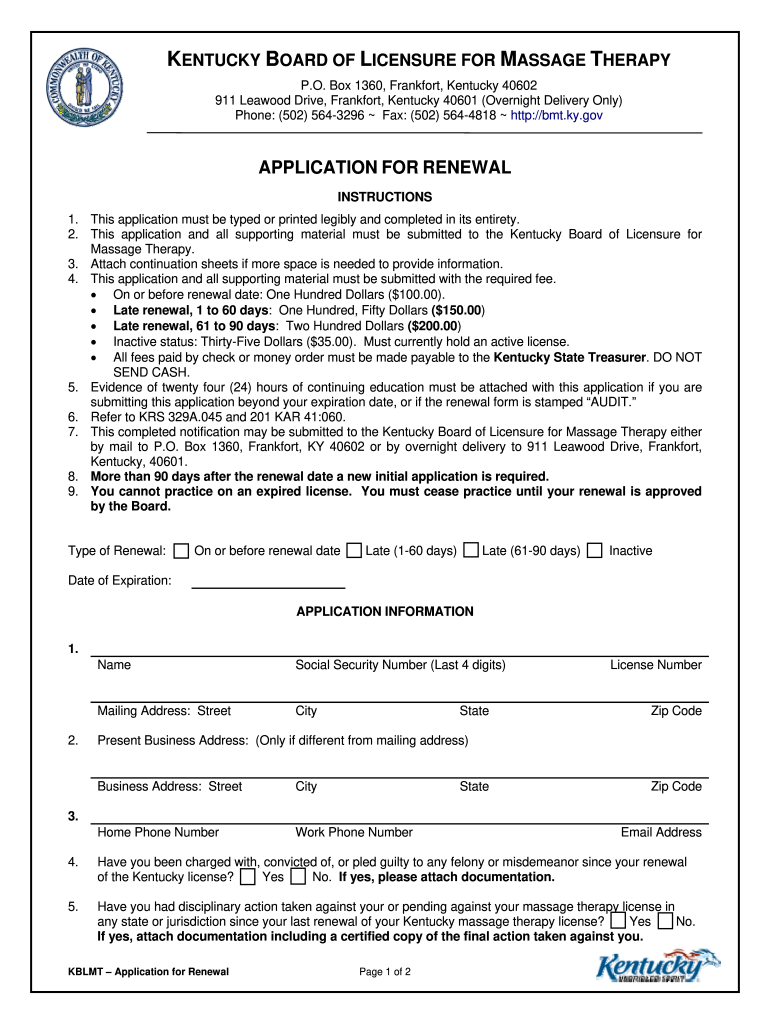
- Click ‘Get Form’ to open the bmtkygov application for renewal in the editor.
- Begin by selecting the type of renewal you are applying for: on or before the renewal date, late (1-60 days), late (61-90 days), or inactive. Fill in the date of expiration.
- Complete the application information section by entering your name, last four digits of your Social Security Number, mailing address, and license number. Ensure all fields are filled legibly.
- Provide your present business address if it differs from your mailing address. Include home and work phone numbers along with your email address.
- Answer the questions regarding any felony or misdemeanor charges, disciplinary actions against your license, and continuing education hours. Attach necessary documentation if applicable.
- List your continuing education courses obtained within the two years preceding your current renewal date, ensuring to include course names, dates, and hours earned.
- Finally, review all entered information for accuracy and completeness before signing the applicant affidavit at the bottom of the form.
Start filling out your bmtkygov form online for free today!
It's free
Got questions?
Is it secure to sign my bmtkygov form electronically?
You need to use only reliable software solutions with strong security compliance to approve your documents electronically. DocHub is just the type of service you need! It stores data on Amazon Web Servers and complies with all required security standards and eSignature regulations, so it’s a trustworthy way to electronically sign your bmtkygov form or other paperwork using this tool.
Can I edit bmtkygov form on my phone?
As a comprehensive document editing service, DocHub is accessible on smart phones. Open DocHub in your choice of mobile browser and employ our smart mobile-friendly toolset to complete your bmtkygov form.
Is online massage therapy training legitimate?
What is the difference between a massage therapist and a masseuse?
In what states can you do massage without a license?
Security and compliance
At DocHub, your data security is our priority. We follow HIPAA, SOC2, GDPR, and other standards, so you can work on your documents with confidence.
Learn more


