Type text, add images, blackout confidential details, add comments, highlights and more.
02. Sign it in a few clicks
Draw your signature, type it, upload its image, or use your mobile device as a signature pad.
03. Share your form with others
Send va form 21 686c pdf via email, link, or fax. You can also download it, export it or print it out.
How to use or fill out 21 686c form with our platform
Ease of Setup
DocHub User Ratings on G2
Ease of Use
DocHub User Ratings on G2
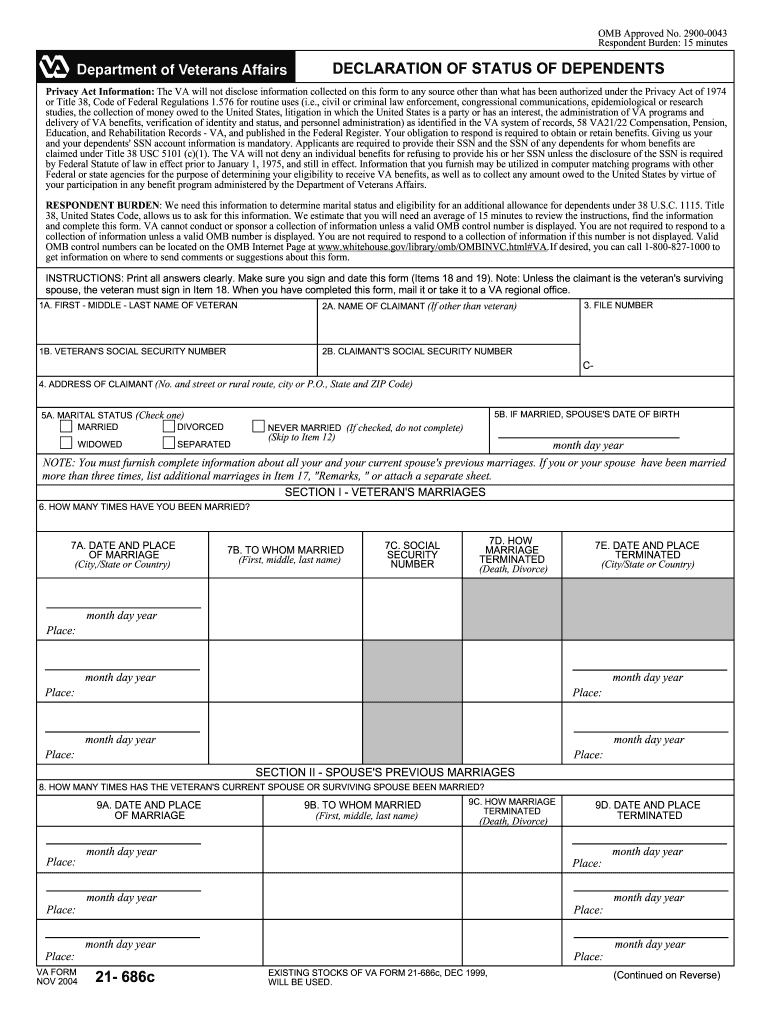
Click ‘Get Form’ to open the 21 686c form in the editor.
Begin by entering the veteran's full name and Social Security number in Items 1A and 1B. Ensure accuracy as this information is crucial for processing.
In Item 5, indicate your marital status by checking the appropriate box. If married, provide your spouse's date of birth in Item 5B.
Complete Section I by detailing all previous marriages of both you and your spouse. Use Items 6 through 7E to provide dates, places, and termination reasons.
Move to Section II to document your spouse's previous marriages, following the same format as Section I.
In Section III, list any unmarried children under your care. Provide their names, dates of birth, and Social Security numbers in Items 14A through 14H.
Finally, review all entries for accuracy before signing and dating the form in Items 18 and 19. Once completed, submit it to a VA regional office.
Start filling out your form online for free today!
VA Form 21-686cVA Form 21-674VA Form 21-686c PDFVA Form 21-686c PDF fillableVA Form 21-686c onlineVA Form 21-686c and 21-674Va form 21 686c exampleVA Form 21-686c Application Request to add and/or remove dependents
Security and compliance
At DocHub, your data security is our priority. We follow HIPAA, SOC2, GDPR, and other standards, so you can work on your documents with confidence.
INSTRUCTIONS: Print all answers clearly. Make sure you sign and date this form (Items 17 and 18). Note: Unless the claimant is the veterans surviving spouse,Read more
VA Form 21-686c - Veterans Benefits Administration
Note: There is no need to submit VA Form 21-686c when filing a claim for additional benefits for a dependent parent or parents. you are a veteran entitled toRead more
Cookie consent notice
This site uses cookies to enhance site navigation and personalize your experience.
By using this site you agree to our use of cookies as described in our Privacy Notice.
You can modify your selections by visiting our Cookie and Advertising Notice.