




Here's how it works



How to use or fill out MASSAGE INTAKE FORM - bactivecareatlantabbcomb with our platform

- Click ‘Get Form’ to open the MASSAGE INTAKE FORM in the editor.
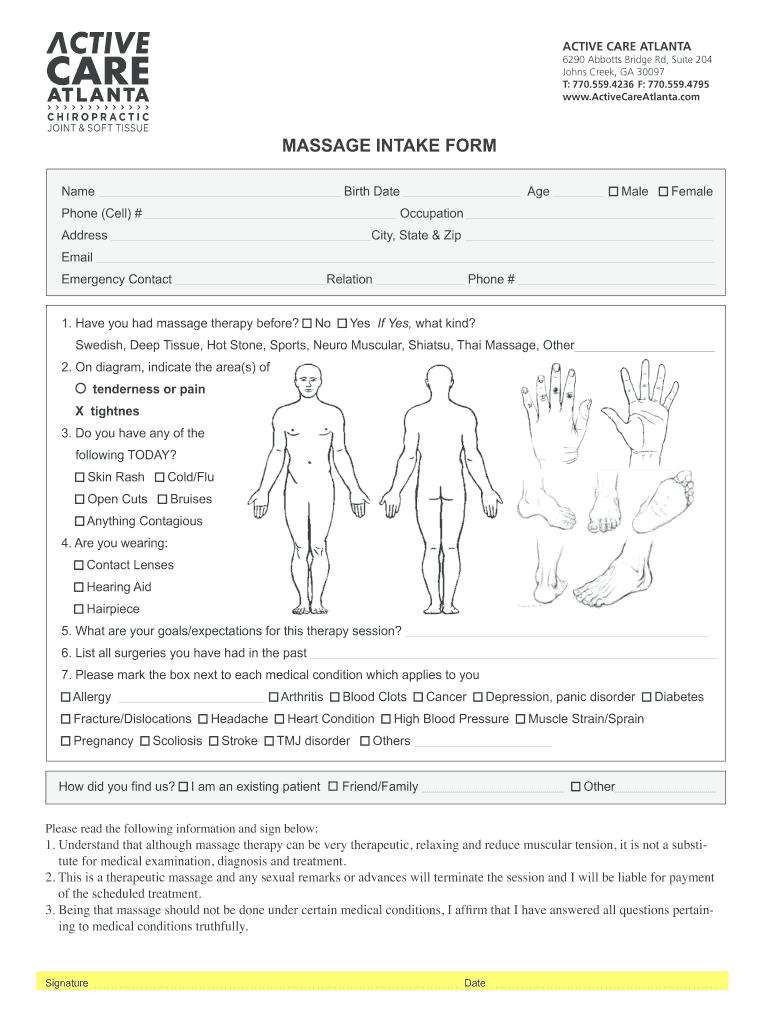
- Begin by entering your personal information, including your name, birth date, age, and gender. This helps the therapist understand your background.
- Fill in your contact details such as phone number, occupation, and address. Ensure accuracy for effective communication.
- Provide an emergency contact's name, relation, and phone number for safety purposes.
- Indicate whether you have had massage therapy before and specify the type if applicable. This information is crucial for tailoring your session.
- On the provided diagram, mark any areas of tenderness or pain to guide the therapist during your session.
- Answer questions regarding current health conditions and any medical history that may affect your therapy. Be honest for your safety.
- Finally, read the consent information carefully and sign with the date to confirm your understanding and agreement.
Start filling out your form online for free today!
It's free
Got questions?
Is it secure to sign my MASSAGE INTAKE FORM - bactivecareatlantabbcomb electronically?
You need to use only trustworthy software solutions with strong data protection compliance to sign your paperwork electronically. DocHub is just the type of service you need! It stores data on Amazon Web Servers and complies with all required security criteria and eSignature regulations, so it’s a reliable way to electronically sign your MASSAGE INTAKE FORM - bactivecareatlantabbcomb or other documents using this tool.
How do you complete MASSAGE INTAKE FORM - bactivecareatlantabbcomb online?
You can complete and sign your MASSAGE INTAKE FORM - bactivecareatlantabbcomb on the internet, even on a tight deadline. All you need to access top-notch editing instruments on any device is a DocHub account, which you can register in a few moments. Once you sign up, upload your document or find what you are searching for in our catalog, complete it utilizing the editing instruments you want, and put your electronic signature on it at the end.
Security and compliance
At DocHub, your data security is our priority. We follow HIPAA, SOC2, GDPR, and other standards, so you can work on your documents with confidence.
Learn more


