Type text, add images, blackout confidential details, add comments, highlights and more.
02. Sign it in a few clicks
Draw your signature, type it, upload its image, or use your mobile device as a signature pad.
03. Share your form with others
Send ffl application form via email, link, or fax. You can also download it, export it or print it out.
How to use or fill out ffl license application with our platform
Ease of Setup
DocHub User Ratings on G2
Ease of Use
DocHub User Ratings on G2
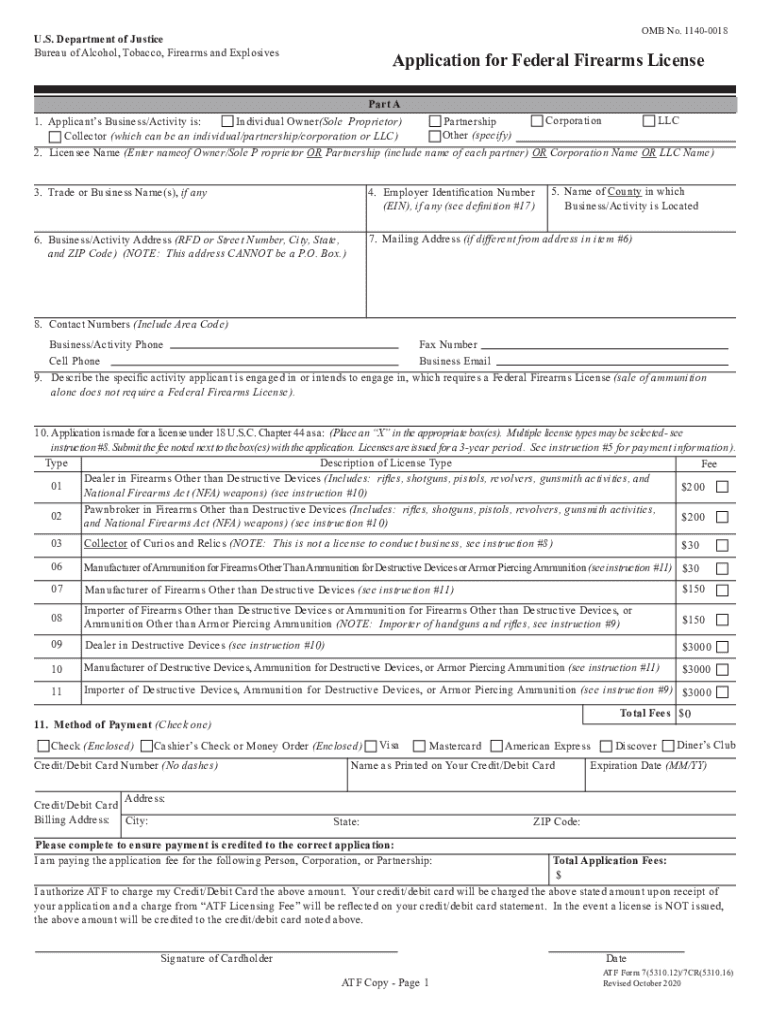
Click ‘Get Form’ to open the FFL license application in the editor.
Begin with Part A, selecting your business type (Corporation, LLC, Partnership, etc.) and enter the Licensee Name. Ensure you provide accurate details as this identifies your application.
Fill in the Business/Activity Address. Remember, this cannot be a P.O. Box. Include your contact numbers and email for communication purposes.
In section 9, describe the specific activity that requires a Federal Firearms License. Be clear and concise to avoid any confusion.
Select the appropriate license type in item 10 by placing an 'X' in the box next to your chosen option. Review associated fees carefully.
Complete all required certifications in item 20 by initialing each box to confirm compliance with local laws and regulations.
Finally, review your application for completeness before submitting it through our platform for processing.
Start filling out your FFL license application today using our platform for free!
We've got more versions of the ffl license application form. Select the right ffl license application version from the list and start editing it straight away!
FFL application onlineFFL license typesHome based FFL requirementsFFL License Type 1FFL license costFFL license Type 3Type 7 FFL requirementsHow to fill out a FFL License Application
Security and compliance
At DocHub, your data security is our priority. We follow HIPAA, SOC2, GDPR, and other standards, so you can work on your documents with confidence.
May 17, 2022 They break down how to get an FFL in 10 steps. They include: According to the ATF, this entire process usually takes about 60 days from start to finish.Read more
Cookie consent notice
This site uses cookies to enhance site navigation and personalize your experience.
By using this site you agree to our use of cookies as described in our Privacy Notice.
You can modify your selections by visiting our Cookie and Advertising Notice.