




Here's how it works

01. Edit your form online
Type text, add images, blackout confidential details, add comments, highlights and more.

02. Sign it in a few clicks
Draw your signature, type it, upload its image, or use your mobile device as a signature pad.

03. Share your form with others
Send it via email, link, or fax. You can also download it, export it or print it out.
How to use or fill out Credit Card Payment Authorization Form - IELTS Vancouver with our platform

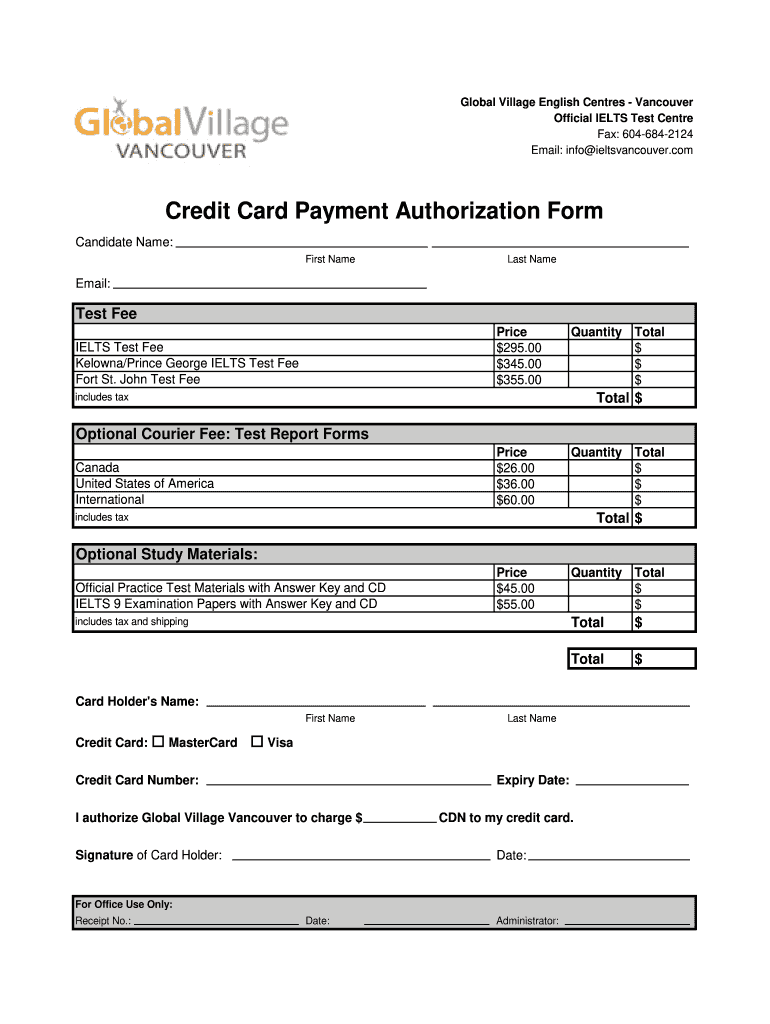
- Click ‘Get Form’ to open the Credit Card Payment Authorization Form in the editor.
- Begin by entering your Candidate Name. Fill in your First Name and Last Name in the designated fields.
- Provide your Email address to ensure you receive confirmation of your payment.
- Select the Test Fee applicable to you from the options provided, and indicate the Quantity. The Total will automatically calculate for you.
- If you wish to add an Optional Courier Fee for Test Report Forms, select the appropriate option and enter the Quantity.
- For Optional Study Materials, choose any materials you want, specify the Quantity, and check that the Total is correct.
- Fill in the Card Holder's Name, including both First and Last Names.
- Select your Credit Card type (MasterCard or Visa) and enter your Credit Card Number along with its Expiry Date.
- Authorize Global Village Vancouver to charge your specified amount by signing in the designated area and entering today’s date.
Start using our platform today to easily complete your Credit Card Payment Authorization Form!
Fill out Credit Card Payment Authorization Form - IELTS Vancouver online
It's free
Security and compliance
At DocHub, your data security is our priority. We follow HIPAA, SOC2, GDPR, and other standards, so you can work on your documents with confidence.
Learn more


