




Here's how it works



How to use or fill out ohio title inquiry with our platform

- Click ‘Get Form’ to open the Ohio Title Inquiry in the editor.
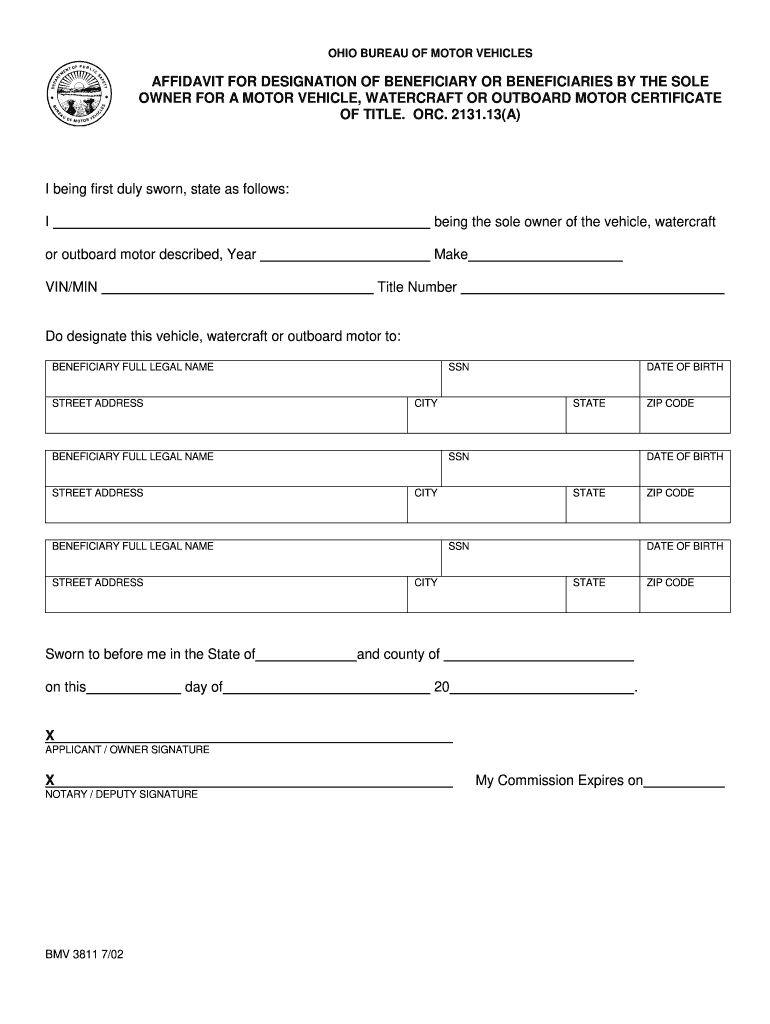
- Begin by entering your personal information in the designated fields. Fill in your full legal name, street address, and Social Security Number (SSN) accurately.
- Next, provide details about the vehicle, watercraft, or outboard motor. Include the year, make, VIN/MIN, and title number to ensure proper identification.
- Designate your beneficiary by filling out their full legal name, street address, date of birth, and SSN. Ensure that all information is correct to avoid any issues.
- Once all fields are completed, review your entries for accuracy. Then proceed to sign as the applicant/owner and have a notary witness your signature.
Start using our platform today for free to streamline your Ohio Title Inquiry process!
It's free
Got questions?
Can I use DocHub to generate legal electronic signatures on my online title inquiry ohio?
Yes, you can utilize DocHub for signing any business and personal documentation, including your online title inquiry ohio. All electronic signatures you generate with our service are legally binding and court-admissible, as DocHub complies with standards required by ESIGN and UETA. Save your accomplished paperwork with a detailed Audit Trail if needed.
How do you get bmv title search?
You can find the latest and most relevant version of the bmv title search in our DocHub forms collection. Search it by categories or utilize the search field to get the exact template that fits your situation. You can open this form for editing after you find it.
Can I get a copy of my car title online Ohio?
How long does it take to get a replacement title in Ohio?
How do I do a title search in Ohio?
Security and compliance
At DocHub, your data security is our priority. We follow HIPAA, SOC2, GDPR, and other standards, so you can work on your documents with confidence.
Learn more


