
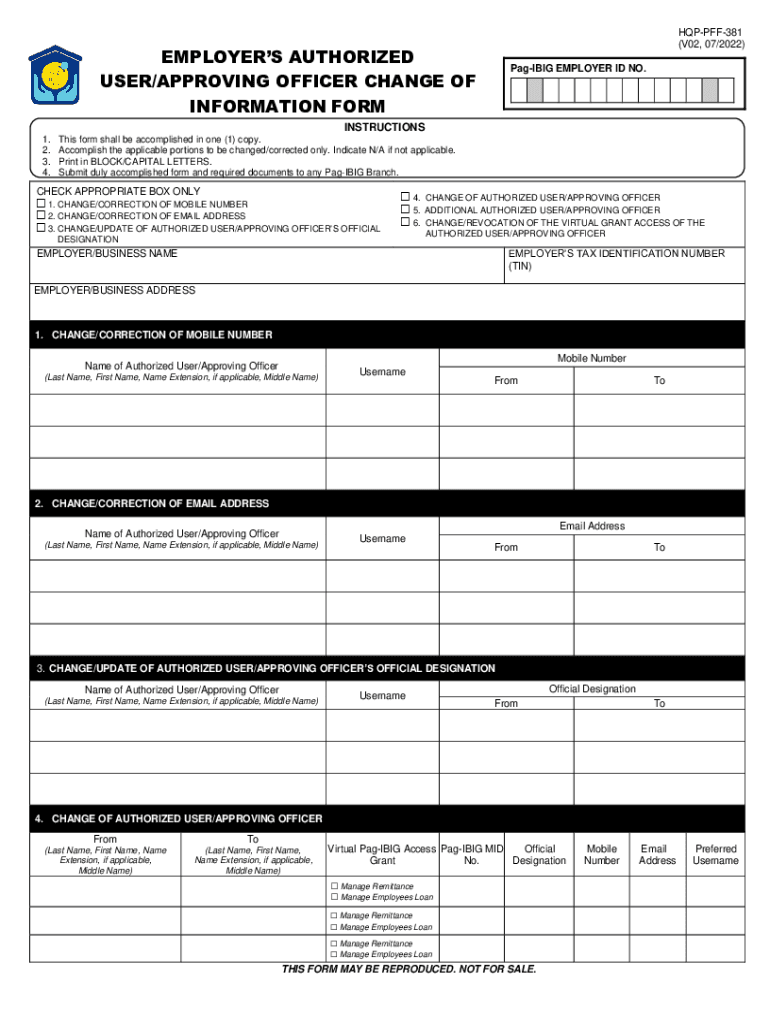







What the Pag-IBIG Employer User Change Form Is
The Pag-IBIG Employer User Change Form is a Philippine employer record update form used to change authorized user details for an employer’s Virtual Pag-IBIG or employer online access. In practical terms, it is designed for organizations that already have employer portal access and need to update the people who can manage that access, such as an approving officer or authorized user.
This form is most relevant to employers that handle Pag-IBIG-related transactions online, including employee contribution reporting, account maintenance, and portal administration. In many workplaces, access is tied to named individuals rather than a department in general, so when those individuals change roles, leave the company, or need their permissions adjusted, the employer account record must be updated.
The document title shown on the reference version, “Employers Authorized User/Approv ing Officer Change of Information Form,” reflects that it is not a general employee benefits form. It is an administrative control document for employer-side access management. That means the form is less about personal member benefits and more about who is allowed to act on behalf of the business in Pag-IBIG systems.
In U.S. terms, the closest comparison would be a company portal administrator update form for a payroll or benefits platform. The purpose is similar: keeping access aligned with the right people, reducing security risk, and preserving a usable audit trail.
The form is typically used when there is a staffing change, a reassignment of compliance responsibilities, or a correction to previously submitted contact and authorization information. In that sense, it helps an employer maintain continuity when account responsibility moves from one person to another.
Who Typically Uses It
Employers registered with Pag-IBIG use this form most often, especially businesses that are required to maintain electronic access for contributions, reporting, or account coordination. The actual user completing the form is usually not a frontline employee, but someone in payroll, human resources, compliance, accounting, or an executive support role.
An approving officer is often a senior representative authorized to validate changes on behalf of the company. That person may be an owner, president, director, general manager, HR head, finance manager, or other designated corporate officer, depending on the organization’s internal authority structure and Pag-IBIG’s documentation requirements.
Authorized users are commonly payroll specialists, benefits administrators, HR assistants, or office staff who need access to manage employer transactions. When one of these individuals changes, the form helps update the portal so the right people retain or lose access accordingly.
Typical scenarios include:
- A payroll officer resigns and a replacement must be added.
- An approving officer changes because of a promotion or leadership transition.
- A company closes one branch and centralizes account management.
- A business corrects an incorrectly listed user name or role.
Smaller businesses may only have one person handling the employer account, while larger organizations may have several users with different levels of access. The form supports both situations by documenting each authorized role clearly.
Key Information the Form Collects
The form generally captures employer identification details and the specific user changes being requested. At a minimum, it usually includes the Pag-IBIG Employer ID number, which serves as the company’s reference in the system.
It may also request the employer’s business name, contact details, and office address. These fields help Pag-IBIG confirm the request belongs to the correct employer account and make it easier to reach the company if clarification is needed.
For the individual whose information is being changed, the form commonly asks for:
- Full name
- Position or designation
- Contact information
- Role type, such as authorized user or approving officer
- Signature or attestation, if required
In many employer update forms, the changes themselves matter as much as the identity of the person. For example, the company may not only be replacing a user, but also changing the user’s role, email address, mobile number, or authority level.
If the form allows additions and removals, it may also show the former user information alongside the new one. That side-by-side structure helps reduce confusion, especially when a business wants to demonstrate that access has been formally transferred rather than simply edited in place.
Some versions may require supporting certifications from the employer’s representative. This is common when the change involves a new approving officer, because Pag-IBIG may need confirmation that the person has authority to act for the company.
How to Complete It Correctly
Completing the Pag-IBIG Employer User Change Form usually begins with identifying the current employer account exactly as it appears in Pag-IBIG records. Accuracy matters here, because even small differences in the employer name, branch name, or Employer ID can slow processing.
The next step is usually to identify what is changing. Some forms request a change of information for an existing user, while others allow a substitution of one user for another. It is important to match the form’s structure rather than trying to fit the change into the wrong section.
A careful completion process often looks like this:
- Enter the employer’s registered details exactly as recorded.
- Identify the user or approving officer whose information is changing.
- Fill in the new information, including name, contact details, and role.
- Review whether the form requires signatures from the employer, the outgoing user, the incoming user, or both.
- Attach any supporting documents required by the employer or Pag-IBIG.
In practice, errors often occur when names are abbreviated, contact details are outdated, or the wrong role is selected. For example, a person may still be listed as an authorized user when they are actually meant to be the approving officer, and that mismatch can delay acceptance.
It is also common for employers to overlook consistency between the form and supporting documents. If the name on the form is written as “Maria L. Santos” but the supporting ID shows “Maria Lourdes Santos,” the discrepancy may need clarification depending on the reviewing office’s standards.
When multiple changes are involved, such as replacing both the user and the approving officer, it is usually safer to document each change clearly instead of compressing everything into one line. Clear formatting reduces the risk of rejection or follow-up inquiries.
Supporting Documents and Verification
Supporting documents are often needed to confirm both the employer’s identity and the authority of the person signing the form. The exact documents can vary by office or account type, but the purpose is consistent: to verify that the requested change is legitimate.
Common supporting materials may include:
- A government-issued ID for the authorized signatory
- Company identification or registration details
- Corporate authorization, board resolution, or secretary’s certificate, if applicable
- A valid company email or contact reference
- Proof of the new user’s employment or designation, if required
For corporate entities, authorization evidence becomes especially important. A business may need to show that the person signing has the power to designate or replace the employer portal user. That is similar to U.S. corporate documentation practices where account administrators are changed through a resolution or formal authorization memo.
Some employers may also be asked to present the outgoing user’s separation or transfer details. This is more of an internal control measure than a universal rule, but it helps explain why access should be removed or changed.
Documentation should be consistent across all records. If the company name on the form is different from the name on its registration papers, or if the signer’s title does not match internal records, the request may be held for clarification.
In cases where the business has multiple branches or affiliated entities, supporting documents should clearly identify which employer account is being updated. This is particularly important if one company has several Pag-IBIG-related records under similar names.
Submission and Processing
The submission method depends on the employer’s local Pag-IBIG office procedures and current administrative rules. In some cases, the form may be submitted in person or through an employer liaison. In others, businesses may be able to transmit documentation through an employer portal, email channel, or approved digital process.
Processing time can vary depending on completeness, office workload, and whether the request needs manual verification. Straightforward changes with all required signatures and attachments often move faster than requests with missing documents or name discrepancies.
A typical processing workflow includes:
- Receipt of the completed form and attachments.
- Review of employer account details and authority documents.
- Validation of the requested changes.
- Updating the employer record in the system.
- Confirmation or acknowledgement of the completed update.
If the form is not filled out consistently, the office may return it for correction. This is common when signatures are missing, the wrong role is checked, or the supporting documents do not match the name and designation listed.
Businesses should also consider timing. If a payroll cycle, reporting deadline, or portal access change is pending, submitting the update early helps avoid disruption. For example, if an HR manager leaves mid-month, waiting until the next filing period could leave the company without a functioning approving officer when an online action is needed.
For employers with internal approval chains, it may take additional time before the form is ready for submission. The review step inside the company is often just as important as the external processing step.
Legal and Compliance Considerations
The form is an administrative authorization document, so its legal significance comes from the fact that it records who is allowed to act for the employer in Pag-IBIG systems. While it is not a U.S. tax filing, it functions similarly to a corporate authorization update in that inaccurate information can create compliance and security problems.
A properly completed form helps establish who has authority to access or approve transactions. That matters for accountability, since employer records may affect contributions, reporting, and official correspondence. If the wrong person retains access, the business could face operational errors or unauthorized actions.
Important compliance points include:
- Ensuring the signer has actual company authority
- Keeping the employer account information current
- Removing access for users who no longer represent the company
- Matching written details to corporate records and IDs
If a business fails to update authorized users after staffing changes, it may create delays in transactions or confusion over responsibility. In a regulated environment, that can become more than an inconvenience, particularly if deadlines are affected.
There can also be privacy implications. Employer portal access often gives users visibility into company and employee-related records, so the employer should limit access to those who need it. Updating the form promptly is part of good access control practice.
For U.S.-based companies with Philippine operations, the form should be handled as part of the local compliance process for the Philippine entity. It is not governed by IRS rules, TurboTax workflows, or U.S. payroll filing conventions, even though the operational purpose may feel familiar.
Digital and Paper Versions
Depending on the employer workflow, the form may exist as a downloadable PDF, a fillable digital form, or a paper version printed for manual completion. The exact format is less important than whether the content remains complete, legible, and properly signed.
A digital version is often easier for recordkeeping because it can be filled in clearly, saved, and shared internally before submission. It is also useful when more than one person needs to review the content before filing, such as payroll, HR, and an approving officer.
Paper versions may still be preferred in offices that manage records physically or require original wet signatures. Some employers use paper copies for internal control, then scan or submit them according to local office procedure.
Advantages of a digital format include:
- Easier correction of typos
- Cleaner formatting
- Faster internal circulation
- Better storage and retrieval
Advantages of paper include:
- Manual signature convenience
- Simpler use in offices with limited digital infrastructure
- Easier attachment to physical supporting documents
Version control matters in both formats. If the employer is using an outdated form, the request may be rejected or delayed. This is especially relevant when a form includes a version code or date, such as the reference form’s 07/2022 notation.
Common Use Cases and Examples
One common example is a payroll changeover. A company hires a new payroll administrator after the previous one resigns, and that new staff member needs access to the employer portal. The form is used to update the system so the new employee becomes the authorized user.
Another example is executive reassignment. A business may have a finance director listed as the approving officer, but after a reorganization, the accounting manager assumes that responsibility. The form documents the new approval authority so the portal aligns with the company structure.
A third example involves correction of contact information. The right person may already be listed, but their email or mobile number is outdated. In that case, the employer may submit a change request to ensure notifications and verification messages reach the right recipient.
A fourth scenario is branch closure or consolidation. If a regional office closes and employer transactions are centralized at headquarters, the form can remove local access and transfer responsibility to the main office team.
A fifth example is ownership or management change. When a company is acquired, or when a partnership becomes a corporation, the individuals authorized to manage external accounts may change. Updating the employer user record helps ensure continuity after the transition.
These examples show that the form is less about one-off edits and more about maintaining accurate administrative authority over time. That makes it relevant to routine business operations, staffing changes, and organizational restructuring.
Common Terms and Form Variants
A few terms are especially important when reading or completing the form. “Employer ID” identifies the business account in the Pag-IBIG system. “Authorized user” usually refers to the person who can operate the employer account. “Approving officer” refers to the person who has sign-off authority over those actions.
Other terms may include “change of information,” “designation,” “authorization,” and “account maintenance.” These terms can be easy to confuse, but each one points to a different administrative function. A designation change is about role, while a contact update is about record accuracy.
The form may also have related or older versions with slightly different titles. For example, an older version might emphasize “authorized user” while a newer one uses both “authorized user” and “approving officer” in the heading. That difference does not necessarily mean the process has changed completely, but it does mean the employer should use the most current version available.
Common variation types include:
- A form for adding a new user
- A form for replacing an existing user
- A form for changing officer details
- A form for correcting company information tied to access
When comparing versions, the key is to check whether the same information is being requested and whether the employer is expected to submit additional supporting papers. Even small formatting differences can reflect updated administrative requirements.
If the business is managing several employer accounts, it is also important to confirm that the form used matches the correct Pag-IBIG Employer ID and branch or registration record. Similar company names can cause confusion if the wrong account is updated.
Practical Filing Considerations
Before submission, the form should be reviewed for consistency, completeness, and alignment with internal company approvals. That internal review is often the most effective way to prevent rework, especially when the request affects access rights or official signatory status.
A helpful review checklist may include:
- Employer name matches registration records
- Employer ID is accurate
- New user or officer details are complete
- Signatures and dates are present
- Supporting documents are attached
- The correct version of the form is being used
Businesses with compliance calendars may want to treat portal access changes as time-sensitive administrative items. If a user leaves the company, access should not remain open longer than necessary. If a new approving officer is taking over, the change should be recorded before the next required action.
Edge cases can arise when the outgoing and incoming personnel overlap temporarily. In that situation, the company may need to keep both users authorized for a short period to avoid interruption, then submit a second request when the transition is complete. That approach depends on local policy and the business’s own control procedures.
For multi-entity organizations, filing should be carefully matched to each legal entity. A parent company and subsidiary may each have separate employer records, and a user change in one does not automatically apply to the other. That distinction matters for accuracy and auditability.
In practice, the strongest results come from treating the form as part of the employer’s internal access governance process, not just as a one-time administrative task.


