






Definition & Meaning
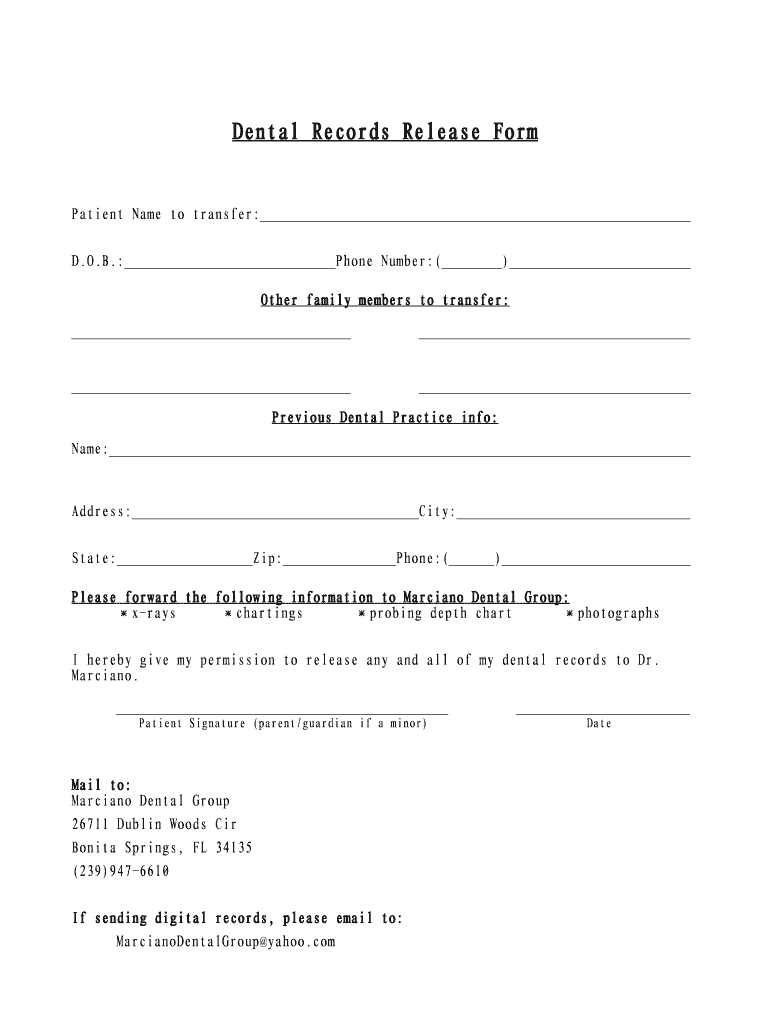
The Dental Records Release Form is a crucial document that authorizes the transfer or sharing of a patient's dental records from one healthcare provider to another. Many dental practices and healthcare facilities use this form to ensure compliance with privacy laws, such as the Health Insurance Portability and Accountability Act (HIPAA) in the United States. This form typically includes information about the patient, the previous dental practice, and details on where the records should be sent. By signing this form, patients give explicit consent for their dental information to be shared, ensuring that new healthcare providers have access to their complete dental history for continued care.
How to Use the Dental Records Release Form
Healthcare providers and patients must correctly complete the Dental Records Release Form to ensure a smooth transfer of information. First, patients should fill in their personal information, including name, date of birth, and contact details. Next, they need to provide information about the dental practice where their records are currently held. This includes the practice's name, address, and contact number. Finally, details of the receiving dental practice should be entered, specifying where the records should be sent to facilitate the transition to a new provider. Patients should review all entered information for accuracy before signing the form, confirming their consent.
Steps to Complete the Dental Records Release Form
- Obtain the form: Patients can usually request the form from either the releasing or receiving dental office. It may also be available for download from the dental practice’s website.
- Patient Information: Fill out your full name, date of birth, and contact information.
- Previous Dental Practice Details: Enter the name, address, and phone number of the dental practice currently holding your records.
- Receiving Dental Practice Details: Provide the name and contact information of the dental office where records are to be transferred.
- Sign the form: After reviewing all sections for accuracy, sign and date the form to provide your consent.
- Submit the form: Depending on the dental practice’s procedures, submit the form in person, by mail, or through a digital platform if available.
Important Terms Related to Dental Records Release Form
- HIPAA Compliance: Ensures patient privacy and secure handling of medical records during the transfer.
- Authorization: Legal permission given by the patient for the release of dental records.
- Confidentiality: Assurance that the patient's dental information is shared only with authorized individuals and entities.
Legal Use of the Dental Records Release Form
HIPAA mandates that patient information remains private and secure, making the Dental Records Release Form a legal necessity when transferring records between providers. This form ensures that all parties comply with privacy laws by obtaining explicit patient consent before any transfer. It also protects dental practices from legal liabilities by documenting the patient's permission and reasons for releasing the records.
Key Elements of the Dental Records Release Form
- Patient Details: Includes personal data essential for identifying the patient and matching records.
- Previous and Receiving Dental Practices: Important for directing where to send the dental records.
- Consent and Signature: Confirms that the patient understands the release of their records and provides official consent.
Examples of Using the Dental Records Release Form
Consider a patient moving to a new city who needs to continue dental care. The patient would use the Dental Records Release Form to authorize their previous dentist to forward their dental history to the new dental office. Similarly, if a patient switches providers within the same area for a specific treatment or second opinion, this form facilitates the sharing of necessary records quickly and efficiently, ensuring continuity of care.
Software Compatibility for Digital Forms
Digital versions of the Dental Records Release Form are often compatible with several document management and editing platforms, such as DocHub, which provides secure and efficient ways to fill online forms, sign electronically, and share documents. Compatibility with cloud services like Google Drive or Dropbox also ensures easy access and storage, making handling such forms more user-friendly and environmentally friendly, reducing the need for paper-based transactions.