






Definition and Meaning of the Signature Line Contract Template
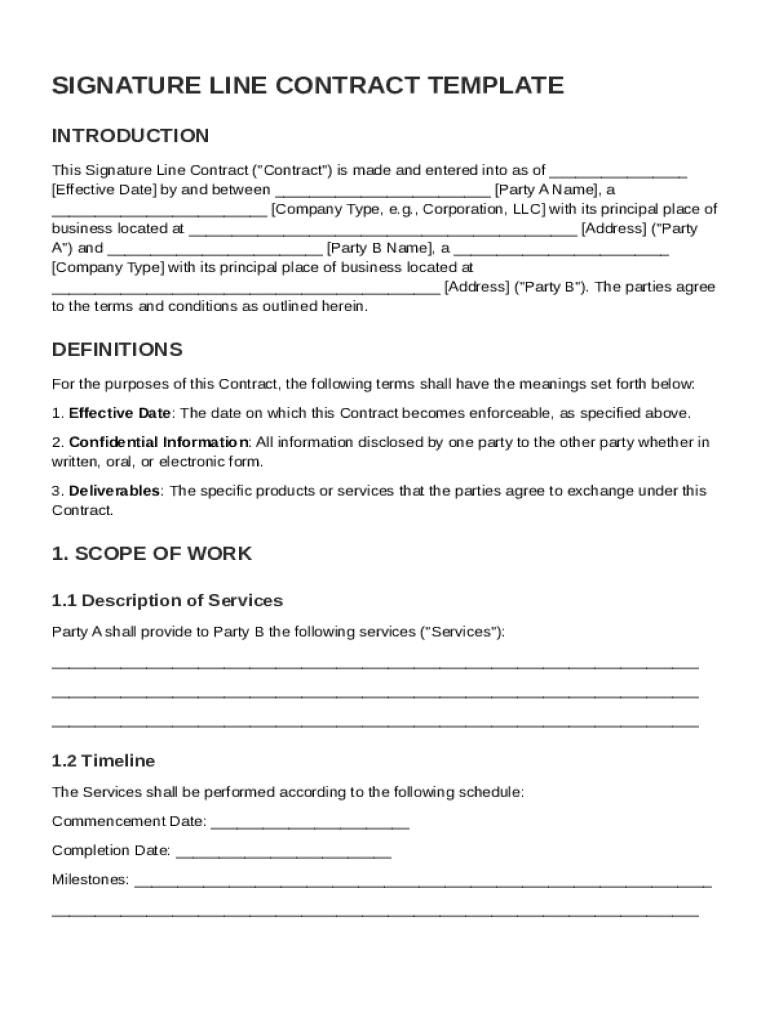
The Signature Line Contract Template is a standardized document designed to formalize agreements between two or more parties. Typically, it outlines crucial components of a contract such as definitions, scope of work, compensation, and any terms and conditions. This template acts as a legal framework within which parties can define their responsibilities and expectations clearly, facilitating a mutual understanding that is essential in reducing potential disputes. The use of such templates streamlines the generation of contracts, ensuring all necessary legal elements are considered and included.
How to Use the Signature Line Contract Template
Using the Signature Line Contract Template involves several key steps to ensure its effectiveness in capturing the details of an agreement:
-
Customizing the Template:
- Start by filling out the names and contact information of all parties involved.
- Adjust the sections to fit the specific terms of the agreement, adding detailed descriptions of the roles and responsibilities of each party.
-
Defining Scope and Terms:
- Clearly outline the scope of work, including specific tasks, deliverables, and timelines.
- Specify terms of compensation, including payment schedules and any conditions for payment adjustments or penalties.
-
Incorporating Legal Provisions:
- Include significant legal terms such as confidentiality, indemnification, governing law, and dispute resolution mechanisms.
- Ensure that the template complies with applicable federal and state laws to maintain its enforceability.
-
Finalizing the Document:
- All parties must review the document to ensure all information is clear and accurate.
- Secure electronic signatures from all involved parties to legally bind the contract.
By customizing sections in the template, users can create a tailored contract that reflects their specific needs while maintaining standard legal protections.
Key Elements of the Signature Line Contract Template
A well-structured Signature Line Contract Template includes the following key elements:
- Parties Involved: Details the names and roles of each party in the agreement.
- Definitions: Provides clarity by defining specific terms used within the contract.
- Scope of Work: Describes the tasks and responsibilities expected from each party.
- Compensation: Outlines payment terms, including amounts, schedules, and methods.
- Confidentiality: Sets the parameters for handling sensitive information.
- Indemnification: Defines protection measures against claims and liabilities.
- Governing Law: Specifies the jurisdiction under which the contract will be governed.
- Dispute Resolution: Describes methods of resolving conflicts, such as mediation or arbitration.
- Miscellaneous Provisions: Addresses additional terms and clauses that do not fit into other sections.
Each component is essential for ensuring all aspects of the agreement are legally sound and aligned with the parties' intentions.
Important Terms Related to the Signature Line Contract Template
Understanding key terms within the Signature Line Contract Template can enhance clarity and compliance:
- Confidentiality: Obligations to protect private information shared between parties.
- Governing Law: The legal framework applicable to the contract, often based on the state where the contract is executed.
- Mediation and Arbitration: Methods for resolving disputes outside of court, providing a faster and often less expensive alternative.
These terms offer insight into the expectations and legal obligations inherent to the contract, enabling more informed decision-making.
Legal Use of the Signature Line Contract Template
The Signature Line Contract Template is an enforceable legal document when used appropriately:
-
Compliance with Laws:
- Ensure that the template adheres to relevant federal, state, and local laws.
- Consider any specific legal requirements of the jurisdiction to avoid voidable agreements.
-
Electronic Signatures:
- Utilize tools like DocHub to collect electronically binding signatures aligned with the ESIGN Act, maintaining their validity in legal proceedings.
-
Modification and Adaptation:
- Make sure modifications to the template do not invalidate any legal protections by consulting legal professionals when necessary.
By using the template within established legal parameters, parties can establish a robust foundation for their contractual relationships.
Steps to Complete the Signature Line Contract Template
To complete the template effectively, follow these detailed steps:
-
Gather Information:
- Collect all necessary information about the parties and the nature of the agreement.
- Identify any special terms that may need additional attention or customization.
-
Draft the Contract:
- Utilize the template to draft the agreement, ensuring each section is thoroughly completed and accurately reflects the intended terms.
-
Review and Revise:
- Allow all parties to review the draft, make necessary revisions, and address any ambiguities.
- Consider professional legal review to ensure compliance and completeness.
-
Execute the Contract:
- Use electronic tools to apply signatures from all parties, securely storing the final document for future reference and enforcement.
Completing these steps ensures a comprehensive and legally sound contract that effectively captures the agreement between parties.
State-Specific Rules for the Signature Line Contract Template
Understanding state-specific regulations is crucial for the enforceability of the template:
- Variations in Laws: Different states may have unique requirements related to aspects such as indemnification clauses or non-compete agreements.
- Certifications and Notices: Some jurisdictions may require additional certifications or notice periods within contracts to align with local regulations.
- Legal Advice: Engaging legal counsel familiar with the state's laws can be beneficial in adapting the template to ensure compliance with jurisdictional nuances.
By acknowledging these differences, users can avoid common pitfalls that might otherwise compromise the validity of their agreements.
Software Compatibility with the Signature Line Contract Template
The Signature Line Contract Template can be easily adapted using DocHub's platform to enhance functionality:
- File Import and Export: Work seamlessly with various file formats, such as PDF, DOC, and others, adapting the template without conversion issues.
- Integration: Directly open, edit, and store documents within a connected cloud storage service, such as Google Drive, maintaining synchronization throughout the editing and signing process.
- Device Compatibility: Access and edit the template from any device, including desktops and mobiles, streamlining workflow and reducing the time needed to execute agreements.
By leveraging these features, users can enhance productivity and ensure a seamless contract creation and management process.