22+ Property Inquiry Form Templates in PDFDOC 2026

Get Form
real estate inquiry form Preview on Page 1

Here's how it works

01. Edit your real estate inquiry form online
Type text, add images, blackout confidential details, add comments, highlights and more.
02. Sign it in a few clicks
Draw your signature, type it, upload its image, or use your mobile device as a signature pad.
03. Share your form with others
Send it via email, link, or fax. You can also download it, export it or print it out.

How to use or fill out 22+ Property Inquiry Form Templates in PDFDOC

Form edit decoration
9.5
Ease of Setup
DocHub User Ratings on G2
9.0
Ease of Use
DocHub User Ratings on G2
  1. Click ‘Get Form’ to open it in the editor.
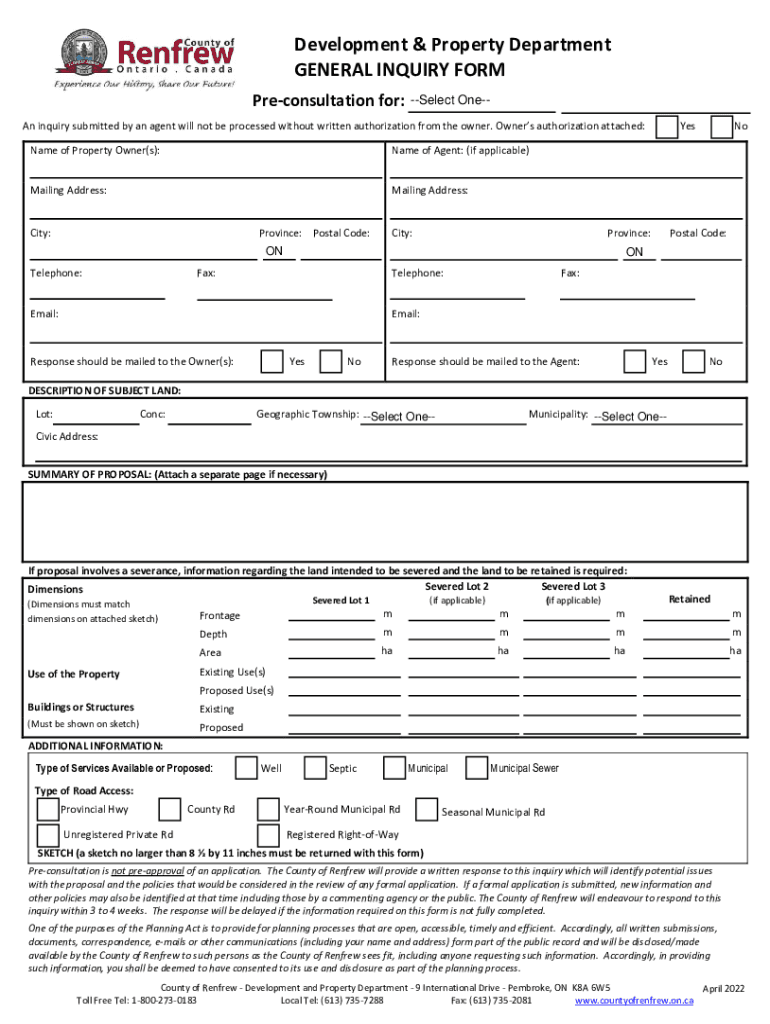
  2. Begin by selecting the appropriate inquiry type from the dropdown menu. Ensure you have written authorization from the property owner if submitting on their behalf.
  3. Fill in the property owner's name and contact details, including mailing address, telephone, and email. If applicable, include the agent's information.
  4. Provide a detailed description of the subject land, including lot number, geographic township, municipality, and civic address.
  5. In the summary of proposal section, clearly outline your intentions for the property. Attach additional pages if necessary.
  6. If your proposal involves severance, specify details for each severed lot including dimensions and existing/proposed uses.
  7. Indicate available services such as well or municipal access and type of road access relevant to your property.
  8. Attach a sketch no larger than 8 ½ by 11 inches that illustrates your proposal clearly.

Start using our platform today to streamline your form completion process for free!

See more 22+ Property Inquiry Form Templates in PDFDOC versions

We've got more versions of the 22+ Property Inquiry Form Templates in PDFDOC form. Select the right 22+ Property Inquiry Form Templates in PDFDOC version from the list and start editing it straight away!
Versions Form popularity Fillable & printable
2022 4.7 Satisfied (39 Votes)
2018 4.8 Satisfied (39 Votes)
2014 4.5 Satisfied (31 Votes)
2007 4.5 Satisfied (25 Votes)
be ready to get more

Complete this form in 5 minutes or less

Get form

Got questions?

We have answers to the most popular questions from our customers. If you can't find an answer to your question, please contact us.
Contact us

Yes, electronically drawing your signature is acceptable, but only if you utilize a tool that complies with industry regulations and policies. Consider DocHub, which ensures eSignature validity under ESIGN and UETA requirements. All you need to eSign your 22+ Property Inquiry Form Templates in PDFDOC is an account with DocHub and an internet connection. When you open your document in our editor, click Sign and choose the Draw option.

It is a no-brainer on a computer or via a mobile device to complete a 22+ Property Inquiry Form Templates in PDFDOC with DocHub. All you need to do is open any installed browser on your smartphone and go to the DocHub site. Once authenticated, add your file and open it in editing mode. Use our toolbar to make your edits and save adjustments. Optionally, keep your document in your files or send it to a recipient immediately.

Property descriptions should include: An attention-grabbing headline (or title) A concise, direct opening statement. Property details with emotive language. Artful, professional photography. A powerful call to action.
You should have gotten a copy of your deed when the home became yours, but its relatively easy to get a copy. The deed includes a legal, written description of the property boundaries, and may include named landmarks such as trees or creeks that you can measure from.

Security and compliance

At DocHub, your data security is our priority. We follow HIPAA, SOC2, GDPR, and other standards, so you can work on your documents with confidence.

Learn more
ccpa2
pci-dss
gdpr-compliance
hipaa
soc-compliance