






Definition & Meaning
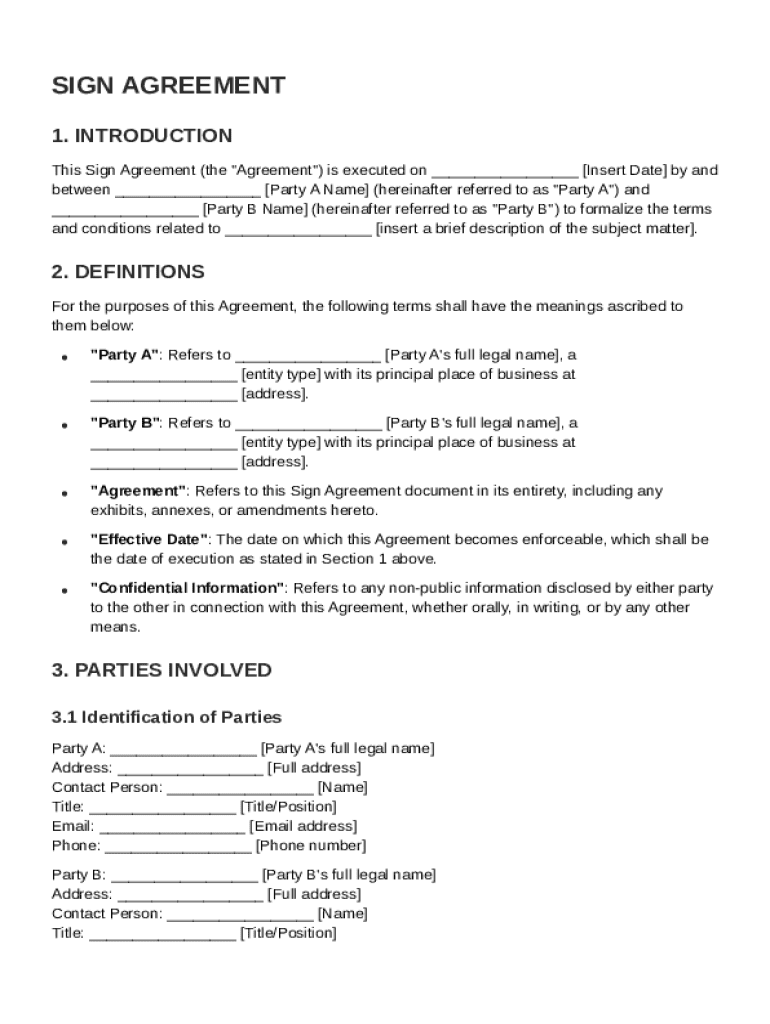
A Sign Agreement Template is a pre-structured document that outlines the terms and conditions for an engagement between two parties, commonly labeled as Party A and Party B. This template serves as a foundational tool to formalize various agreements, whether for services, products, partnerships, or other collaborative efforts. The document typically includes essential sections such as definitions, roles and responsibilities, duration, financial details, confidentiality obligations, and termination clauses. The Sign Agreement Template is a versatile tool that helps clarify expectations and responsibilities while ensuring both parties are aligned and informed. This structure also provides a legal framework for addressing potential disputes, by outlining governing laws and resolution procedures.
How to Use the Sign Agreement Template
To effectively use a Sign Agreement Template, begin by filling out the introductory section with the names of the involved parties and the date of the agreement. Subsequently, detail each party’s specific roles and responsibilities. Next, outline the duration and financial aspects, clarifying payment terms, invoice frequency, and any penalties for late payments. Explicitly document confidentiality obligations and, if applicable, include clauses about the use of proprietary information. Lastly, insert termination clauses to define under what conditions the agreement can be dissolved, and specify the governing law to be applied in case of disputes.
To ensure all sections are comprehensive and to avoid potential misunderstandings, involve a legal advisor or someone familiar with contract law during this process. This review helps prevent omissions and protects against legal vulnerabilities. Additionally, leverage DocHub’s editing and signing tools to make any necessary adjustments and to finalize the document digitally.
Key Elements of the Sign Agreement Template
The Sign Agreement Template encompasses several critical components designed to protect and inform both parties involved:
- Definitions: Clarifies specific terms used throughout the document to ensure mutual understanding.
- Roles and Responsibilities: Clearly delineates tasks and obligations for each party.
- Financial Details: Specifies compensation terms, including payment schedules and amounts.
- Confidentiality Obligations: Outlines expectations regarding non-disclosure and the handling of sensitive information.
- Termination Clauses: Describes the process and conditions under which the agreement can be terminated.
- Governing Law: Identifies the jurisdiction under which the agreement will be interpreted.
By addressing these key elements, the template reduces uncertainty and potential for disputes, facilitating a smooth contractual relationship.
Steps to Complete the Sign Agreement Template
-
Identify Parties and Date: Begin by entering the full names and contact information of both Party A and Party B, including the date the agreement is being finalized.
-
Define Terms: Clearly define any industry-specific or complex terms used within the contract to ensure clarity.
-
Outline Roles and Responsibilities: Specify what each party is obligated to perform, including any deliverables and milestones.
-
Set Financial Terms: Detail payment structures, timelines, and any potential bonuses or penalties.
-
State Confidentiality Requirements: Indicate limitations on the sharing of information outside of the agreement stakeholders.
-
Add Termination Conditions: Specify how and when the agreement may be prematurely ended, including any required notices.
-
Review and Sign: Use DocHub's digital signature tools to complete and authenticate the agreement, ensuring each party signs appropriately.
These steps provide a structured approach to complete the Sign Agreement Template effectively and lawfully.
Legal Use of the Sign Agreement Template
The Sign Agreement Template serves as a legal document that can be enforced in court if necessary. It complies with the legal standards set out by the ESIGN Act, ensuring electronic signatures are recognized as equally binding as ink-on-paper. Usage of this template helps establish clear expectations, which can mitigate misunderstandings and disputes. It is essential to ensure that the terms within the agreement do not violate any federal or state laws. Consulting a legal professional during the formulation of the contract is advisable to safeguard its validity and adherence to applicable laws.
State-Specific Rules for the Sign Agreement Template
While the Sign Agreement Template provides a robust framework for agreements, it is essential to consider state-specific variations that may affect enforceability or requirements. Different jurisdictions may have unique laws regarding contract terms, enforceability, or additional clauses like non-compete agreements or disclosure requirements. For instance, what is permissible under California law may not meet legal standards in New York. It's vital for each party to verify with local legal counsel that the agreement aligns with their state’s legal provisions and practices, ensuring comprehensive compliance across jurisdictions.
Practical Examples of Using the Sign Agreement Template
The Sign Agreement Template is versatile and can be applied to a wide array of scenarios:
- Freelance Services: Formalize hiring conditions between a freelancer and a company, detailing project deliverables, payment terms, and confidentiality rules.
- Partnership Agreements: Outline roles and profit-sharing terms among business partners, including dispute resolution methods.
- Purchasing Agreements: Specify delivery schedules, product specifications, and return policies between suppliers and purchasers.
Utilizing these templates helps in protecting interests and aligning expectations, proving invaluable in both short-term projects and long-standing business relationships.
Versions or Alternatives to the Sign Agreement Template
Several variations of the Sign Agreement Template cater to different industries and specific needs. Depending on the nature of the agreement, alternatives such as Service Level Agreements, Non-Disclosure Agreements, or Memorandum of Understandings might be appropriate. Each variant addresses particular considerations such as service delivery standards, confidentiality terms, or collaborative project scopes. Adapting the right version ensures tailored protection and clarity specific to the contractual context, thereby enhancing both compliance and functionality.