Mason Individual Return (PDF) - City of Mason - imaginemason 2026

Get Form
imaginemason Preview on Page 1

Here's how it works

01. Edit your imaginemason online
Type text, add images, blackout confidential details, add comments, highlights and more.
02. Sign it in a few clicks
Draw your signature, type it, upload its image, or use your mobile device as a signature pad.
03. Share your form with others
Send it via email, link, or fax. You can also download it, export it or print it out.

How to use or fill out Mason Individual Return (PDF) - City of Mason - imaginemason with our platform

Form edit decoration
9.5
Ease of Setup
DocHub User Ratings on G2
9.0
Ease of Use
DocHub User Ratings on G2
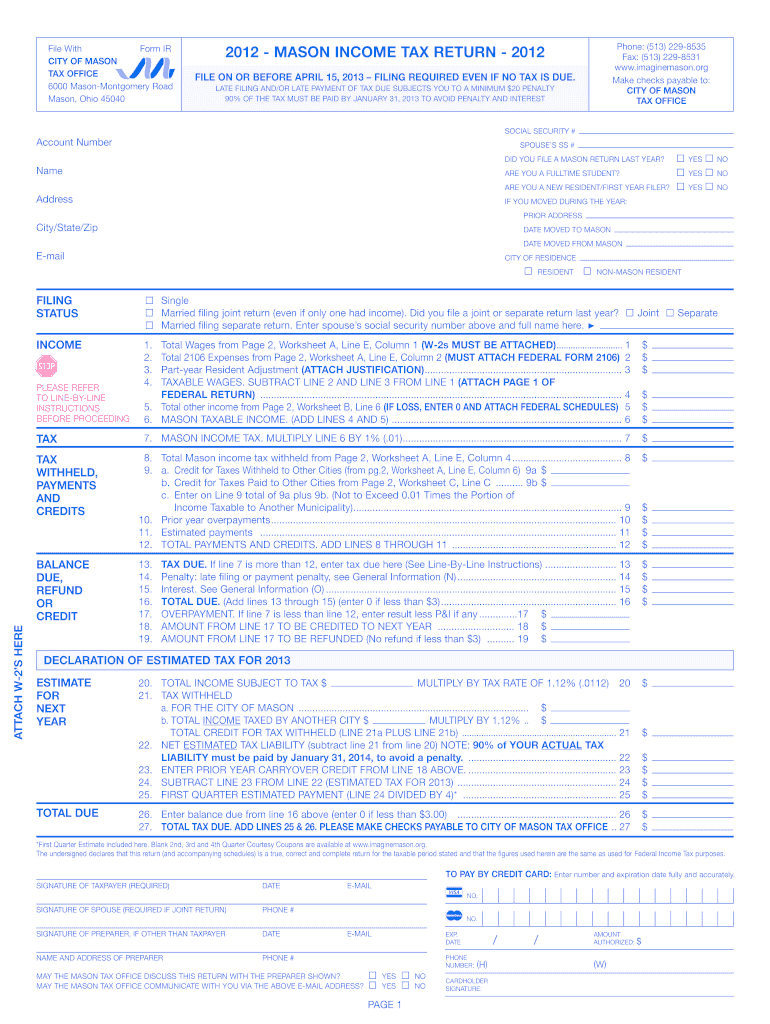
  1. Click ‘Get Form’ to open the Mason Individual Return in the editor.
  2. Begin by entering your Social Security Number and Account Number at the top of the form. If applicable, include your spouse’s SSN.
  3. Indicate whether you filed a Mason return last year and if you are a new resident or full-time student by selecting 'Yes' or 'No' as appropriate.
  4. Fill in your current address and any prior addresses if you moved during the year. Ensure all fields are completed accurately.
  5. Proceed to the income section. Enter total wages from your W-2 forms, ensuring to attach them as required. Calculate taxable wages by subtracting any allowable expenses.
  6. Complete the tax withheld, payments, and credits sections by entering relevant figures from your worksheets. Make sure to double-check for accuracy.
  7. Finally, review all entries for completeness before signing and dating the form at the bottom. Ensure that all necessary attachments are included.

Start filling out your Mason Individual Return today using our platform for free!

See more Mason Individual Return (PDF) - City of Mason - imaginemason versions

We've got more versions of the Mason Individual Return (PDF) - City of Mason - imaginemason form. Select the right Mason Individual Return (PDF) - City of Mason - imaginemason version from the list and start editing it straight away!
Versions Form popularity Fillable & printable
2023 4.3 Satisfied (20 Votes)
2022 4.8 Satisfied (110 Votes)
2021 4.3 Satisfied (143 Votes)
2020 4.8 Satisfied (111 Votes)
2018 4 Satisfied (69 Votes)
2017 4.3 Satisfied (130 Votes)
2016 4.3 Satisfied (150 Votes)
2014 4.3 Satisfied (116 Votes)
2012 4 Satisfied (49 Votes)
be ready to get more

Complete this form in 5 minutes or less

Get form

Got questions?

We have answers to the most popular questions from our customers. If you can't find an answer to your question, please contact us.
Contact us

Electronic document approval demands a software solution that complies with data security and eSignature standards. DocHub is an excellent tool for that, because it meets all the aforementioned requirements. Whatever method you like to sign your Mason Individual Return (PDF) - City of Mason - imaginemason in DocHub, your eSignature will be legally binding and court-admissible.

If you store your documents in Google Drive, there is no need to download your Mason Individual Return (PDF) - City of Mason - imaginemason on the computer and upload it back to our editor. A much easier way is to set up a browser extension developed by DocHub to simplify this flow. The extension allows editing PDFs in your internet browser. Alternatively, you can integrate your DocHub and Gmail accounts for more efficient modifying.

Security and compliance

At DocHub, your data security is our priority. We follow HIPAA, SOC2, GDPR, and other standards, so you can work on your documents with confidence.

Learn more
be ready to get more

Complete this form in 5 minutes or less

Get form