Office of the RegistrarBaylor University 2026

Get Form
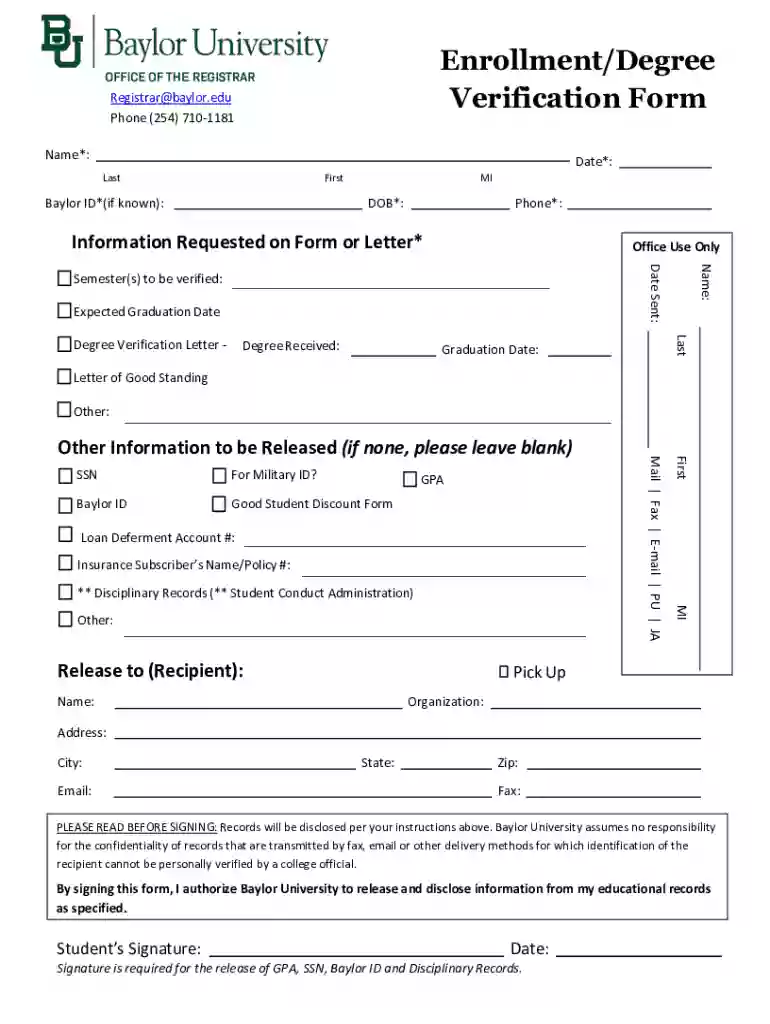
Office of the RegistrarBaylor University Preview on Page 1

Here's how it works

01. Edit your form online
Type text, add images, blackout confidential details, add comments, highlights and more.

02. Sign it in a few clicks
Draw your signature, type it, upload its image, or use your mobile device as a signature pad.

03. Share your form with others
Send it via email, link, or fax. You can also download it, export it or print it out.

Definition and Purpose of the Form

The "Office of the RegistrarBaylor University" form is a vital document utilized for the verification of a student's enrollment status and degree information. This form is typically required when a student needs to provide proof of their academic standing for various purposes, such as employment, scholarship applications, or further education. It includes sections where students must fill in personal details, specify the information they are requesting, and provide details of the recipient. The form is designed to ensure that the educational records are released with the student's explicit consent, hence the necessity of the student's signature.

Steps to Complete the Form

To accurately complete the Office of the RegistrarBaylor University form, students should follow these steps:

  1. Personal Information Section: Begin by filling out your full name, student ID, and other personal identification details as requested.

  2. Information Requested: Specify whether you are requesting enrollment verification, degree verification, or both. Clearly state the terms or semesters relevant to this request.

  3. Recipient Details: Provide the full name and address of the entity or individual who will receive this verification. Ensure accuracy to prevent delivery issues.

  4. Signature and Authorization: Carefully read the authorization statement and sign the form. This step confirms your permission to release educational records as specified.

  5. Submission Method: Choose whether to submit the form online, by mail, or in person, and follow the respective procedure for submission.

Purpose and Importance

Understanding the importance of the Office of the RegistrarBaylor University form is essential for various stakeholder groups. Primarily, students use this form to authenticate their enrollment and degree accomplishments. This verification is critical when seeking employment opportunities, continuing education, or applying for scholarships and grants. Institutions and employers require this verification to confirm that students have met specific academic qualifications and standards.

Who Typically Uses This Form

The form is predominantly used by:

  • Students and Alumni: To validate their academic credentials for employment and further education.
  • Employers: To verify the qualifications and enrollment status of current or prospective employees.
  • Educational Institutions: To confirm a student's academic history when processing admissions for further studies.
  • Scholarship and Funding Bodies: To ensure applicants meet the eligibility requirements based on their academic status.

Legal Use and Compliance

Ensuring legal compliance when utilizing the Office of the RegistrarBaylor University form is crucial. The form must align with the Family Educational Rights and Privacy Act (FERPA) regulations, which protect students' educational records. Students' authorization is mandatory for releasing such information, making it essential to accurately complete the consent sections to avoid unauthorized data disclosure.

Key Elements of the Document

The form includes several critical components:

  • Student Details: Full name, student ID, contact details.
  • Request Information: Type of verification needed and specific terms or dates.
  • Recipient's Information: Official name and address for sending the verification.
  • Authorization: Student's signature to confirm consent for information release.

Form Submission Methods

The form can be submitted through multiple channels for convenience:

  • Online Submission: Via the university's student portal or designated online platforms.
  • Mail: Sending the completed form to the Office of the Registrar's physical address.
  • In-Person: Delivering the form directly to the office during working hours to ensure receipt confirmation.

Digital vs. Paper Version

The choice between digital and paper versions of the form can impact processing time:

  • Digital Version: Often faster and more efficient, allowing for direct submission via university systems or emails.
  • Paper Version: May be necessary for situations where a physical signature is required; however, it could involve longer processing times due to postal delivery.

Examples of Use Cases

Some common scenarios where the form is employed include:

  • Job Applications: Utilizing the form to provide proof of degree and enrollment status when required by potential employers.
  • Graduate School Applications: Submitting the form to verify academic credentials as part of the application package.
  • Financial Aid and Scholarships: Providing verification of status and academic progress for eligibility checks.

Software Compatibility

For digital submissions, compatibility with document management and processing software is beneficial:

  • DocHub: Facilitates the editing and signing of forms with tools that integrate seamlessly with online file management and signature functionalities.
  • Integration with Cloud Services: Allows for easy import and export from platforms like Google Drive, enhancing convenience for students managing digital forms.
be ready to get more

Complete this form in 5 minutes or less

Get form

Got questions?

We have answers to the most popular questions from our customers. If you can't find an answer to your question, please contact us.
Contact us
The most popular majors at Baylor University include: Registered Nursing/Registered Nurse; Biology/Biological Sciences, General; Marketing/Marketing Management, General; Health/Medical Preparatory Programs, Other; Accounting; Psychology, General; Finance, General; Communication, General; Communication Sciences and
Log-on BearWeb, select Student Academic ServicesRegistrationRegistration Status. The date and time for your registration will be listed under Registration Status.
Check BearWeb to see if you have any holds that will prevent you from registering. Log in to BearWeb Student Academic Services Registration Registration Status. A registration HOLD is not the same thing as an advising FLAG.
We are responsible for processing transfer credit and maintaining articulation agreements with other institutions. Additionally, we register new and continuing students for classes, maintain academic records, prepare transcripts and diplomas, and review for exceptions to University policy.
Staff members at the Office of the Registrar are always available to answer your questions. Please call 254-710-1181 or email Registrar@baylor.edu for assistance.

Security and compliance

At DocHub, your data security is our priority. We follow HIPAA, SOC2, GDPR, and other standards, so you can work on your documents with confidence.
Learn more
ccpa2
pci-dss
gdpr-compliance
hipaa
soc-compliance
be ready to get more

Complete this form in 5 minutes or less

Get form

People also ask

Contact Information: 254-710-1181 or Registrar@baylor.edu.

Related links