Rp 602ca 2012 form-2026

Get Form
rp 602ca 2012 form Preview on Page 1

Here's how it works

01. Edit your form online
Type text, add images, blackout confidential details, add comments, highlights and more.
02. Sign it in a few clicks
Draw your signature, type it, upload its image, or use your mobile device as a signature pad.
03. Share your form with others
Send it via email, link, or fax. You can also download it, export it or print it out.

How to use or fill out rp 602ca 2012 form with our platform

Form edit decoration
9.5
Ease of Setup
DocHub User Ratings on G2
9.0
Ease of Use
DocHub User Ratings on G2
  1. Click ‘Get Form’ to open the rp 602ca 2012 form in the editor.
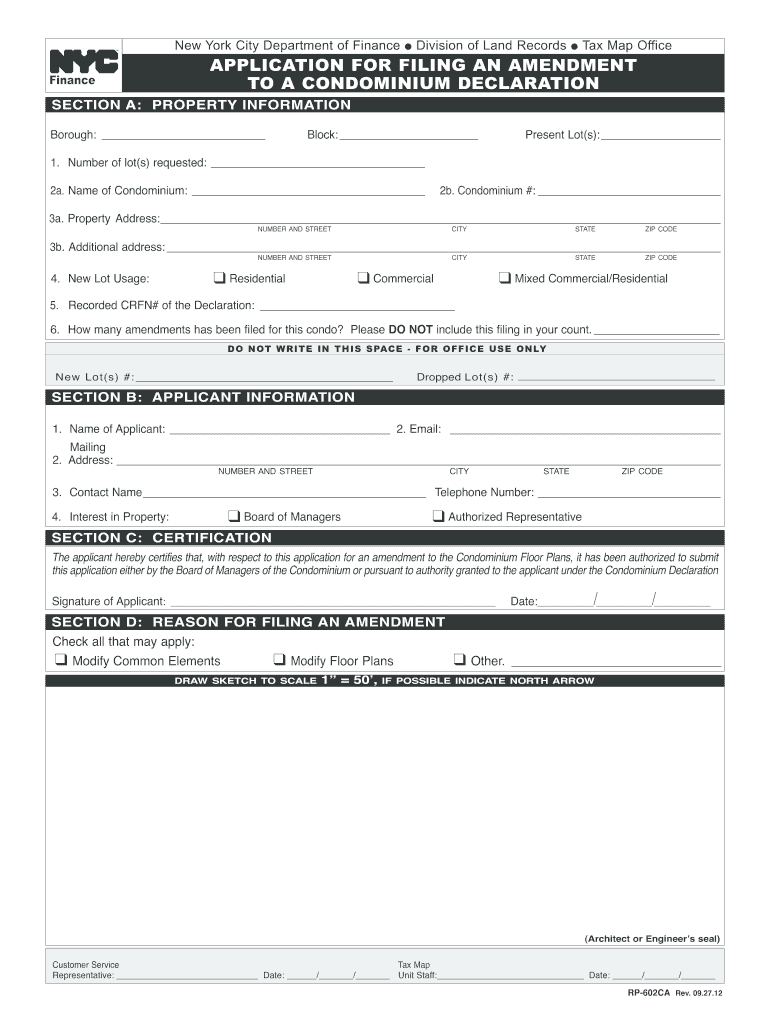
  2. Begin with SECTION A: PROPERTY INFORMATION. Fill in the borough, block number, and the number of lots requested. Provide the name of the condominium and its corresponding number.
  3. Complete the property address fields, ensuring accuracy for city, state, and zip code. If there is an additional address, include it in the designated space.
  4. Indicate the new lot usage by checking one of the options: Residential, Commercial, or Mixed Commercial/Residential. Enter the recorded CRFN# of the declaration and count any previous amendments filed.
  5. Move to SECTION B: APPLICANT INFORMATION. Fill in your name, email address, mailing address, contact name, telephone number, and your interest in property.
  6. In SECTION C: CERTIFICATION, sign and date to certify your authority to submit this application.
  7. Finally, complete SECTION D: REASON FOR FILING AN AMENDMENT by checking applicable boxes and providing a sketch if necessary.

Start using our platform today for free to streamline your rp 602ca 2012 form completion!

See more rp 602ca 2012 form versions

We've got more versions of the rp 602ca 2012 form form. Select the right rp 602ca 2012 form version from the list and start editing it straight away!
Versions Form popularity Fillable & printable
2022 4.4 Satisfied (52 Votes)
2019 4.8 Satisfied (131 Votes)
2017 4.4 Satisfied (170 Votes)
2016 4 Satisfied (70 Votes)
2012 4.4 Satisfied (185 Votes)
be ready to get more

Complete this form in 5 minutes or less

Get form

Got questions?

We have answers to the most popular questions from our customers. If you can't find an answer to your question, please contact us.
Contact us

Sure, it is possible with DocHub. This secure and compliant online solution has a phone-based signing option. After you log in to your DocHub account and add your rp 602ca 2012 form to our editor, fill out all required fields and utilize the Sign tool on the upper barf. Click on Create your signature and select Phone from the available choices. Here, you scan a QR code with your smartphone and draw your signature on your phone display, as you usually do when signing physical papers. If you access DocHub right from your mobile device, you can electronically sign your form by drawing your electronic signature, adding its image, or simply with a typed name.

You need only a web connection and a browser to complete your rp 602ca 2012 form by using an iOS phone. Open the DocHub website and authenticate. Then, add your document or select it from the list in your dashboard. Then use our editing tools to complete your form and save all your modifications. You can also send it to a dedicated recipient right away.

Security and compliance

At DocHub, your data security is our priority. We follow HIPAA, SOC2, GDPR, and other standards, so you can work on your documents with confidence.

Learn more
be ready to get more

Complete this form in 5 minutes or less

Get form