




Here's how it works

01. Edit your how much does forever 21 pay online
Type text, add images, blackout confidential details, add comments, highlights and more.

02. Sign it in a few clicks
Draw your signature, type it, upload its image, or use your mobile device as a signature pad.

03. Share your form with others
Send how much does forever 21 pay per hour via email, link, or fax. You can also download it, export it or print it out.
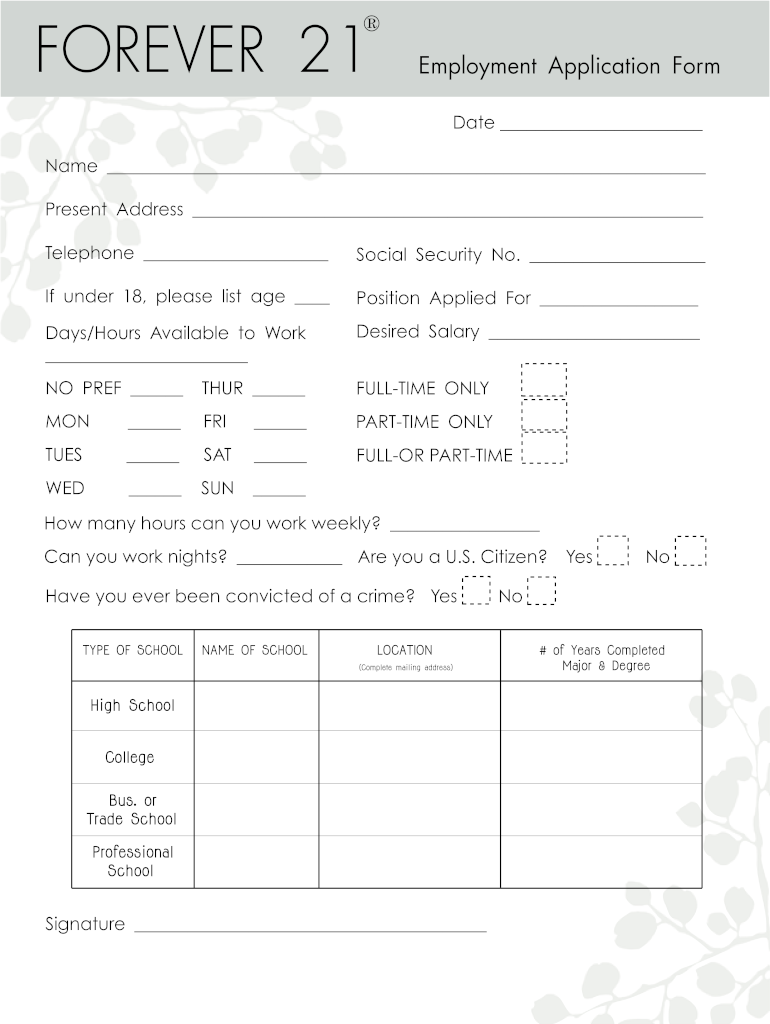
How to use or fill out the Forever 21 Employment Application Form

- Click ‘Get Form’ to open it in the editor.
- Begin by entering the date at the top of the form. This helps establish when your application is submitted.
- Fill in your name and present address accurately. Ensure that your contact information, including telephone number, is correct for easy communication.
- Provide your Social Security Number and age if you are under 18. This information is crucial for employment verification.
- Indicate the position you are applying for and specify your availability by checking the appropriate boxes for days and hours you can work.
- State your desired salary and how many hours you can work weekly. Additionally, indicate if you can work nights.
- Answer citizenship and criminal history questions honestly, as these are standard requirements in employment applications.
- Complete the education section by listing schools attended, their locations, years completed, and any degrees earned.
- Finally, sign the form to validate your application before submitting it through our platform.
Start filling out your Forever 21 application today using our platform for free!
Fill out forever 21 form online
It's free
Security and compliance
At DocHub, your data security is our priority. We follow HIPAA, SOC2, GDPR, and other standards, so you can work on your documents with confidence.
Learn more


