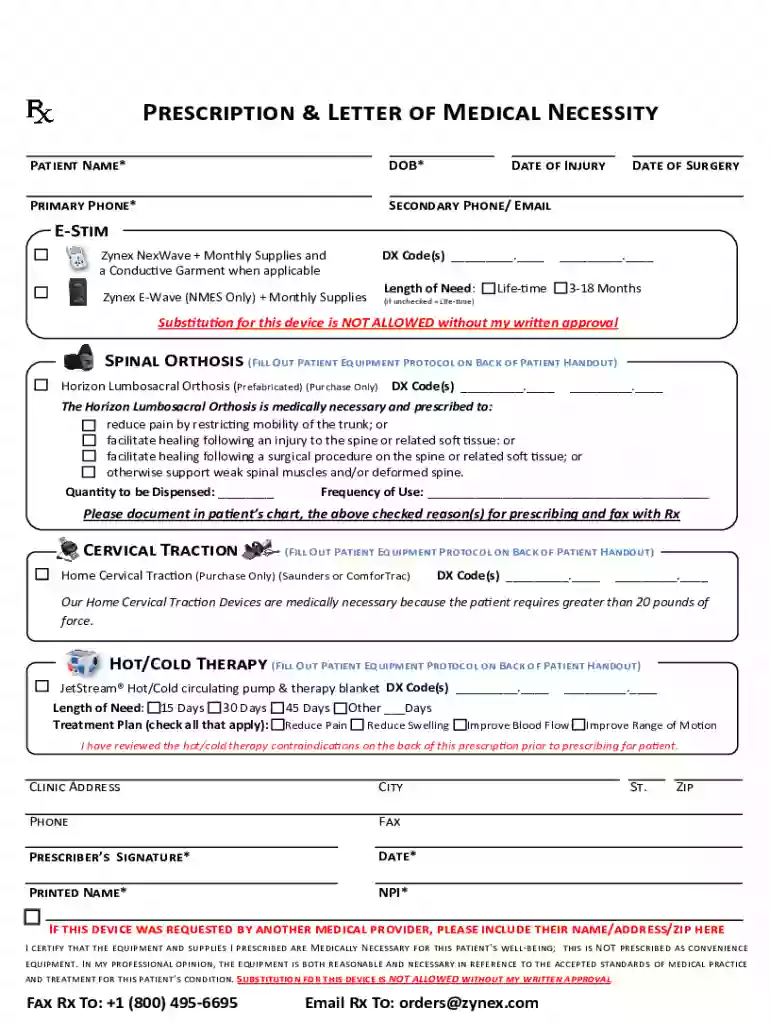
Prescription & Letter of Medical Necessity - zynex 2026

Get Form
zynex order form Preview on Page 1

Here's how it works

01. Edit your zynex order form online
Type text, add images, blackout confidential details, add comments, highlights and more.

02. Sign it in a few clicks
Draw your signature, type it, upload its image, or use your mobile device as a signature pad.

03. Share your form with others
Send it via email, link, or fax. You can also download it, export it or print it out.

How to use or fill out Prescription & Letter of Medical Necessity - zynex with our platform

Form edit decoration
9.5
Ease of Setup
DocHub User Ratings on G2
9.0
Ease of Use
DocHub User Ratings on G2
  1. Click ‘Get Form’ to open it in the editor.
  2. Begin by entering the Patient Name and Date of Birth in the designated fields. Ensure accuracy as this information is crucial for processing.
  3. Fill in the Primary Phone and Secondary Phone/Email fields to ensure communication regarding the prescription.
  4. Indicate the Date of Injury and Date of Surgery if applicable, as these details support medical necessity.
  5. Select the appropriate equipment needed, such as E-Stim devices or Spinal Orthosis, and provide corresponding DX Codes where required.
  6. Specify Length of Need by checking either Life-time or a specific duration (3-18 Months).
  7. Complete any additional sections related to Hot/Cold Therapy, including Length of Need and Treatment Plan options.
  8. Finally, ensure that the Prescriber’s Signature, Date, Printed Name, and NPI are filled out before submitting.

Start using our platform today for free to streamline your document editing and signing process!

See more Prescription & Letter of Medical Necessity - zynex versions

We've got more versions of the Prescription & Letter of Medical Necessity - zynex form. Select the right Prescription & Letter of Medical Necessity - zynex version from the list and start editing it straight away!
Versions Form popularity Fillable & printable
2023 4.8 Satisfied (35 Votes)
2022 4.3 Satisfied (46 Votes)
2021 4.8 Satisfied (67 Votes)
2021 4.8 Satisfied (37 Votes)
2021 4.5 Satisfied (34 Votes)
2021 4.8 Satisfied (155 Votes)
2020 4.8 Satisfied (161 Votes)
2020 4.8 Satisfied (135 Votes)
2020 4.8 Satisfied (53 Votes)
2020 4.7 Satisfied (43 Votes)
2020 4.8 Satisfied (133 Votes)
2020 4.4 Satisfied (124 Votes)
2019 4.4 Satisfied (24 Votes)
2019 4.3 Satisfied (31 Votes)
2018 4.5 Satisfied (50 Votes)
be ready to get more

Complete this form in 5 minutes or less

Get form

Got questions?

We have answers to the most popular questions from our customers. If you can't find an answer to your question, please contact us.
Contact us
I am writing to request coverage for [Name of Durable Medical Equipment (DME)] for [Patient Name]. [Patient Name] has been diagnosed with [Patients Diagnosis], and I believe that [Name of DME] is medically necessary for their condition. [Provide details about the recommended DME and why it is necessary].
You can request a medical note by either making an appointment with your doctor in person or via a digital appointment. Once this has been carried out, you will be issued with a proof of your medical condition note that can be given to your employer or another party.
A Letter of Medical Necessity (LMN) is the written explanation from the treating physician describing the medical need for services, equipment, or supplies to assist the claimant in the treatment, care, or relief of their accepted work-related illness(es).
Zynex will bill your health insurance company for the monthly rental and/or purchase of the NexWave device. Monthly supplies will be shipped to you and billed to your insurance company. Depending on your insurance coverage, you may be responsible for an unmet deductible and/or co-insurance amounts.

Security and compliance

At DocHub, your data security is our priority. We follow HIPAA, SOC2, GDPR, and other standards, so you can work on your documents with confidence.

Learn more