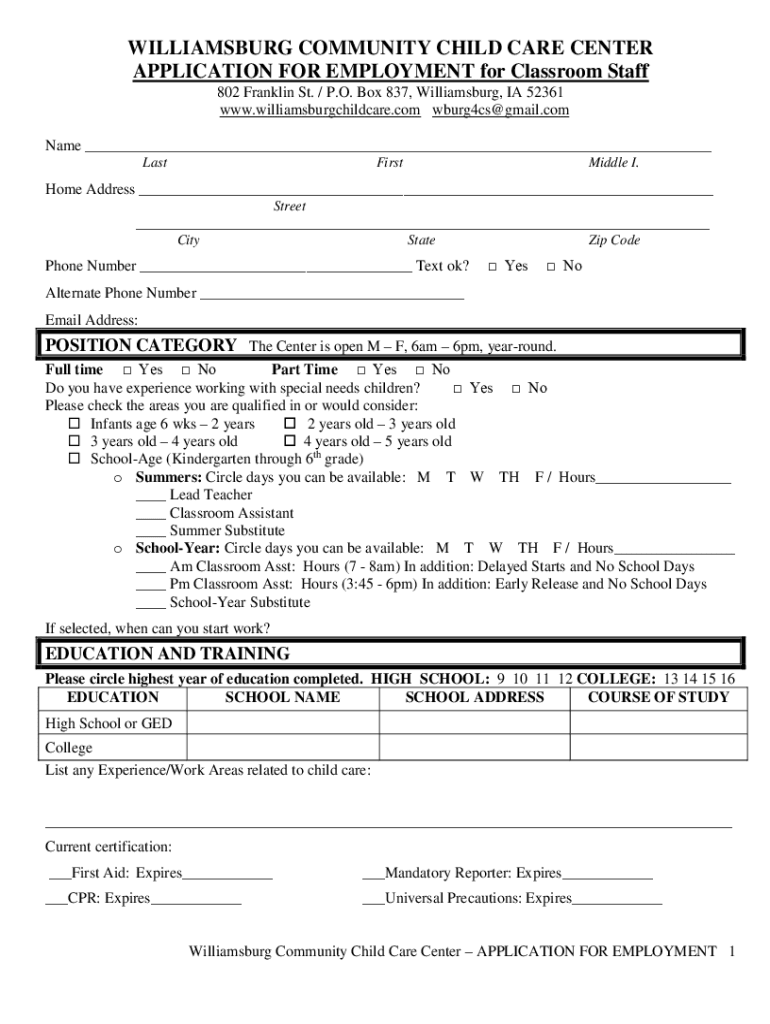
WILLIAMSBURG COMMUNITY CHILD CARE CENTER APPLICATION FOR EMPLOYMENT for 2026

Get Form
WILLIAMSBURG COMMUNITY CHILD CARE CENTER APPLICATION FOR EMPLOYMENT for Preview on Page 1

Here's how it works

01. Edit your form online
Type text, add images, blackout confidential details, add comments, highlights and more.
02. Sign it in a few clicks
Draw your signature, type it, upload its image, or use your mobile device as a signature pad.
03. Share your form with others
Send it via email, link, or fax. You can also download it, export it or print it out.

How to use or fill out WILLIAMSBURG COMMUNITY CHILD CARE CENTER APPLICATION FOR EMPLOYMENT

Form edit decoration
9.5
Ease of Setup
DocHub User Ratings on G2
9.0
Ease of Use
DocHub User Ratings on G2
  1. Click ‘Get Form’ to open the application in our editor.
  2. Begin by entering your personal information in the designated fields, including your name, address, and contact details. Ensure accuracy for effective communication.
  3. Indicate your preferred position category by checking the appropriate boxes for full-time or part-time availability. Specify your experience with special needs children if applicable.
  4. In the education section, circle the highest year of education completed and provide details about your educational background, including school names and courses of study.
  5. List your employment history starting with the most recent employer. Include job responsibilities and whether they can be contacted for references.
  6. Provide two personal references who are not family members or former supervisors, along with their contact information.
  7. Read through the employment policy carefully before signing and dating the application to confirm your understanding and agreement.

Start filling out your application today using our platform for free!

See more WILLIAMSBURG COMMUNITY CHILD CARE CENTER APPLICATION FOR EMPLOYMENT for versions

We've got more versions of the WILLIAMSBURG COMMUNITY CHILD CARE CENTER APPLICATION FOR EMPLOYMENT for form. Select the right WILLIAMSBURG COMMUNITY CHILD CARE CENTER APPLICATION FOR EMPLOYMENT for version from the list and start editing it straight away!
Versions Form popularity Fillable & printable
2024 4.8 Satisfied (57 Votes)
2023 4.6 Satisfied (29 Votes)
2023 4.2 Satisfied (33 Votes)
2023 4.8 Satisfied (51 Votes)
2023 4.3 Satisfied (30 Votes)
2023 4.4 Satisfied (43 Votes)
2023 4.1 Satisfied (50 Votes)
2022 4.8 Satisfied (52 Votes)
2022 4.1 Satisfied (32 Votes)
2022 4.7 Satisfied (57 Votes)
2022 4.8 Satisfied (152 Votes)
2022 4.8 Satisfied (68 Votes)
2022 4.3 Satisfied (38 Votes)
2021 4.8 Satisfied (60 Votes)
2021 4.8 Satisfied (162 Votes)
be ready to get more

Complete this form in 5 minutes or less

Get form

Got questions?

We have answers to the most popular questions from our customers. If you can't find an answer to your question, please contact us.
Contact us

Log in to your DocHub account and add your WILLIAMSBURG COMMUNITY CHILD CARE CENTER APPLICATION FOR EMPLOYMENT for to our editor using one of its upload methods - from your device, cloud storage, secure URL, or your DocHub folders if you have already managed your form before. Open our editor, click the Sign button in the top toolbar, and decide on your signing method. You can use a picture of your handwritten signature, draw it, type in your name, or use a QR code as an alternative.

You can easily edit fill out your WILLIAMSBURG COMMUNITY CHILD CARE CENTER APPLICATION FOR EMPLOYMENT for on any iOS gadget. Open an internet browser of your liking, visit the DocHub site, authorize or create a new account, add your file for editing, and make your required changes. Our service is mobile-friendly, so using its features on your smartphone will be a no-brainer, even on the first try.

Security and compliance

At DocHub, your data security is our priority. We follow HIPAA, SOC2, GDPR, and other standards, so you can work on your documents with confidence.

Learn more
ccpa2
pci-dss
gdpr-compliance
hipaa
soc-compliance
be ready to get more

Complete this form in 5 minutes or less

Get form