




Here's how it works

01. Edit your qatar energy vendor registration online
Type text, add images, blackout confidential details, add comments, highlights and more.

02. Sign it in a few clicks
Draw your signature, type it, upload its image, or use your mobile device as a signature pad.

03. Share your form with others
Send click get form to open are qatar petroleums main products via email, link, or fax. You can also download it, export it or print it out.
How to use or fill out qatar vendor petroleum with our platform

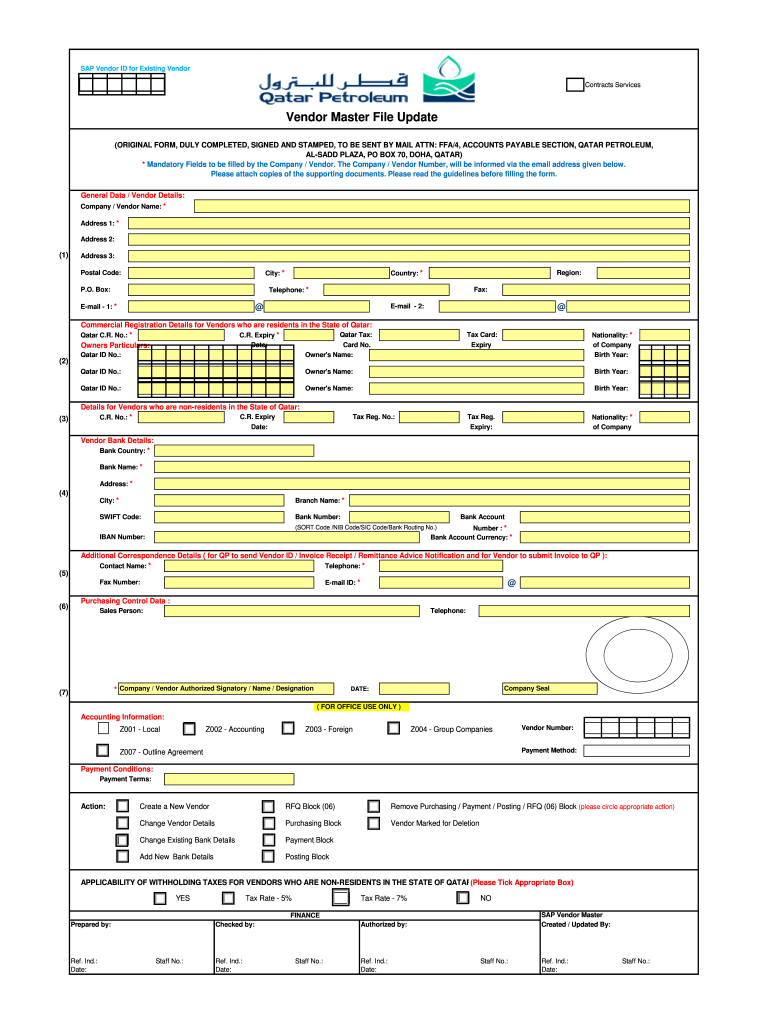
- Click ‘Get Form’ to open the qatar vendor petroleum document in the editor.
- Begin by filling out the 'General Data / Vendor Details' section. Enter your Company/Vendor Name, Address, Postal Code, City, and Country. Ensure all mandatory fields marked with an asterisk (*) are completed.
- For vendors residing in Qatar, provide your Commercial Registration details including Qatar Tax, C.R. Expiry Date, and Owner's particulars. Non-residents should complete their respective sections with C.R. No. and Tax Reg. No.
- In the 'Vendor Bank Details' section, input your Bank Name, Address, Branch Name, SWIFT Code, and Bank Account Number. Make sure to select the correct currency for your bank account.
- Complete the 'Additional Correspondence Details' for effective communication regarding Vendor ID and invoices by providing a contact name and email ID.
- Finally, ensure that the authorized signatory section is filled out correctly with the name and designation before saving your changes.
Start using our platform today to streamline your form completion process for free!
Fill out qatar vendor petroleum online
It's free
Security and compliance
At DocHub, your data security is our priority. We follow HIPAA, SOC2, GDPR, and other standards, so you can work on your documents with confidence.
Learn more


