




Here's how it works



How to use or fill out da form 3853 1 pdf with our platform

- Click ‘Get Form’ to open the DA Form 3853-1 in the editor.
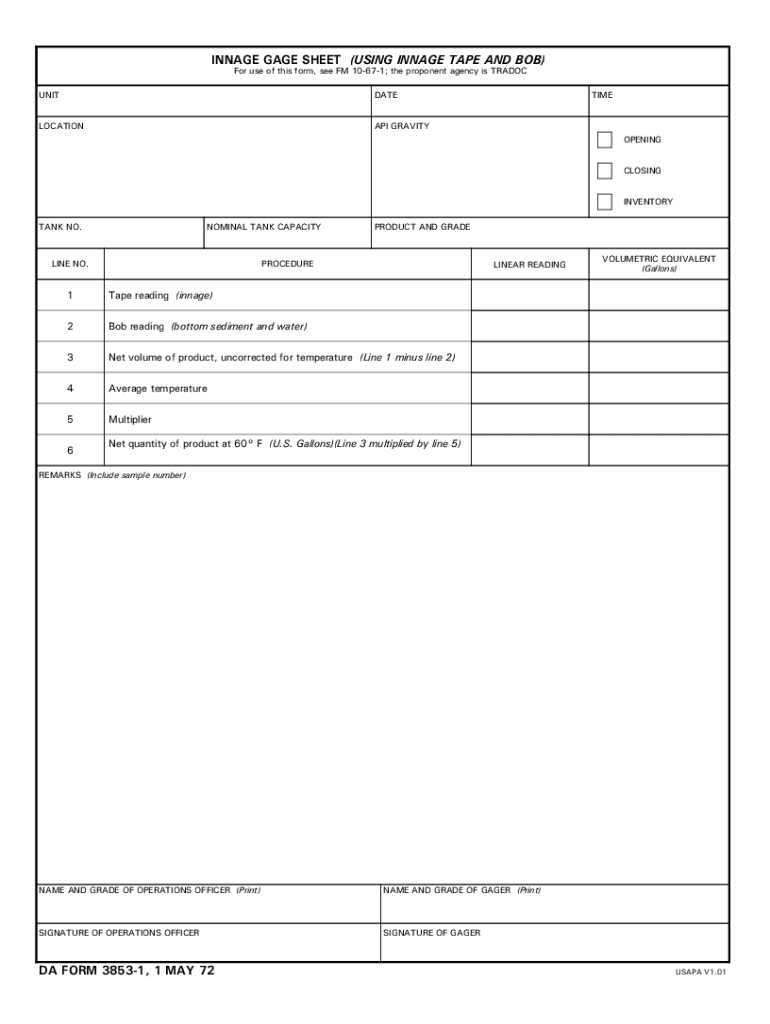
- Begin by entering your unit information in the designated field at the top of the form, followed by the date, location, and time.
- Fill in the API gravity opening and closing values as required for accurate inventory tracking.
- In the inventory section, input the tank number and nominal tank capacity. This ensures proper identification of each tank.
- Proceed to record linear readings: first, enter the tape reading (innage) and then the bob reading (bottom sediment and water).
- Calculate and enter the net volume of product by subtracting line 2 from line 1. This value is crucial for inventory accuracy.
- Input the average temperature and volumetric equivalent multiplier to determine net quantity at 60° F.
- Finally, include any remarks such as sample numbers, and ensure all signatures are provided by both operations officer and gager.
Start using our platform today for free to streamline your document editing and form completion!
It's free
Got questions?
How do I sign my i 385 form pdf online?
Sign in to your DocHub account and import your i 385 form pdf to our editor using one of its upload options - from your device, cloud storage, secure URL, or your DocHub folders if you have already managed your document before. Open our editor, click the Sign key in the top toolbar, and choose your signing method. You can upload an image of your handwritten signature, draw it, type in your name, or utilize a QR code instead.
How do you edit da form 8003 online?
With DocHub, you have several convenient ways to edit your da form 8003 online. You can drag and drop the form and edit it straight at the DocHub site or use our browser extension to fill out your form right away. On top of that, you can edit your PDF on your smartphone, as DocHub is compatible with all the accessible mobile platforms.
How do you fill out a da31?
How do you know if you are promotable Army?
How do I fill out a DA 31 2020?
Security and compliance
At DocHub, your data security is our priority. We follow HIPAA, SOC2, GDPR, and other standards, so you can work on your documents with confidence.
Learn more


