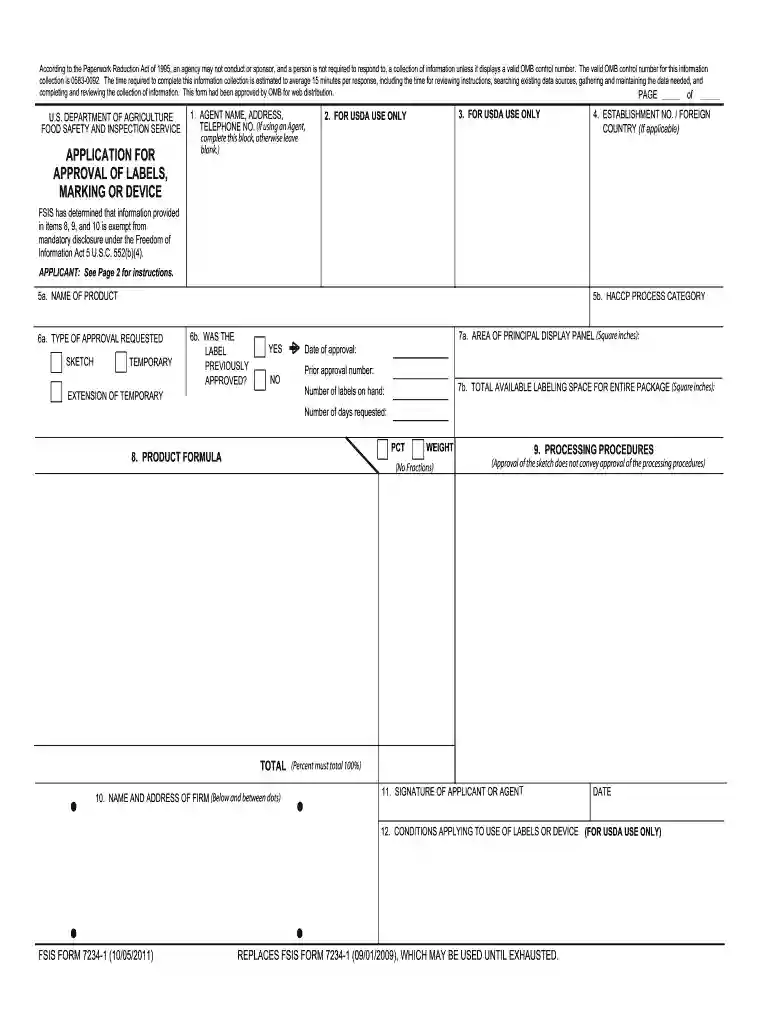
Fsis label approval form 2026

Get Form
label approval form Preview on Page 1

Here's how it works

01. Edit your label approval form online
Type text, add images, blackout confidential details, add comments, highlights and more.

02. Sign it in a few clicks
Draw your signature, type it, upload its image, or use your mobile device as a signature pad.

03. Share your form with others
Send fsis label approval form via email, link, or fax. You can also download it, export it or print it out.

How to use or fill out fsis label approval form with our platform

Form edit decoration
9.5
Ease of Setup
DocHub User Ratings on G2
9.0
Ease of Use
DocHub User Ratings on G2
  1. Click ‘Get Form’ to open the fsis label approval form in the editor.
  2. Begin by filling out the agent's name, address, and telephone number if applicable. If not using an agent, leave this section blank.
  3. In section 4, enter the establishment number or foreign country if relevant. This is crucial for identification purposes.
  4. For section 5a, provide the common name of your product. Avoid trade names and ensure clarity.
  5. In section 5b, indicate the HACCP process category that applies to your product. Refer to relevant regulations for guidance.
  6. Complete sections 6a and 6b by selecting the type of approval requested and indicating whether the label was previously approved.
  7. Fill out sections 7a and 7b regarding labeling space and total available labeling area in square inches.
  8. Detail your product formula in section 8, listing ingredients by weight or percentage without fractions.
  9. Outline processing procedures in section 9 as required by regulations. Ensure all information is accurate and complete.
  10. Finally, sign and date the application in section 11 before submitting it through our platform for a streamlined process.

Start using our platform today to simplify your fsis label approval form submission!

See more fsis label approval form versions

We've got more versions of the fsis label approval form form. Select the right fsis label approval form version from the list and start editing it straight away!
Versions Form popularity Fillable & printable
2011 4.9 Satisfied (294 Votes)
2011 4 Satisfied (23 Votes)
2009 4.4 Satisfied (185 Votes)
2002 4 Satisfied (57 Votes)
be ready to get more

Complete this form in 5 minutes or less

Get form

Got questions?

We have answers to the most popular questions from our customers. If you can't find an answer to your question, please contact us.
Contact us
Required meat label information Product name: The product name must accurately define the product in the package and use the USDA-Food Safety Inspection Service (USDA-FSIS) approved definitions. Official inspection legend including the establishment number: Address line. Net weight or quantity: Ingredient statement:
Nearly all product labels contain the following parts: Brand name and logo. The brand name and logo are essential elements that represent the identity and values of a company. Product name. Product description and features. Ingredients and nutritional information. Net weight/volume. Manufacturer information.
According to FSIS guidelines, all meat and poultry products must include specific information on their labels. This includes the product name, inspection legend (indicating it has been inspected and passed by FSIS), handling statement, net weight statement, and ingredients statement.
Five Basic Label Requirements Identity of food in package form. Name of manufacturer, packer, or distributor. Place of business. Ingredient declaration. Net quantity of contents.