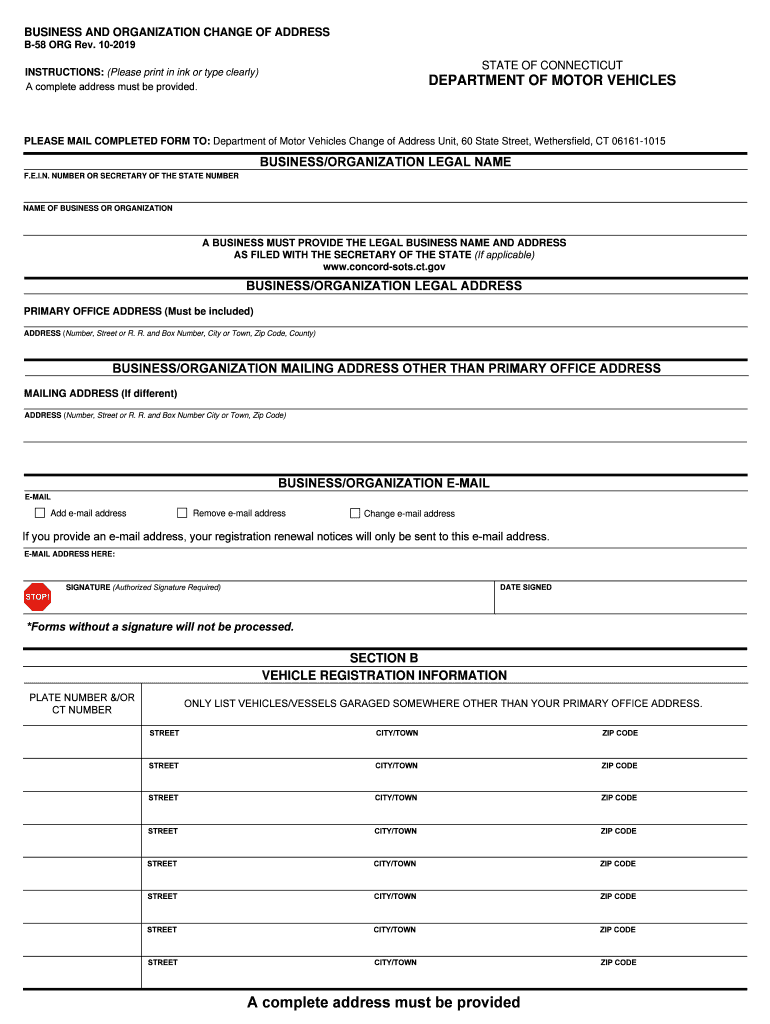
Connecticut b58 business form 2026

Get Form
connecticut b58 business form Preview on Page 1

Here's how it works

01. Edit your form online
Type text, add images, blackout confidential details, add comments, highlights and more.
02. Sign it in a few clicks
Draw your signature, type it, upload its image, or use your mobile device as a signature pad.
03. Share your form with others
Send it via email, link, or fax. You can also download it, export it or print it out.

How to use or fill out Connecticut B58 Business Form with DocHub

Form edit decoration
9.5
Ease of Setup
DocHub User Ratings on G2
9.0
Ease of Use
DocHub User Ratings on G2
  1. Click ‘Get Form’ to open the Connecticut B58 business form in our platform.
  2. Begin by entering the 'Business/Organization Legal Name' and 'F.E.I.N. Number or Secretary of the State Number' in the designated fields. Ensure that the legal name matches what is filed with the Secretary of the State.
  3. Fill in the 'Business/Organization Legal Address' with your primary office address, including all necessary details such as street number, city, and zip code.
  4. If your mailing address differs from your primary office address, complete the 'Business/Organization Mailing Address' section accordingly.
  5. Provide an email address in the 'Business/Organization E-Mail' field. You can choose to add, change, or remove an email address as needed.
  6. Sign and date the form in the designated area. Remember, forms without a signature will not be processed.
  7. For vehicle registration information, list any vehicles/vessels garaged at an address other than your primary office. Fill out each required field completely.

Start using our editor today to fill out your Connecticut B58 business form for free!

See more connecticut b58 business form versions

We've got more versions of the connecticut b58 business form form. Select the right connecticut b58 business form version from the list and start editing it straight away!
Versions Form popularity Fillable & printable
2019 4.9 Satisfied (45 Votes)
2016 4.4 Satisfied (115 Votes)
be ready to get more

Complete this form in 5 minutes or less

Get form

Got questions?

We have answers to the most popular questions from our customers. If you can't find an answer to your question, please contact us.
Contact us

Electronic document approval demands a software solution that complies with data security and eSignature standards. DocHub is a perfect tool for that, since it fulfills all the above mentioned requirements. Whatever method you prefer to sign your connecticut b58 business form in DocHub, your electronic signature will be legally binding and court-admissible.

Document editing with DocHub is equally convenient on desktop and mobile devices. You just need an internet browser to revise your connecticut b58 business form on Android. Open our site and sign in to access the instruments you need. Add your file and introduce your intended modifications. After that, you can keep your form in your file storage or send it out right away.

Completed Connecticut registration and title application (Form H-13B).
The Form AU-463 is used by Connecticut residents to declare the transfer of ownership and title of a motor vehicle or vessel as a gift. The form includes information about the donor, donee, vehicle details, and a declaration of truthfulness under penalties of false statement.
The Form H-13B is used as a registration and title application form for motor vehicles in the State of Connecticut. Originally published by ct.gov.

Security and compliance

At DocHub, your data security is our priority. We follow HIPAA, SOC2, GDPR, and other standards, so you can work on your documents with confidence.

Learn more
ccpa2
pci-dss
gdpr-compliance
hipaa
soc-compliance

People also ask

Online: Individuals and organizations can check for compliance issues online and make payments through the DMVs online service. By phone: Call 860-263-5725 to process your payment.
Request and complete a Supplemental Assignment of Ownership Form (Form Q1). This form is also available at your local DMV office. Without this form, we are unable to transfer ownership. Complete the Application for Replacement Certificate of Title (Form H6B).
All Connecticut Department of Motor Vehicle forms may be obtained through the Connecticut Department of Motor Vehicle website. Several forms available on the DMV website can also be found in the lobby of the Police Department. Please contact the Police Department to see if they have the form you need at (860) 633-8301.

Related links