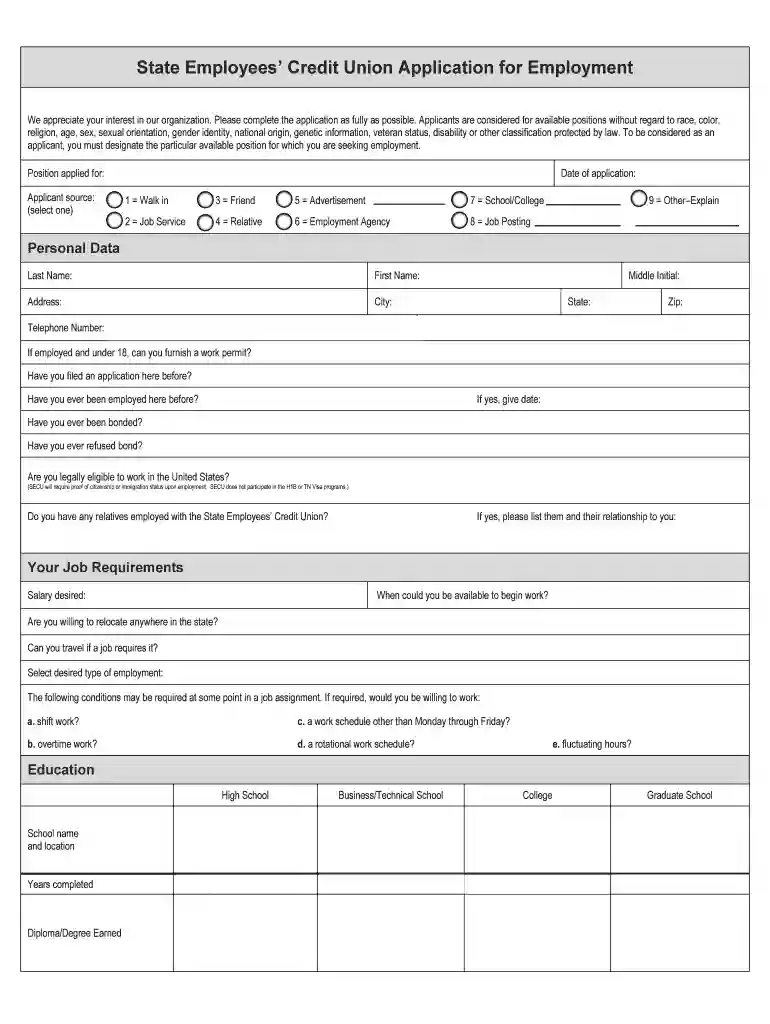
Fillable SECU Application. We appreciate your interest in our organization. Please complete the application as fully as possible. Applicants are considered for available positions without regard to race, color, religion, age, sex, sexual orientation, 2026

Get Form
Fillable SECU Application. We appreciate your interest in our organization. Please complete the application as fully as possible. Applicants are considered for available positions without regard to race, color, religion, age, sex, sexual orientation, Preview on Page 1

Here's how it works

01. Edit your form online
Type text, add images, blackout confidential details, add comments, highlights and more.

02. Sign it in a few clicks
Draw your signature, type it, upload its image, or use your mobile device as a signature pad.

03. Share your form with others
Send it via email, link, or fax. You can also download it, export it or print it out.

How to Use or Fill Out the Fillable SECU Application

Form edit decoration
9.5
Ease of Setup
DocHub User Ratings on G2
9.0
Ease of Use
DocHub User Ratings on G2
  1. Click 'Get Form' to open the Fillable SECU Application in our platform.
  2. Begin by filling out your personal data, including your last name, first name, address, and contact information. Ensure all fields are completed accurately.
  3. Designate the position you are applying for and select your applicant source from the provided options.
  4. Complete the education section by listing your schools attended and degrees earned. Be sure to include years completed.
  5. In the work experience section, list your last three positions held, starting with the most recent. Include details such as employer name, job description, dates of employment, and reasons for leaving.
  6. Provide references who are not related to you and have not been previous employers. Include their names, addresses, and phone numbers.
  7. Read through the Applicant’s Certification and Agreement carefully before signing. Ensure that your signature is handwritten.

Start filling out your application today using our editor for a seamless experience!

See more Fillable SECU Application. We appreciate your interest in our organization. Please complete the application as fully as possible. Applicants are considered for available positions without regard to race, color, religion, age, sex, sexual orientation, versions

We've got more versions of the Fillable SECU Application. We appreciate your interest in our organization. Please complete the application as fully as possible. Applicants are considered for available positions without regard to race, color, religion, age, sex, sexual orientation, form. Select the right Fillable SECU Application. We appreciate your interest in our organization. Please complete the application as fully as possible. Applicants are considered for available positions without regard to race, color, religion, age, sex, sexual orientation, version from the list and start editing it straight away!
Versions Form popularity Fillable & printable
2019 4.8 Satisfied (187 Votes)
2017 4.4 Satisfied (34 Votes)
2015 4.4 Satisfied (32 Votes)
be ready to get more

Complete this form in 5 minutes or less

Get form

Got questions?

We have answers to the most popular questions from our customers. If you can't find an answer to your question, please contact us.
Contact us

Sure, and it’s really straightforward! DocHub is a web-based PDF editor with advanced document management capabilities that allow you promptly modify your documents, complete empty fields and drop new ones for other people to fill out, and create electronic signatures in several ways. Add your Fillable SECU Application. We appreciate your interest in our organization. Please complete the application as fully as possible. Applicants are considered for available positions without regard to race, color, religion, age, sex, sexual orientation,, give information as requested, and select how you want to eSign your template - by typing your name, drawing your signature, uploading its picture, or utilizing a QR code.

Document editing with DocHub is equally convenient on desktop and mobile devices. You only need an internet browser to revise your Fillable SECU Application. We appreciate your interest in our organization. Please complete the application as fully as possible. Applicants are considered for available positions without regard to race, color, religion, age, sex, sexual orientation, on Android. Open our website and sign in to access the instruments you require. Add your document and introduce your intended changes. After that, you can keep your form in your document storage or send it out right away.

The basic components of an employment application encompass essential sections such as personal information, employment history, education and training, skills, resume, cover letter, references, certification, and may include a request for writing samples.
An employment application allows you to ask for information that is relevant to your company educational background, job history, skills, certifications, hours available to work, etc.
The job requisition is an internal document used to get approval for a new position or fill a vacant role. It is a standard form filled in by the hiring manager and submitted to their supervisor or HR. The job req is the first step in the hiring process.

Security and compliance

At DocHub, your data security is our priority. We follow HIPAA, SOC2, GDPR, and other standards, so you can work on your documents with confidence.

Learn more
ccpa2
pci-dss
gdpr-compliance
hipaa
soc-compliance
be ready to get more

Complete this form in 5 minutes or less

Get form

People also ask

An employer does not have to hire you if you are unable to perform all of the essential functions of the job, even with reasonable accommodation. However, an employer cannot reject you only because the disability prevents you from performing minor duties that are not essential to the job.
An application form will usually ask for some personal information about you, such as your full name, date of birth, address, phone number and email address. The form might also ask you for a few sentences to introduce yourself. You can use this answer to say why youre interested in this job or training.
If a question does not apply to you, draw a line or write N/A in the space. Use only positive information. Avoid negative words such as quit or fired. Use positive phrases such as better opportunity or potential for advancement.

Related links