



Here's how it works



How to use or fill out s sv 850 with our platform

- Click ‘Get Form’ to open the s sv 850 in the editor.
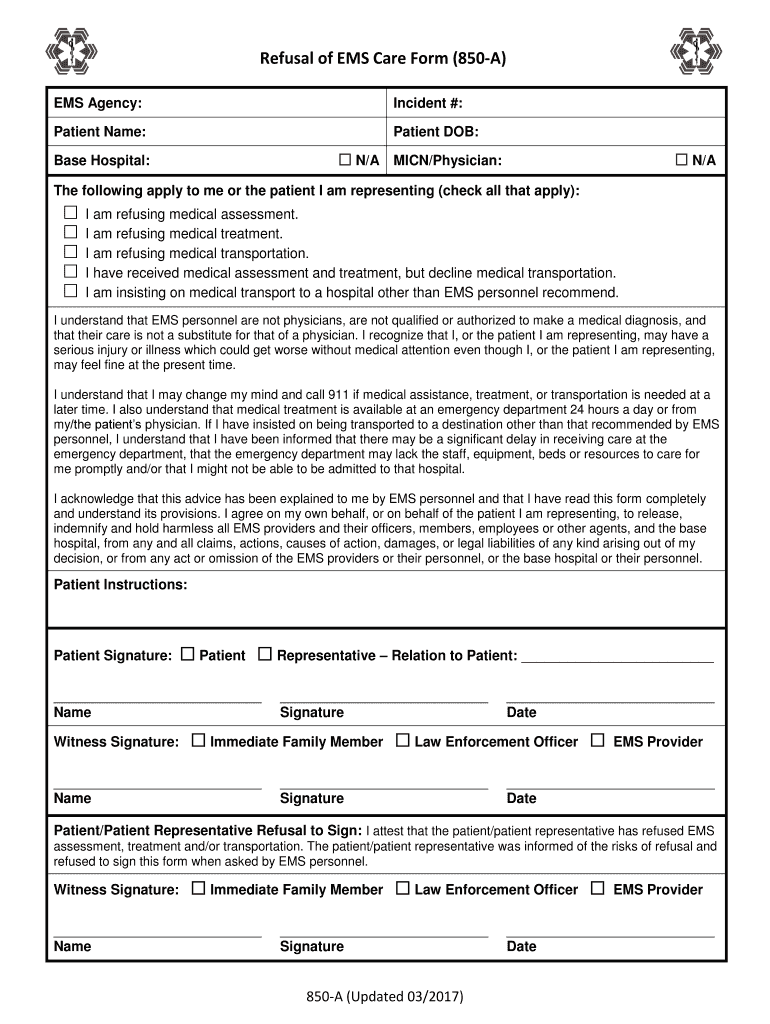
- Begin by entering the EMS Agency and Incident Number at the top of the form. This information is crucial for record-keeping.
- Fill in the Patient Name and Date of Birth fields accurately to ensure proper identification.
- Indicate any applicable options by checking the boxes that apply to you or the patient you represent regarding refusal of care.
- Read through the acknowledgment section carefully, ensuring you understand your rights and responsibilities before signing.
- Sign in the Patient Signature field, indicating whether you are signing on behalf of yourself or as a representative, and provide your relation if applicable.
- Have a witness sign where indicated, ensuring all signatures are dated correctly for legal purposes.
Start using our platform today to fill out your s sv 850 form online for free!
It's free
Got questions?
How can I sign my s sv 850 without printing?
eSignatures are an excellent replacement for traditional signing, as they save time, effort, and costs people spend on printing, scanning, and paper delivery. You can eSign your s sv 850 using a reliable and powerful online document management services like DocHub. It complies with major eSignature standards (ESIGN and UETA), so all forms approved there are legally binding and have the same validity as manually signed ones.
How to fill out s sv 850 on the internet for free in 2024?
Using a swift editing system like DocHub, you do not need anything but a browser and internet connection to edit your s sv 850 online easily. Upload your document or find the appropriate form in DocHub’s catalog, open our editor with a single click, and finish it digitally. To revise your forms at any time, sign up a free account with DocHub.
Is Aprilia SRV 850 discontinued?
Is the Aprilia SRV 850 automatic?
What is the top speed of Aprilia SRV 850?
Security and compliance
At DocHub, your data security is our priority. We follow HIPAA, SOC2, GDPR, and other standards, so you can work on your documents with confidence.
Learn more