



Here's how it works



How to use or fill out nd damage disclosure statement with our platform

- Click ‘Get Form’ to open the nd damage disclosure statement in the editor.
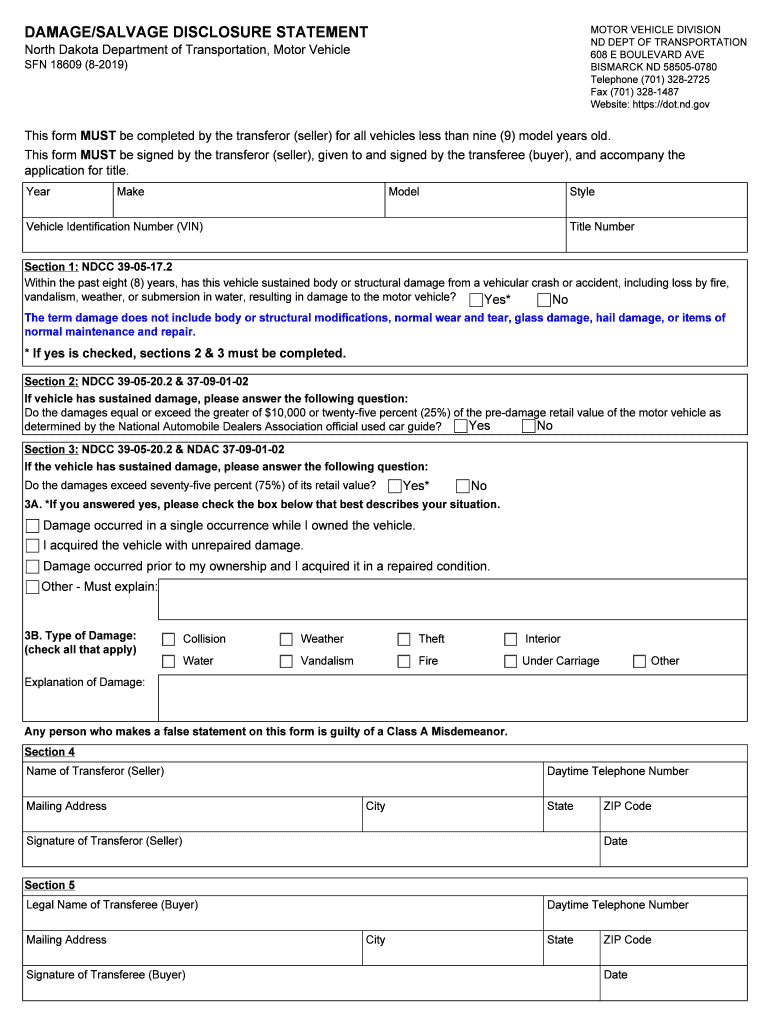
- Begin by filling in the vehicle details: Year, Make, Model, Style, Vehicle Identification Number (VIN), and Title Number.
- In Section 1, indicate whether the vehicle has sustained any body or structural damage in the past eight years by selecting 'Yes' or 'No'. If 'Yes', proceed to Sections 2 and 3.
- For Section 2, answer if the damages equal or exceed $10,000 or 25% of the pre-damage retail value by selecting 'Yes' or 'No'.
- In Section 3, determine if damages exceed 75% of its retail value. If 'Yes', complete Sections 3A and 3B by providing details about ownership and types of damage.
- Fill out Sections 4 and 5 with the seller's and buyer's information respectively, ensuring all fields are completed accurately before signing.
Start using our platform today for free to streamline your document editing and signing process!
It's free
See more nd damage disclosure statement versions
Got questions?
How do I sign my dakota transportation for free?
Most eSignature services require users to have a paid subscription. With DocHub, there are two options for you to add an electronic signature to your dakota transportation at no cost:
- You can do it during a 7-day trial period;
- You can subscribe to a free plan.
The second option, though, has limitations on the number of signatures, sign requests, emails, and documents for editing available per month. You can check for full details here.
Can I sign my north dakota damage while I edit it?
If you edit your north dakota damage with DocHub, you will not need to look for other applications or services to eSign it. An electronic signature is part of DocHub’s substantial editing toolset, which enables you to implement changes in your form without switching between websites. Just complete your form, double-check the correctness of your data and put your electronic signature at the end to make it submission-ready within a few minutes.
Security and compliance
At DocHub, your data security is our priority. We follow HIPAA, SOC2, GDPR, and other standards, so you can work on your documents with confidence.
Learn more