Type text, add images, blackout confidential details, add comments, highlights and more.

02. Sign it in a few clicks
Draw your signature, type it, upload its image, or use your mobile device as a signature pad.

03. Share your form with others
Send it via email, link, or fax. You can also download it, export it or print it out.

How to use or fill out a 226 with our platform
Ease of Setup
DocHub User Ratings on G2
Ease of Use
DocHub User Ratings on G2
Click ‘Get Form’ to open the 226 in the editor.
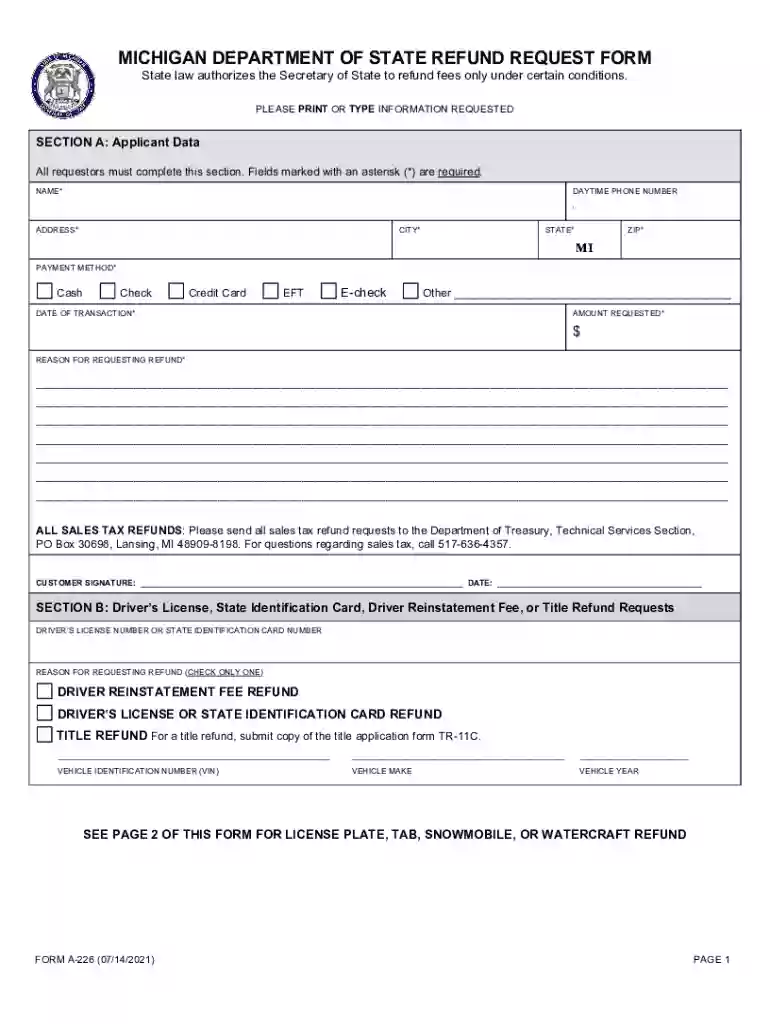
Begin with Section A: Applicant Data. Fill in your name, daytime phone number, address, city, state, and ZIP code. Ensure all fields marked with an asterisk (*) are completed.
Select your payment method from the options provided: Cash, Check, Credit Card, EFT, E-check, or Other. Enter the date of transaction and the amount requested.
In the reason for requesting a refund field, provide a detailed explanation of why you are seeking a refund.
Proceed to Section B if applicable. Enter your driver’s license number or state ID number and select the reason for your refund request by checking one option.
If you are requesting a refund for vehicle-related fees in Section C, fill in the registration number and expiration date. Choose your reason for requesting a refund and provide any necessary details.
Finally, sign and date the form at the bottom before submitting it through our platform.
Start filling out your 226 form online for free today!
Sep 27, 2023 A/V Instructions A 226 Locate the control panel on the wall near the screen. Power on the system by pressing the On button on the controlRead more
Cookie consent notice
This site uses cookies to enhance site navigation and personalize your experience.
By using this site you agree to our use of cookies as described in our Privacy Notice.
You can modify your selections by visiting our Cookie and Advertising Notice.