




Here's how it works

01. Edit your apply for doku online
Type text, add images, blackout confidential details, add comments, highlights and more.

02. Sign it in a few clicks
Draw your signature, type it, upload its image, or use your mobile device as a signature pad.

03. Share your form with others
Send it via email, link, or fax. You can also download it, export it or print it out.
How to use or fill out In order to apply for a U with our platform

- Click ‘Get Form’ to open it in the editor.
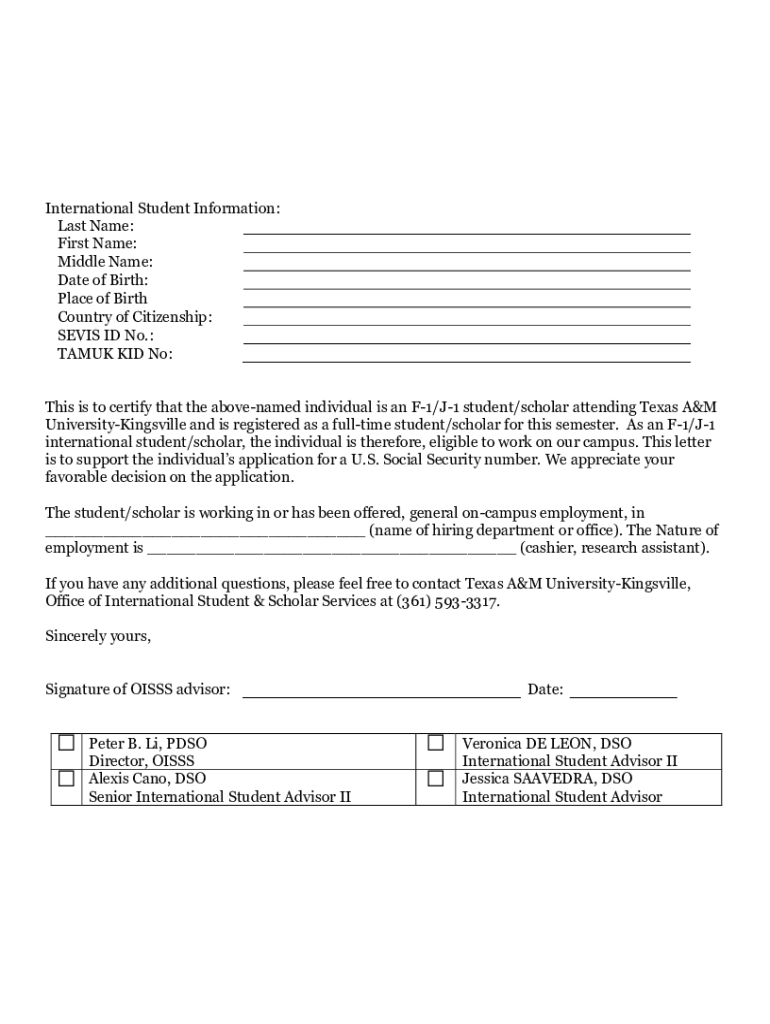
- Begin by filling out the 'International Student Information' section. Enter your Last Name, First Name, Middle Name, Date of Birth, Place of Birth, Country of Citizenship, SEVIS ID No., and TAMUK KID No.
- Next, ensure you have a completed and signed Employment Verification Letter. This letter should confirm your status as an F-1/J-1 student/scholar and detail your on-campus employment.
- Review the list of required documents: Passport, Form I-94, Form I-20 or DS-2019, Employment Verification Letter, Employment Letter, and completed Form SS5.
- Once all sections are filled out accurately and documents are gathered, save your form. You can then print it directly from our platform or download it for submission.
Start using our platform today to streamline your application process for a U.S. Social Security Number!
Fill out In order to apply for a U online
It's free
It's free
See more In order to apply for a U versions
We've got more versions of the In order to apply for a U form. Select the right In order to apply for a U version from the list and start editing it straight away!
Security and compliance
At DocHub, your data security is our priority. We follow HIPAA, SOC2, GDPR, and other standards, so you can work on your documents with confidence.
Learn more


Related forms

PHYSICAL REVIEW CTM - forms aps
The document is an overview of the editorial and publication details for the journal 'Physical Review CTM' by the Americ ...

AVMA MODEL DOG AND CAT CONTROL ORDINANCE
The AVMA Model Dog and Cat Control Ordinance outlines regulations for the ownership, licensing, and care of dogs and cat ...

Effects of Unbounded Interviews, Time in Sample, and Recency on Reported Crimes in the National Crim
Effects of Unbounded Interviews, Time in Sample, and Recency on Reported Crimes in the National Crim
The document discusses the National Crime Victimization Survey (NCVS) and its methodology, focusing on the effects of un ...

12-December AA - rock geosociety
The document is a comprehensive overview of the Geological Society of America's (GSA) activities, including details abou ...

1994: bias in list-assisted telephone samples - American Statistical - amstat
The document discusses the biases associated with list-assisted telephone sampling methods, particularly focusing on a t ...

Public Opinions on Strategies for Managing Stray Cats and
The document presents a study conducted in Ohio to assess attitudes and perceptions towards free-roaming cats among resi ...

OPERATIONS MANAGEMENT BODY
The APICS Operations Management Body of Knowledge (OMBOK) Framework, Third Edition, serves as a comprehensive guide outl ...

Michael Kircher, Markus Voelter, Klaus Jank, Christa Schwanninger, Michael Stal
The document 'Broker Revisited' presents an updated description of the Broker pattern in distributed systems, emphasizin ...