



Here's how it works



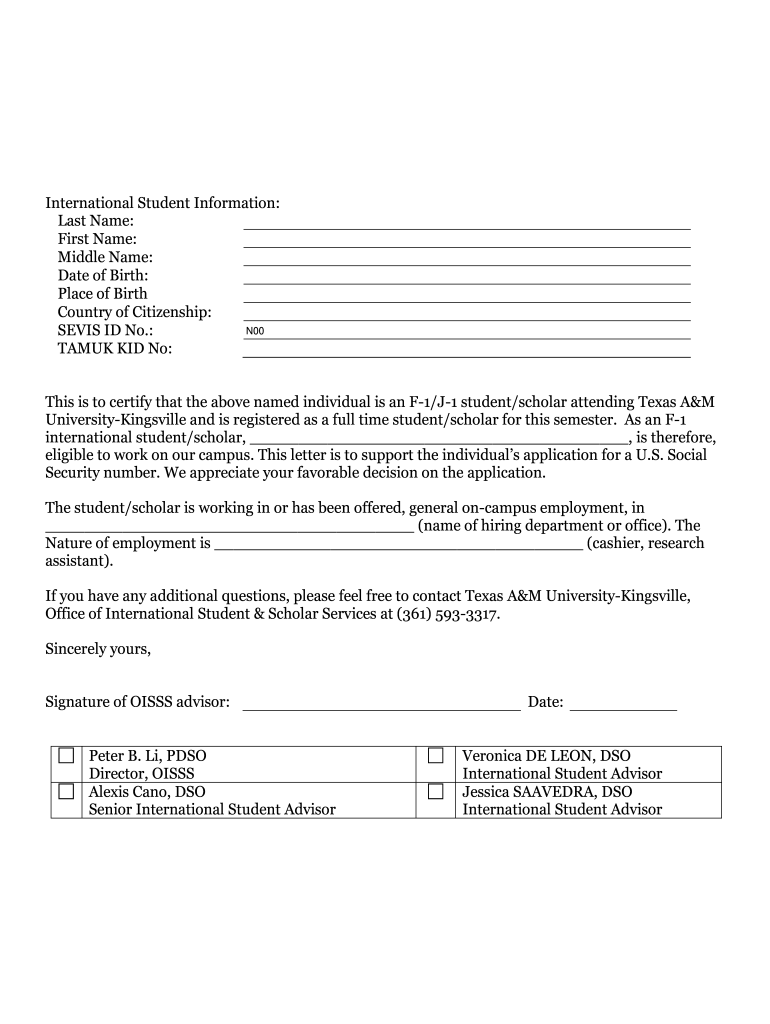
How to use or fill out Fillable Online Form OISSS-115, Request for a Social Security Letter

- Click ‘Get Form’ to open it in the editor.
- Begin by filling out the 'International Student Information' section on the second page. Enter your Last Name, First Name, Middle Name, Date of Birth, Place of Birth, Country of Citizenship, SEVIS ID No., and TAMUK KID No.
- In the certification section, ensure that your advisor certifies your status as an F-1/J-1 student/scholar attending Texas A&M University-Kingsville. This includes entering the name of your hiring department and nature of employment.
- Review all entered information for accuracy. Ensure that all required fields are completed before proceeding.
- Once completed, save your form and download it for submission along with necessary documents like your passport and employment verification letter.
Start using our platform today to easily fill out and manage your forms for free!
It's free
See more Fillable Online Form OISSS-115, Request for a Social Security ... versions
Got questions?
What is the best way to send my Fillable Online Form OISSS-115, Request for a Social Security ... for eSignature?
Upload your Fillable Online Form OISSS-115, Request for a Social Security ... to DocHub (after you’ve created an account for this). If you need to fill out fields in it, use appropriate tools from the top pane. For instance, drop Signature Fields, assign each to a particular party, and click on Sign → Request signatures from others. Personalize your message for your recipients and click Send Request. You can also send your paperwork by fax or as a Signing link instead of using email (you’ll find these options by navigating to the Menu → Send)
How do you get Fillable Online Form OISSS-115, Request for a Social Security ...?
You can find the latest and most relevant version of the Fillable Online Form OISSS-115, Request for a Social Security ... in our DocHub forms collection. Browse it by categories or use the search field to locate the exact template that suits your case. You can open this form for editing after you find it.
Security and compliance
At DocHub, your data security is our priority. We follow HIPAA, SOC2, GDPR, and other standards, so you can work on your documents with confidence.
Learn more


Related forms