




Here's how it works



How to use or fill out International Students and Scholars Social Security and ITIN Form with Our Platform

- Click ‘Get Form’ to open it in the editor.
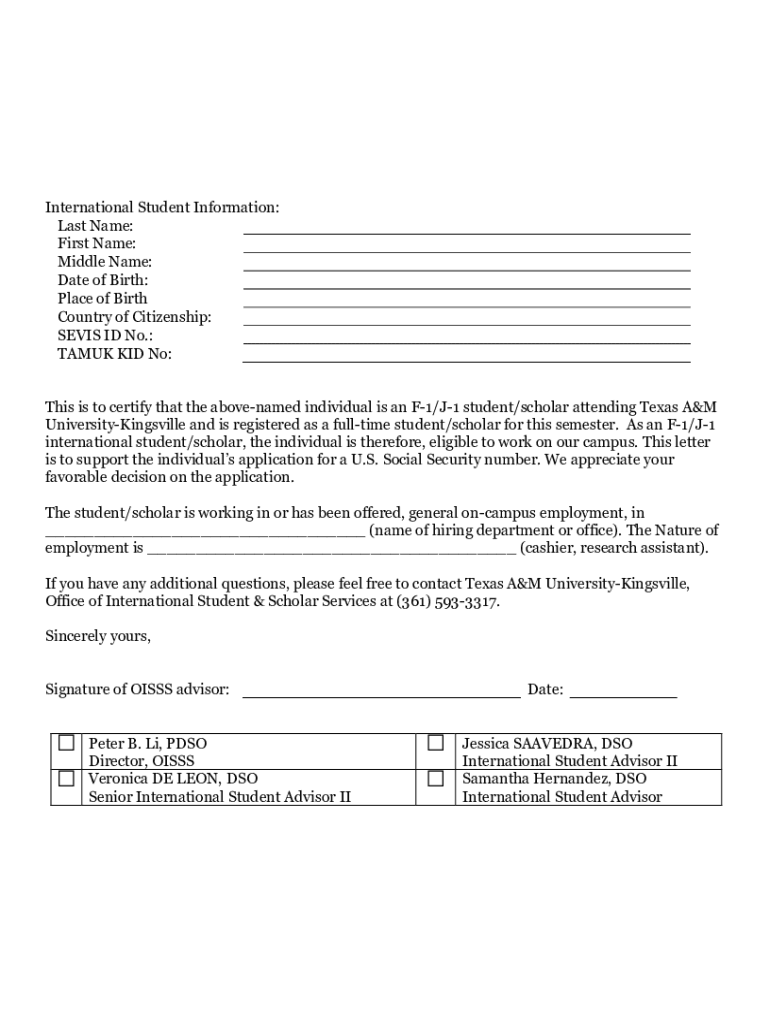
- Begin by filling out the 'International Student Information' section. Enter your last name, first name, middle name, date of birth, place of birth, country of citizenship, SEVIS ID No., and TAMUK KID No.
- Ensure you have a completed job offer letter ready. If needed, download the Social Security Hiring Letter Template from the provided link.
- Gather all required documents: your passport, Form I-94 (accessible online), Form I-20 or DS-2019, a signed Employment Verification Letter (the second page of this form), and an employment letter.
- Complete Form SS5 by downloading it from the SSA website. Make sure all information is accurate before submission.
- Review all sections for completeness and accuracy. Once satisfied, save your document within our platform for easy access.
Start using our platform today to streamline your form completion process for free!
It's free
See more International Students and ScholarsSocial Security and ITIN - UniversitOffice of International Student and Scholar ServicesInternational Students and ScholarsSocial Security and ITIN - UniversitInternational Students and ScholarsSocial Security versions
Got questions?
What is the best way to send my itin international student for eSignature?
Upload your itin international student to DocHub (once you’ve set up an account for this). If you need to fill out fields in it, use appropriate tools from the upper pane. For instance, add Signature Fields, assign each to specific party, and click on Sign → Request signatures from others. Change your message for your recipients and click Send Request. You can also send your document by fax or as a Signing link instead of using email (you’ll find these options by navigating to the Menu → Send)
How do you fill out my iit isss portal online?
You may get and edit your my iit isss portal online by using DocHub. Its straightforward but feature-rich design enables you to start productive work immediately after you register your account. Create your profile and add your file, then our interface will guide you via our stress-free form completion experience.
Security and compliance
At DocHub, your data security is our priority. We follow HIPAA, SOC2, GDPR, and other standards, so you can work on your documents with confidence.
Learn more


