Imm5280 2026

Get Form
imm 5280 Preview on Page 1

Here's how it works

01. Edit your imm 5280 online
Type text, add images, blackout confidential details, add comments, highlights and more.

02. Sign it in a few clicks
Draw your signature, type it, upload its image, or use your mobile device as a signature pad.

03. Share your form with others
Send imm5280 via email, link, or fax. You can also download it, export it or print it out.

How to use or fill out imm5280 with our platform

Form edit decoration
9.5
Ease of Setup
DocHub User Ratings on G2
9.0
Ease of Use
DocHub User Ratings on G2
  1. Click ‘Get Form’ to open the imm5280 document in the editor.
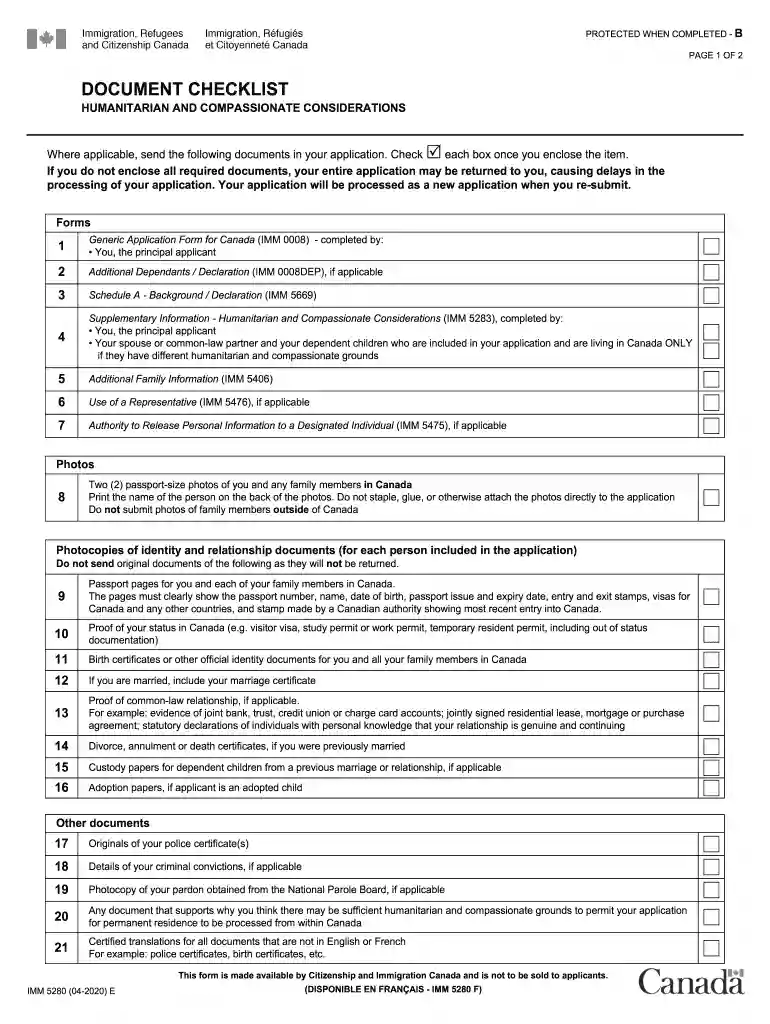
  2. Begin by reviewing the Document Checklist section. Ensure you have all required documents ready for submission, as missing items can delay your application.
  3. Fill out your personal information accurately in the designated fields. This includes your name, date of birth, and contact details.
  4. Complete the sections regarding your family members. If applicable, include details about your spouse or common-law partner and dependent children living in Canada.
  5. Attach any necessary supporting documents as indicated in the checklist. Use our platform's upload feature to easily add these files.
  6. Review all entries for accuracy before finalizing. Utilize our editing tools to make any necessary adjustments.
  7. Once completed, save your form and follow the instructions for submission outlined in the checklist.

Start using our platform today to streamline your imm5280 form completion for free!

See more imm5280 versions

We've got more versions of the imm5280 form. Select the right imm5280 version from the list and start editing it straight away!
Versions Form popularity Fillable & printable
2022 4.8 Satisfied (116 Votes)
2021 4.8 Satisfied (199 Votes)
2020 4.3 Satisfied (157 Votes)
2015 4.3 Satisfied (91 Votes)
be ready to get more

Complete this form in 5 minutes or less

Get form

Got questions?

We have answers to the most popular questions from our customers. If you can't find an answer to your question, please contact us.
Contact us

Sure, a typed name is accepted as a legitimate electronic signature when you create it on your form using a compliant solution like DocHub. Simply upload your imm5280 to our editor, click Sign in the top tool pane → Create your signature → Type your name in the appropriate tab, and choose how it will look on your document.

Apart from an extensive toolset for editing PDFs on mobile phones, DocHub allows you to sign your imm5280 along the way. Open our editor in your web browser, make changes using DocHub’s toolset, and finish your editing by eSigning the finished form.

Security and compliance

At DocHub, your data security is our priority. We follow HIPAA, SOC2, GDPR, and other standards, so you can work on your documents with confidence.

Learn more
ccpa2
pci-dss
gdpr-compliance
hipaa
soc-compliance
be ready to get more

Complete this form in 5 minutes or less

Get form