Notary i psers form 2026

Get Form
notary i psers form Preview on Page 1

Here's how it works

01. Edit your form online
Type text, add images, blackout confidential details, add comments, highlights and more.
02. Sign it in a few clicks
Draw your signature, type it, upload its image, or use your mobile device as a signature pad.
03. Share your form with others
Send it via email, link, or fax. You can also download it, export it or print it out.

How to use or fill out notary i psers form with our platform

Form edit decoration
9.5
Ease of Setup
DocHub User Ratings on G2
9.0
Ease of Use
DocHub User Ratings on G2
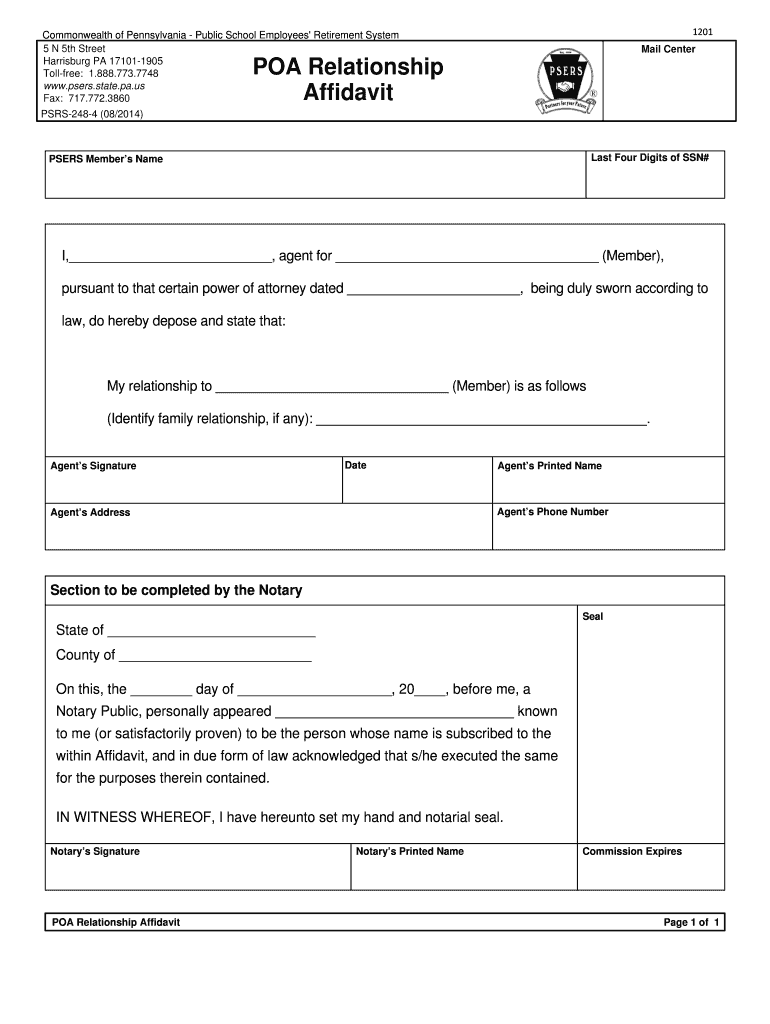
  1. Click ‘Get Form’ to open the notary i psers form in the editor.
  2. Begin by entering the last four digits of the member's Social Security Number in the designated field.
  3. Fill in the PSERS Member’s Name, ensuring accuracy as this identifies the individual involved.
  4. In the section for agent information, write your name and specify your relationship to the member. This is crucial for establishing authority.
  5. Sign and date where indicated as the agent, then provide your printed name, phone number, and address.
  6. Leave the section for Notary completion blank; this will be filled out during notarization.

Start using our platform today to easily complete your notary i psers form online for free!

See more notary i psers form versions

We've got more versions of the notary i psers form form. Select the right notary i psers form version from the list and start editing it straight away!
Versions Form popularity Fillable & printable
2019 4.8 Satisfied (86 Votes)
2014 4.2 Satisfied (74 Votes)
be ready to get more

Complete this form in 5 minutes or less

Get form

Got questions?

We have answers to the most popular questions from our customers. If you can't find an answer to your question, please contact us.
Contact us
A general power of attorney, which grants someone the authority to act on your behalf for a wide range of financial or legal matters, does not require notarization to be valid under California law. However, it must be signed by the person granting the power (the principal) in the presence of a witness.
Where to find a Notary near you FindaNotary.com. AAA and UPS Stores. Law firms or law offices. Real estate firms or real estate offices. Tax preparer or accountant offices. Auto tag and license service centers.
Does US Post Office have a notary? No, the US Post Office does not have a notary on staff to provide notarization services. US Post Office employees are employed by the federal government and do not have the authority to provide state-level services such as document notarization.
Do you solemnly swear under penalty of perjury that the statements in this document are true and correct to the best of your knowledge? The signer will reply, I do or Yes. After the signer answers affirmatively (with Yes or I do), you should instruct the individual to sign in the appropriate space.
A Power of Attorney (POA) is a key legal document in Pennsylvania. It lets a principal choose someone to make decisions for them. This can include financial, legal, and healthcare decisions. The POA must be written, dated, signed, and witnessed by two people and a notary public to be valid.

Security and compliance

At DocHub, your data security is our priority. We follow HIPAA, SOC2, GDPR, and other standards, so you can work on your documents with confidence.

Learn more
ccpa2
pci-dss
gdpr-compliance
hipaa
soc-compliance

People also ask

Most banks provide notarization for a wide range of documents, including affidavits, powers of attorney, deeds, contracts, and more. However, its best to call your specific bank branch to confirm they can docHub your specific document with their official seal.
The U.S. Embassy, Consulates, and Consular Agencies in Brazil provide notary services. They are available for all nationalities and available by appointment only. Except for affidavits, we can only provide notarial services for documents that are to be used in the United States.
The UPS Store locations offer notary services to help make life easier. Once your documents are docHubd, the center will help you make any necessary copies and ship them where they need to go.

Related links