Missouri termination child support 2026

Get Form
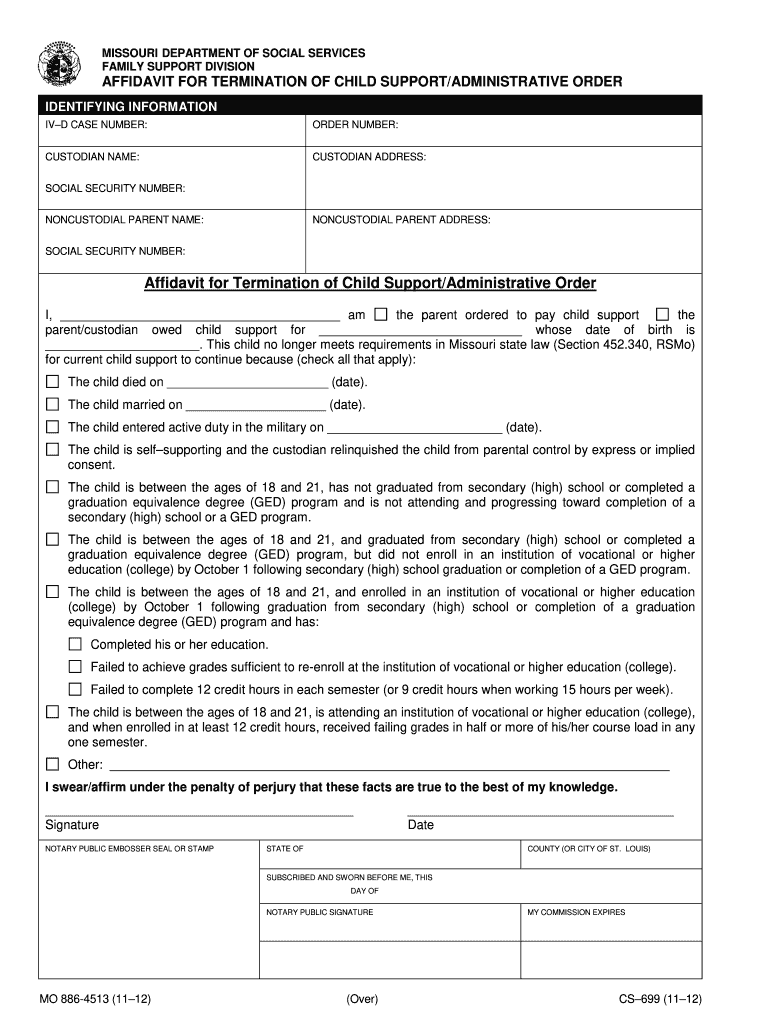
missouri child support termination form Preview on Page 1

Here's how it works

01. Edit your missouri child support termination form online
Type text, add images, blackout confidential details, add comments, highlights and more.
02. Sign it in a few clicks
Draw your signature, type it, upload its image, or use your mobile device as a signature pad.
03. Share your form with others
Send missouri voluntary termination of parental rights form via email, link, or fax. You can also download it, export it or print it out.

How to use or fill out Missouri Termination Child Support

Form edit decoration
9.5
Ease of Setup
DocHub User Ratings on G2
9.0
Ease of Use
DocHub User Ratings on G2
  1. Click ‘Get Form’ to open the Missouri Termination Child Support Affidavit in our editor.
  2. Begin by filling in the identifying information, including the IV-D case number, order number, and names and addresses of both custodial and noncustodial parents. Ensure accuracy as this information is crucial for processing.
  3. In the affidavit section, clearly state your relationship to the child and provide their date of birth. Check all applicable boxes that justify the termination of support based on Missouri state law.
  4. Sign the affidavit in the designated area. Remember to include a notary public's signature and seal to validate your document.
  5. Once completed, mail the notarized affidavit to the Family Support Division at the provided address. If you are submitting it as a custodian owed support, ensure you send a copy to the noncustodial parent as well.

Start using our platform today for free to streamline your document editing and submission process!

See more missouri termination child support versions

We've got more versions of the missouri termination child support form. Select the right missouri termination child support version from the list and start editing it straight away!
Versions Form popularity Fillable & printable
2020 4.2 Satisfied (41 Votes)
2020 4.8 Satisfied (237 Votes)
2020 4.8 Satisfied (110 Votes)
2019 4.8 Satisfied (116 Votes)
2019 4.8 Satisfied (67 Votes)
2019 4.8 Satisfied (100 Votes)
2019 4.8 Satisfied (88 Votes)
2019 4.9 Satisfied (58 Votes)
2019 4.1 Satisfied (36 Votes)
2018 4.8 Satisfied (182 Votes)
2018 4.8 Satisfied (250 Votes)
2018 4.8 Satisfied (121 Votes)
2017 4.8 Satisfied (117 Votes)
2017 4.8 Satisfied (101 Votes)
2017 4.8 Satisfied (73 Votes)
be ready to get more

Complete this form in 5 minutes or less

Get form

Got questions?

We have answers to the most popular questions from our customers. If you can't find an answer to your question, please contact us.
Contact us
Under Missouri law, child support ends when a child docHubes the age of 18, with some exceptions and extensions. If the child is still in high school when they turn 18, child support continues until the child graduates from high school.
A person commits the offense of nonsupport if he or she knowingly fails to provide adequate support for his or her spouse; a parent commits the offense of nonsupport if such parent knowingly fails to provide adequate support which such parent is legally obligated to provide for his or her child or stepchild who is not
To sign up for automatic withdrawal, you must complete an Automatic Withdrawal Authorization. Make sure you include the financial institution routing number, account number and a deposit slip or voided check with your authorization. You can sign up for automatic withdrawal at .
Yes. Parents can agree to waive child support. And here in Missouri, courts often approve those arrangements if theyre clearly thought-out and make sense for the child. That said, its not as simple as just signing a piece of paper and moving on.
To waive child support arrears, draft a clear letter stating the intent to forgive past and current arrears related to the noncustodial parent (NCP). Include case details, parties names, and specify that no further collection will be pursued. Submit the letter to the child support office as instructed.

Security and compliance

At DocHub, your data security is our priority. We follow HIPAA, SOC2, GDPR, and other standards, so you can work on your documents with confidence.

Learn more
ccpa2
pci-dss
gdpr-compliance
hipaa
soc-compliance