




Here's how it works

01. Edit your ps form 1093 online
Type text, add images, blackout confidential details, add comments, highlights and more.

02. Sign it in a few clicks
Draw your signature, type it, upload its image, or use your mobile device as a signature pad.

03. Share your form with others
Send usps free po box application via email, link, or fax. You can also download it, export it or print it out.
How to use or fill out ps form 1093 with our platform

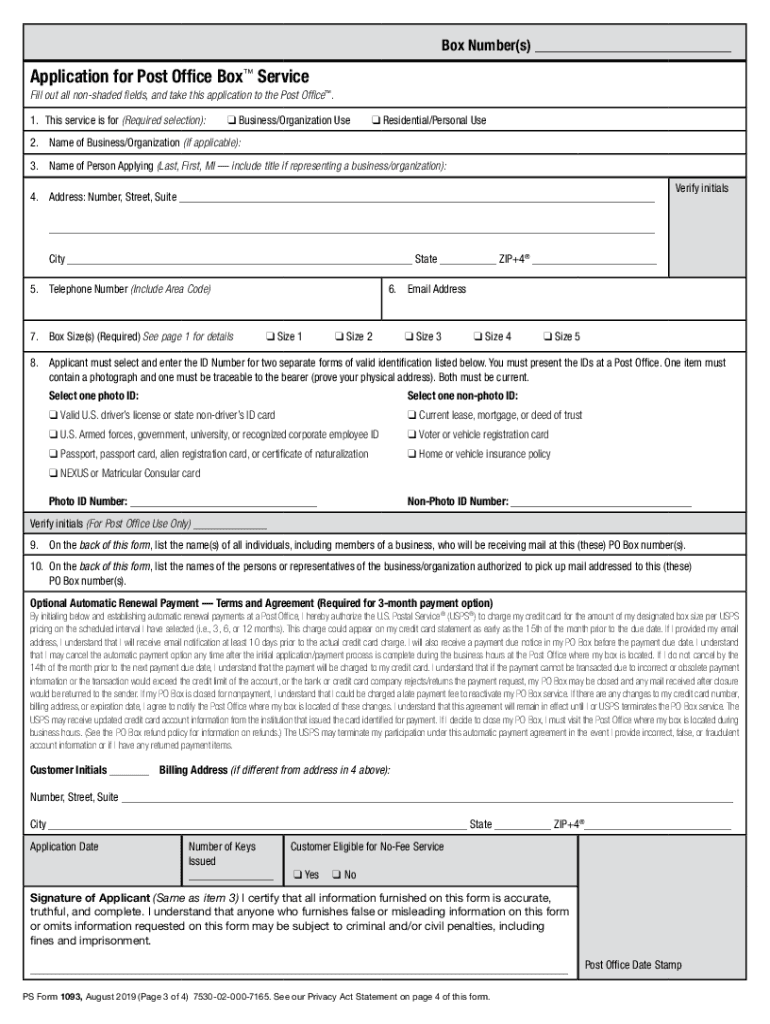
- Click ‘Get Form’ to open the PS Form 1093 in the editor.
- Begin by selecting whether the service is for Business/Organization Use or Residential/Personal Use. This is a required selection.
- Fill in your name and address details accurately, ensuring that all non-shaded fields are completed.
- Select the appropriate box size based on your mail volume from the options provided (Size 1 to Size 5).
- Enter your telephone number and email address for communication purposes.
- Choose two forms of valid identification from the list provided, ensuring one is a photo ID and the other is traceable to your physical address.
- On the back of the form, list all individuals who will receive mail at this PO Box, as well as those authorized to pick up mail.
- Review all entered information for accuracy before finalizing your application. Once complete, take it to your local Post Office for processing.
Start using our platform today to fill out PS Form 1093 easily and for free!
Fill out ps form 1093 online
It's free
It's free
See more ps form 1093 versions
We've got more versions of the ps form 1093 form. Select the right ps form 1093 version from the list and start editing it straight away!
Security and compliance
At DocHub, your data security is our priority. We follow HIPAA, SOC2, GDPR, and other standards, so you can work on your documents with confidence.
Learn more


Related forms

Reveille peak ranch waiver
The document is an Acceptance of Risks Indemnification Agreement for guests participating in activities at Reveille Peak ...

Model Plan for a Comprehensive Drug-Free Workplace - SAMHSA
The 'Medical Review Officer Guidance Manual for Federal Workplace Drug Testing Programs' provides comprehensive guidelin ...

Qualified Claimant's Statement
The document is a Qualified Claimant’s Statement from Lincoln National Life Insurance Company, outlining the process for ...

Office of the Registrar, Marymount University, 2807 North Glebe Road, Arlington, VA 22207-4299
Office of the Registrar, Marymount University, 2807 North Glebe Road, Arlington, VA 22207-4299
The document is a Transcript Request Form for Marymount University, detailing the process for students to request their ...

BinaxNOW COVID-19 Rapid Antigen Test Kit Guidance
The document provides guidance on the use of the BinaxNOW™ COVID-19 Rapid Antigen Test Kit, emphasizing its role in poin ...

Statutory Basis for, the Proposed Rule - gpo
The document is a notice from the Securities and Exchange Commission regarding a proposed rule change by the Internation ...
78216 Federal Register Vol - gpo
The document is a notice of proposed rulemaking by the Department of Health and Human Services, proposing to include vas ...

Foundation (NSF) is required to publish - gpo
The document is a notice from the National Science Foundation (NSF) regarding permit applications received under the Ant ...