






Understanding the Massachusetts Temperature Log Template
The Massachusetts temperature log template is designed for facilities that need to monitor and record the temperature of their vaccine refrigerators consistently. This practice is essential for ensuring the integrity and effectiveness of vaccines by preventing exposure to unsuitable temperatures.
Importance of Temperature Logging
Maintaining a regular temperature log is crucial for healthcare facilities. Here are several key reasons:
- Vaccine Integrity: Vaccines must be stored within specific temperature ranges to remain effective. Any excursion can compromise their safety and efficacy.
- Regulatory Compliance: The Massachusetts Department of Public Health mandates temperature recording for facilities storing vaccines, ensuring adherence to healthcare regulations.
- Quality Control: Continuous monitoring and documentation help identify any temperature fluctuations quickly and allow for prompt corrective actions.
Components of the Massachusetts Temperature Log
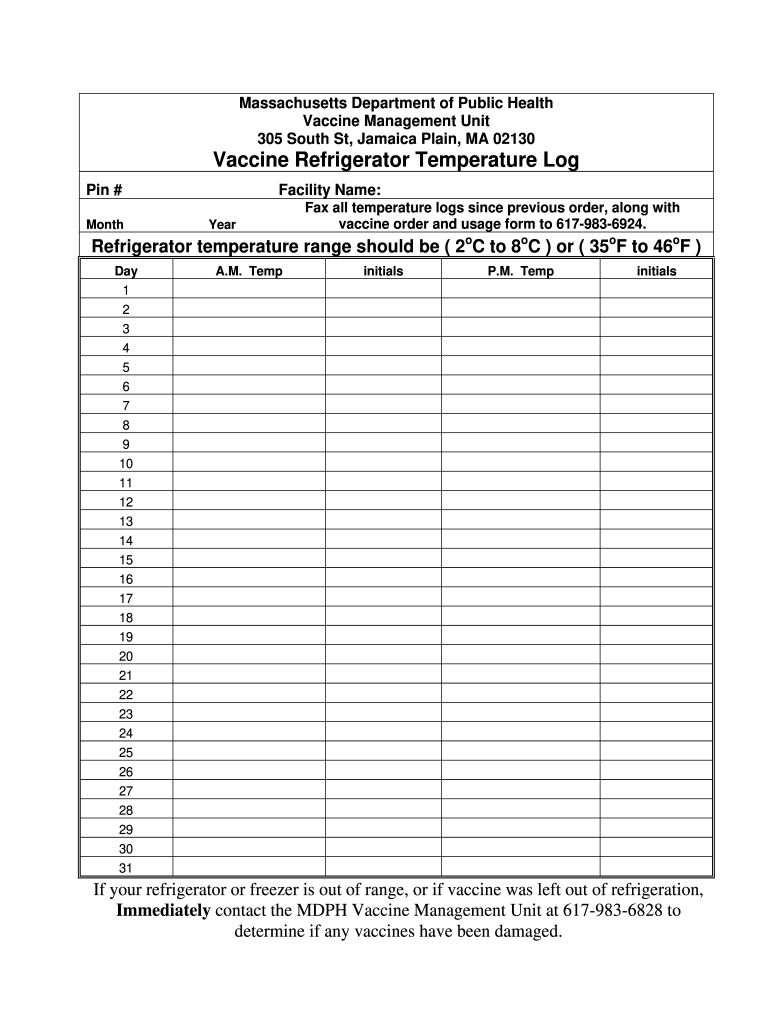
The temperature log template typically includes various fields and sections designed for comprehensive documentation. Elements typically seen in these logs are:
- Date and Time: When the temperature was checked.
- Freezer and Refrigerator Temperatures: Specific readings must be recorded to monitor for compliance.
- Initials of Personnel: Identifying who checked and recorded the temperatures adds accountability.
- Notes Section: Allows staff to document any unusual occurrences, such as equipment malfunctions.
How to Use the Massachusetts Temperature Log Template
Using the Massachusetts temperature log template involves a systematic approach to ensure accurate data recording. The following steps outline the process:
- Preparation: Print the temperature log template or use a digital version compatible with device applications.
- Regular Monitoring: Check the temperature at least twice daily, preferably at same times each day for consistency.
- Record Data: Fill in the date, time, and temperature readings promptly. Ensure you have the right units of measurement.
- Documentation of Issues: Document any deviations immediately, and report them as required by protocols defined by the Massachusetts Department of Public Health.
Best Practices for Effective Temperature Logging
Implementing best practices improves the reliability of the temperature log. Consider the following practices:
- Training Staff: Ensure all staff members involved in temperature monitoring are adequately trained in using the log and understanding the importance of temperature control.
- Routine Checks: Set reminders for checking temperatures to ensure values are regularly recorded.
- Backup Systems: Use both digital and paper logs to serve as a backup if one system fails, protecting against data loss.
Compliance and Reporting Requirements
Facilities must be aware of their responsibilities regarding compliance:
- Daily Log: A daily log is required to document temperatures and is subject to review by regulatory bodies.
- Reporting Anomalies: When temperatures fall outside acceptable ranges, facilities must report these issues to the Massachusetts Department of Public Health, along with actions taken.
Examples of Temperature Logs
Examples of temperature logs can assist in understanding how to properly format or utilize the template. Commonly seen logs include:
- Printable Refrigerator Temperature Log Sheet PDF: A simple format that allows for handwritten entries.
- VFC Temperature Log PDF: Specifically designed for facilities participating in the Vaccine for Children program, tailored for pediatric vaccine storage.
Documenting Equipment Malfunctions
In instances of equipment failure that affect temperature control:
- Log Details: Include the date, description of the malfunction, and actions taken to resolve the issue.
- Management Notification: Notify management immediately and follow facility protocols for dealing with equipment issues.
Conclusion: Consistency is Key
While detailed documentation and adherence to protocols are essential for maintaining temperature logs, the ultimate goal is the effective and safe storage of vaccines. Regular training, diligent record-keeping, and proactive problem-solving contribute to high standards of patient safety and compliance with state regulations.