




Here's how it works



How to use or fill out Box 30243, Lansing, MI 48909 - dleg state mi with our platform

- Click ‘Get Form’ to open it in the editor.
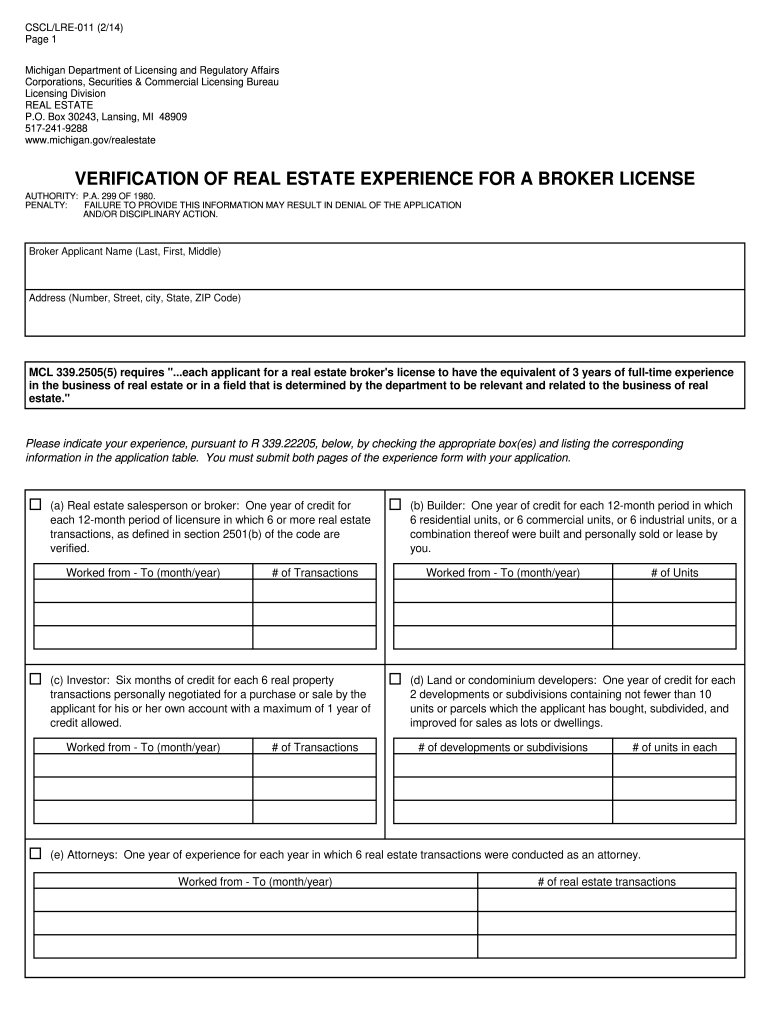
- Begin by entering your name in the 'Broker Applicant Name' field. Ensure you include your last name, first name, and middle initial.
- Fill in your complete address in the designated section, including street number, city, state, and ZIP code.
- Indicate your real estate experience by checking the appropriate boxes for each category that applies to you. Be sure to provide details such as dates worked and the number of transactions or units.
- For each experience type listed (e.g., salesperson, builder), enter the relevant information in the corresponding fields. This includes work periods and transaction counts.
- Finally, review all entries for accuracy before signing and dating the form at the bottom to certify that your statements are true.
Start using our platform today to easily complete your Box 30243 form online for free!
It's free
Got questions?
Can I sign my Box 30243, Lansing, MI 48909 - dleg state mi electronically?
According to eSignature laws, documents signed digitally have the same validity as those approved with pen and paper. You can electronically sign almost any business and private documentation. Four types of paperwork still call for handwritten signatures only - wills and testamentary trusts, court orders and other court papers, state statutes governing divorce, adoption, or other family law, and notice of cancellation of utility services. If you adhere to the guidelines and use a trustworthy and compliant software solution, like DocHub, you can eSign your Box 30243, Lansing, MI 48909 - dleg state mi without printing it.
Can I sign my Box 30243, Lansing, MI 48909 - dleg state mi while I edit it?
If you edit your Box 30243, Lansing, MI 48909 - dleg state mi with DocHub, you will not need to look for other applications or services to eSign it. An electronic signature is part of DocHub’s substantial editing toolset, which allows you to apply changes in your form without switching between platforms. Just complete your form, double-check the correctness of the data and place your electronic signature at the end to make it submission-ready quickly.
Security and compliance
At DocHub, your data security is our priority. We follow HIPAA, SOC2, GDPR, and other standards, so you can work on your documents with confidence.
Learn more


