




Here's how it works

01. Edit your superbill template mental health pdf online
Type text, add images, blackout confidential details, add comments, highlights and more.

02. Sign it in a few clicks
Draw your signature, type it, upload its image, or use your mobile device as a signature pad.

03. Share your form with others
Send superbill template mental health via email, link, or fax. You can also download it, export it or print it out.
How to use or fill out superbill template mental health with our platform

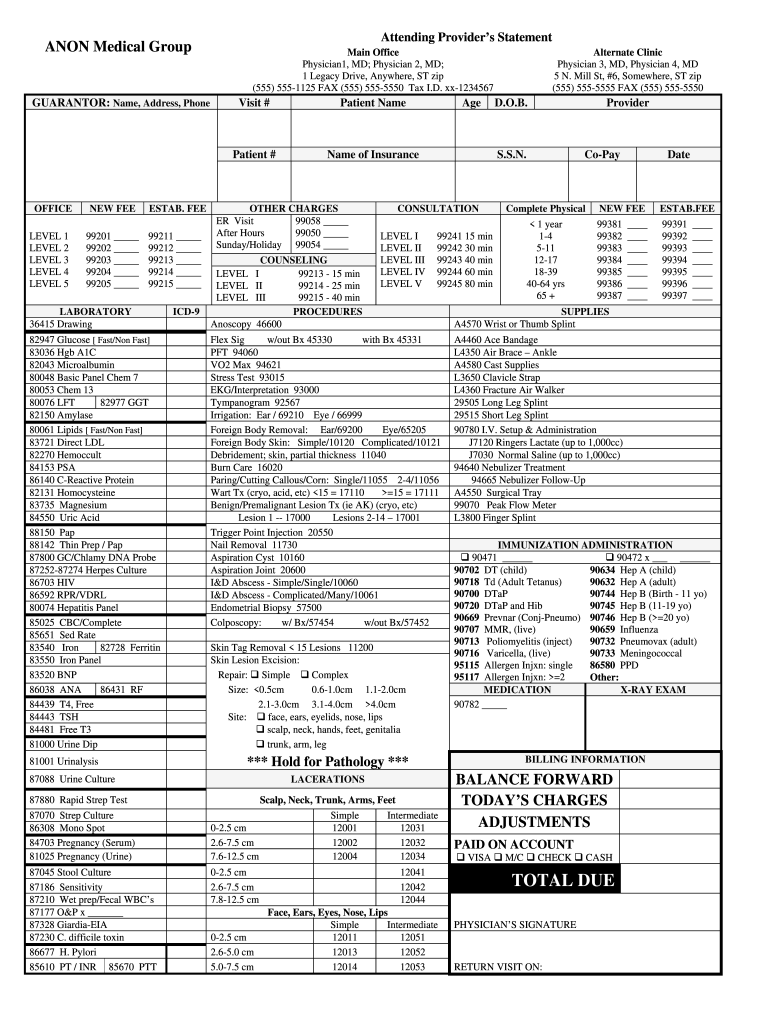
- Click ‘Get Form’ to open the superbill template in the editor.
- Begin by filling in the Guarantor section with the name, address, and phone number of the responsible party.
- In the Attending Provider’s Statement, enter the names of the attending physicians and their contact information.
- For each service level (NEW FEE and ESTAB. FEE), input the appropriate codes and corresponding charges based on the services provided.
- Complete any laboratory tests that were performed by checking off relevant codes from the Laboratory section.
- Fill in patient details such as Patient Name, Patient Number, Date of Birth, and Visit Number in their respective fields.
- Review all entries for accuracy before saving or exporting your completed superbill for submission.
Start using our platform today to streamline your superbill completion process for free!
Fill out superbill template mental health online
It's free
It's free
See more superbill template mental health versions
We've got more versions of the superbill template mental health form. Select the right superbill template mental health version from the list and start editing it straight away!
| Versions | Form popularity | Fillable & printable |
|---|---|---|
| 2011 | 4.8 Satisfied (265 Votes) |
Security and compliance
At DocHub, your data security is our priority. We follow HIPAA, SOC2, GDPR, and other standards, so you can work on your documents with confidence.
Learn more


Related forms

Inter Intra District Transfer - Marysville Joint Unified School District
The document is an Inter/Intra District Agreement form for the Marysville Joint Unified School District, used for reques ...

MAKE CHECKS PAYABLE TO "SECRETARY
The document is a UCC-3 Financing Statement Amendment form from the Secretary of the State of Connecticut, used to amend ...

FormsIndian River Clerk of the Circuit Court and Comptroller
The document is a Declaration of Domicile filed with the Clerk & Comptroller of St. Lucie County, Florida, affirming the ...

Will Search Request Form - Allegheny County, PA
The document provides instructions for conducting a will search in Allegheny County, detailing the $10 fee for the searc ...

Form 206 evidence of life uk
The document is a Form 206, titled 'Evidence of Life', used in the High Court for declaring the living status of a perso ...

Get Bus Accident Report Form - US Legal Forms
The document is a School Bus Crash Report Form designed for school districts to report incidents involving school buses. ...