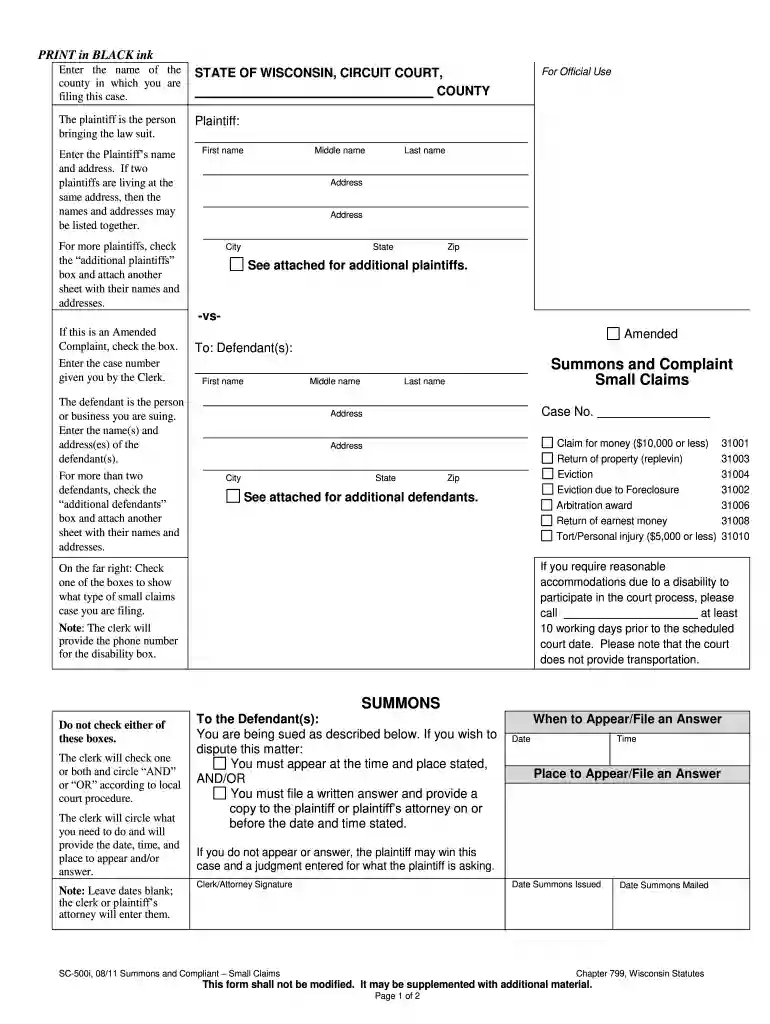
Summons and complaint form sc 2011-2026

Get Form
summons and complaint form sc Preview on Page 1

Here's how it works

01. Edit your summons and complaint form sc online
Type text, add images, blackout confidential details, add comments, highlights and more.

02. Sign it in a few clicks
Draw your signature, type it, upload its image, or use your mobile device as a signature pad.

03. Share your form with others
Send complaint and summons form via email, link, or fax. You can also download it, export it or print it out.

How to use or fill out summons and complaint form sc 2011 with our platform

Form edit decoration
9.5
Ease of Setup
DocHub User Ratings on G2
9.0
Ease of Use
DocHub User Ratings on G2
  1. Click ‘Get Form’ to open the summons and complaint form SC 2011 in the editor.
  2. Begin by entering the name of the county where you are filing your case at the top of the form. This is essential for proper jurisdiction.
  3. In the 'Plaintiff' section, input your name and address. If there are multiple plaintiffs at the same address, list them together. Ensure all details are accurate.
  4. If applicable, check the box for 'additional plaintiffs' and attach a separate sheet with their names and addresses.
  5. Proceed to fill in the defendant's information in the 'To: Defendant(s)' section. Include their name(s) and address(es). For more than two defendants, check 'additional defendants' and provide a separate sheet.
  6. Select the type of small claims case you are filing by checking one of the boxes provided on the right side of the form.
  7. In the 'Complaint' section, clearly state your demands against the defendant(s) and provide a brief explanation of facts supporting your claim.
  8. Before signing, take this document to a Notary Public for verification. After notarization, sign and date it accordingly.

Start using our platform today to easily complete your summons and complaint form for free!

See more summons and complaint form sc 2011 versions

We've got more versions of the summons and complaint form sc 2011 form. Select the right summons and complaint form sc 2011 version from the list and start editing it straight away!
Versions Form popularity Fillable & printable
2019 4.8 Satisfied (78 Votes)
2018 4.4 Satisfied (102 Votes)
2011 4.4 Satisfied (219 Votes)
be ready to get more

Complete this form in 5 minutes or less

Get form

Got questions?

We have answers to the most popular questions from our customers. If you can't find an answer to your question, please contact us.
Contact us
Service of a summons and complaint upon a defendant of any class referred to in paragraph (1) or (3) of this subdivision of this rule may be made by the plaintiff or by any person authorized to serve process pursuant to Rule 4(c), including a sheriff or his deputy, by registered or certified mail, return receipt
Court Rules (a) The defendant may reply to the plaintiffs complaint by filing a written statement in a form approved by the magistrate or by personally appearing and making an oral statement.
Court Rules (2) if not served within the statute of limitations, actual service must be accomplished not later than one hundred twenty days after filing.
Service occurs when an adverse party is given a summons and complaint stating that a lawsuit has been filed. A summons is essentially a request to appear before the court and a complaint is a document that lays out the reason why someone is getting sued. A summons and complaint will state the party suing you.
An answering party may not give lack of information or knowledge as a reason for failure to admit or deny unless he states that he has made reasonable inquiry and that the information known or readily obtainable by him is insufficient to enable him to admit or deny.

Security and compliance

At DocHub, your data security is our priority. We follow HIPAA, SOC2, GDPR, and other standards, so you can work on your documents with confidence.

Learn more
ccpa2
pci-dss
gdpr-compliance
hipaa
soc-compliance
be ready to get more

Complete this form in 5 minutes or less

Get form