Type text, add images, blackout confidential details, add comments, highlights and more.

02. Sign it in a few clicks
Draw your signature, type it, upload its image, or use your mobile device as a signature pad.

03. Share your form with others
Send campbell flimsy via email, link, or fax. You can also download it, export it or print it out.

How to use or fill out fort campbell form 2635 with our platform
Ease of Setup
DocHub User Ratings on G2
Ease of Use
DocHub User Ratings on G2
Click ‘Get Form’ to open the Fort Campbell Form 2635 in the editor.
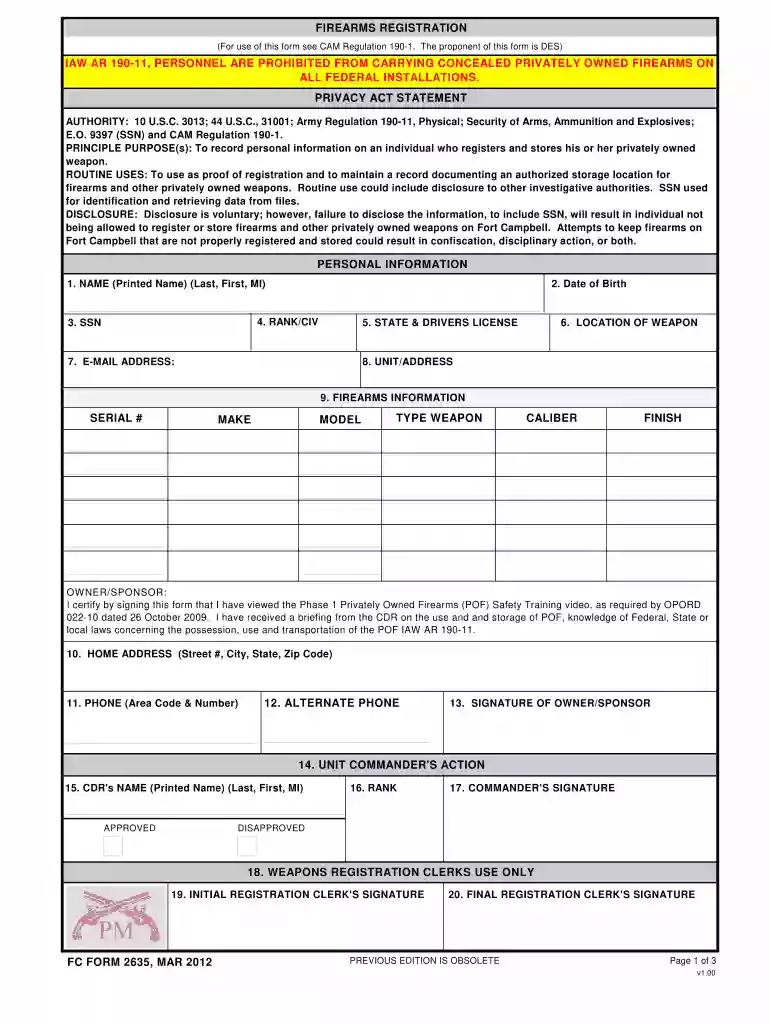
Begin by filling in your personal information. Enter your printed name, date of birth, and Social Security Number (SSN) in the designated fields.
Next, provide your rank or civilian status, state and driver's license number, and the location of your weapon. Ensure that all details are accurate for proper registration.
In the firearms information section, list each firearm you wish to register. Include details such as serial number, make, model, type of weapon, caliber, and finish.
Complete the home address and contact information fields. Make sure to include both primary and alternate phone numbers.
Sign the form digitally or manually as the owner/sponsor. If applicable, have your unit commander complete their section with their name, rank, and signature.
Once completed, save your form. You can either print it for manual submission at the Visitor Control Center or email it securely as instructed.
Start using our platform today to streamline your form completion process for free!
We've got more versions of the fort campbell form 2635 form. Select the right fort campbell form 2635 version from the list and start editing it straight away!
Fort campbell form 2635 pdfFort campbell form 2635 onlineFort campbell form 2635 2022FC form 2635 fillableFort Campbell WEAPONS REGISTRATIONFort campbell form 2171Fort campbell hunting formsFort campbell background check
Security and compliance
At DocHub, your data security is our priority. We follow HIPAA, SOC2, GDPR, and other standards, so you can work on your documents with confidence.
by A Regulation 2014 Cited by 1 This regulation contains internal control provi- sions in accordance with AR 112 and identifies key internal controls that must be evaluated (Read more
Cookie consent notice
This site uses cookies to enhance site navigation and personalize your experience.
By using this site you agree to our use of cookies as described in our Privacy Notice.
You can modify your selections by visiting our Cookie and Advertising Notice.