BRA-25 (10/96) 2026

Get Form
BRA-25 (10/96) Preview on Page 1

Here's how it works

01. Edit your form online
Type text, add images, blackout confidential details, add comments, highlights and more.
02. Sign it in a few clicks
Draw your signature, type it, upload its image, or use your mobile device as a signature pad.
03. Share your form with others
Send it via email, link, or fax. You can also download it, export it or print it out.

How to use or fill out BRA-25 (10/96) with our platform

Form edit decoration
9.5
Ease of Setup
DocHub User Ratings on G2
9.0
Ease of Use
DocHub User Ratings on G2
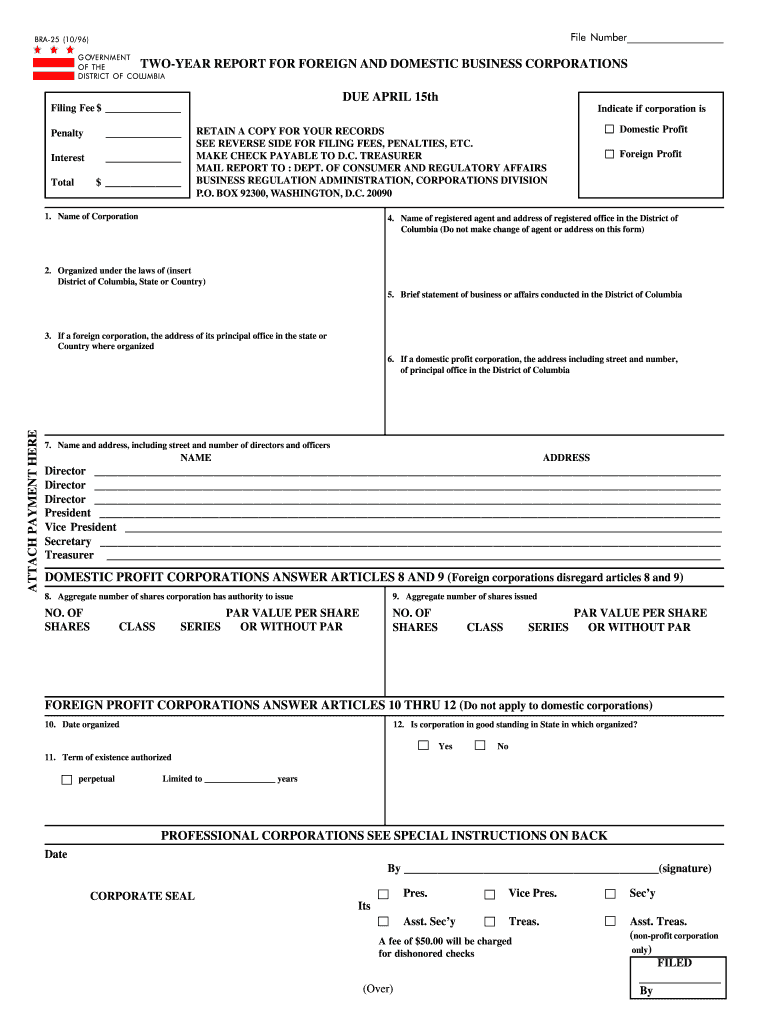
  1. Click ‘Get Form’ to open the BRA-25 (10/96) in the editor.
  2. Begin by entering your File Number at the top of the form. This is essential for tracking your submission.
  3. In Section 1, input the Name of Corporation. Ensure accuracy as this will be used for official records.
  4. For Section 2, specify where your corporation is organized, whether it’s in the District of Columbia, another state, or a foreign country.
  5. Complete Section 3 if applicable, providing the address of your principal office if you are a foreign corporation.
  6. Fill out Section 4 with the name and address of your registered agent in D.C., ensuring no changes are made on this form.
  7. In Section 5, provide a brief statement about your business activities conducted in D.C.
  8. Continue filling out Sections 6 and 7 with addresses and names of directors and officers as required.
  9. If applicable, complete Sections 8 and 9 for domestic profit corporations regarding shares issued and authorized.
  10. Finally, review all entries for accuracy before signing at the bottom. Attach any necessary payment as indicated.

Start using our platform today to easily fill out and submit your BRA-25 (10/96) form online for free!

See more BRA-25 (10/96) versions

We've got more versions of the BRA-25 (10/96) form. Select the right BRA-25 (10/96) version from the list and start editing it straight away!
Versions Form popularity Fillable & printable
2014 4.9 Satisfied (422 Votes)
2012 4 Satisfied (40 Votes)
1996 4 Satisfied (56 Votes)
be ready to get more

Complete this form in 5 minutes or less

Get form

Got questions?

We have answers to the most popular questions from our customers. If you can't find an answer to your question, please contact us.
Contact us
Washington D.C. Corporation Annual Report Requirements: $300. $100 expedite fee is required if delivering in-person. Turnaround: 15 days for Mail or Online filings; Fee of $100 for one day service or $50 for 3 day service for In-person filings.
LLC Annual Fees (as of 2025): State LLCLLC Filing FeeLLC Annual Fee California LLC $70 $800 + $20 Colorado LLC $50 $25 Connecticut LLC $120 $80 Delaware LLC $110 $30047 more rows Jul 24, 2025
Washington D.C. Professional LLC Annual Report Requirements: $300. $100 expedite fee is required if delivering in-person. Turnaround: 15 days for Mail or Online filings; Fee of $100 for one day service or $50 for 3 day service for In-person filings.
There are no annual fees in Washington DC. However, there are two types of bi-annual fees (costs that are paid every 2 years). All Washington DC LLCs need to pay $300 every two years for the Biennial Report. All District of Columbia LLCs have to pay ongoing fees for Biennial Reports to remain in good standing.
State LLC Costs: Overview StateState FeeAnnual Fee California $70.00 $800 Colorado $50.00 $10 Connecticut $120.00 $80 Delaware $110.00 $30047 more rows 6 days ago

Security and compliance

At DocHub, your data security is our priority. We follow HIPAA, SOC2, GDPR, and other standards, so you can work on your documents with confidence.

Learn more
ccpa2
pci-dss
gdpr-compliance
hipaa
soc-compliance
be ready to get more

Complete this form in 5 minutes or less

Get form