




Here's how it works

01. Edit your two year report for domestic foreign filing entity online
Type text, add images, blackout confidential details, add comments, highlights and more.

02. Sign it in a few clicks
Draw your signature, type it, upload its image, or use your mobile device as a signature pad.

03. Share your form with others
Send bra25 via email, link, or fax. You can also download it, export it or print it out.
How to use or fill out bra 25 with our platform

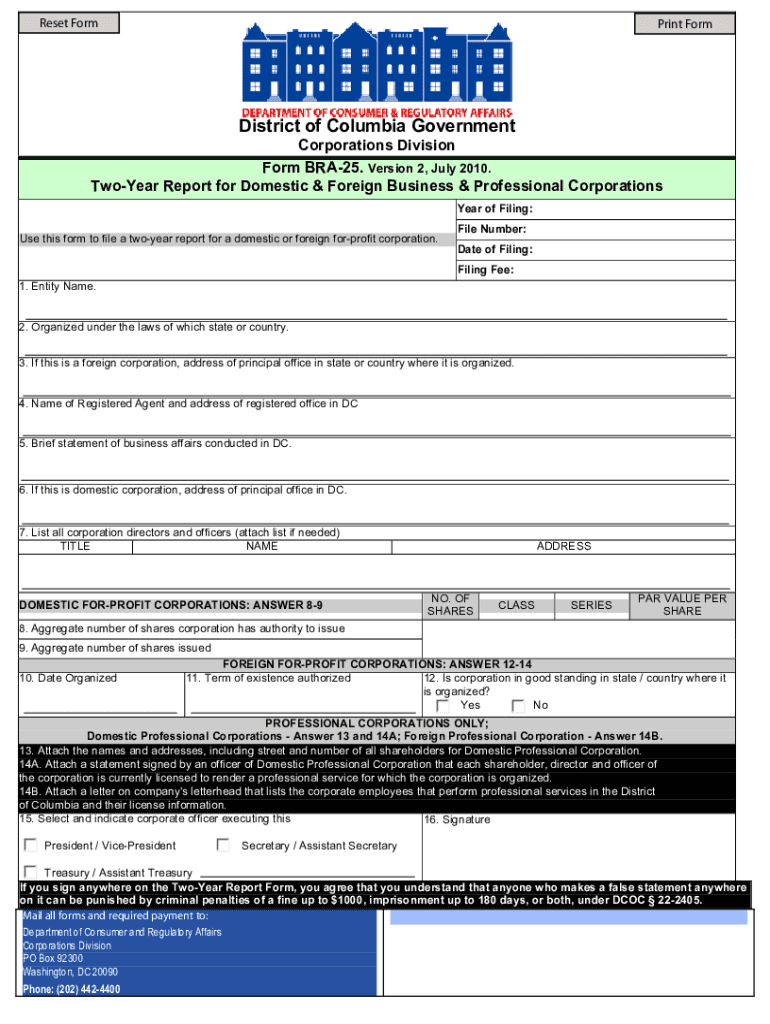
- Click ‘Get Form’ to open the BRA-25 in the editor.
- Begin by entering your file number, year of filing, date of filing, and the applicable filing fee in the designated fields.
- In Item 1, input the corporation's name exactly as it appears on the certificate of incorporation or authority. If there has been a name change, ensure you file for an amended authority simultaneously.
- For Item 2, specify the state where your corporation was formed. If you have re-domesticated to another state, remember to file for an amended authority.
- In Item 3, provide the address in the state of formation. If this address is outside that state, include your registered agent's address instead.
- Complete Item 4 by entering the name and address of your current registered agent as recorded with the Corporations Division. Use forms RA-1 and RA-3 if updates are needed.
- For Item 5, write a brief statement detailing your business activities in D.C., avoiding vague terms like 'any lawful business.'
- If applicable (for domestic corporations), fill out Items 6 through 9 regarding corporate addresses and share information.
- Finally, review all entries for accuracy before signing and dating the report in Items 15 and 16. Select the appropriate corporate officer executing this report.
Start filling out your BRA-25 form online for free today!
Fill out bra 25 online
It's free
It's free
See more bra 25 versions
We've got more versions of the bra 25 form. Select the right bra 25 version from the list and start editing it straight away!
Security and compliance
At DocHub, your data security is our priority. We follow HIPAA, SOC2, GDPR, and other standards, so you can work on your documents with confidence.
Learn more


