Bra 25 2025

Get Form
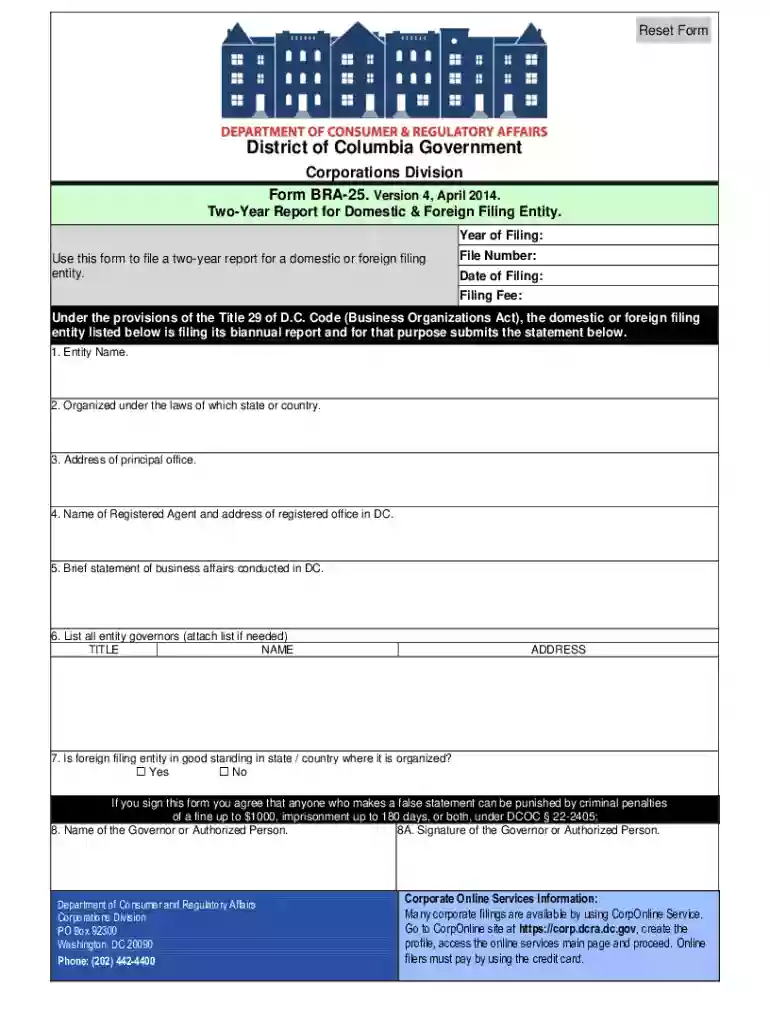
dc bra 25 Preview on Page 1

Here's how it works

01. Edit your dc bra 25 online
Type text, add images, blackout confidential details, add comments, highlights and more.

02. Sign it in a few clicks
Draw your signature, type it, upload its image, or use your mobile device as a signature pad.

03. Share your form with others
Send bra 25 biennial report via email, link, or fax. You can also download it, export it or print it out.

How to use or fill out bra 25 with our platform

Form edit decoration
9.5
Ease of Setup
DocHub User Ratings on G2
9.0
Ease of Use
DocHub User Ratings on G2
  1. Click ‘Get Form’ to open it in the editor.
  2. Begin by entering your file number, year of filing, date of filing, and the applicable filing fee in the designated fields.
  3. In Item 1, provide the name of your domestic or foreign filing entity. Ensure accuracy for proper identification.
  4. For Item 2, indicate the state where your entity was formed. This is crucial for compliance.
  5. In Item 3, enter the principal address of your entity. This should be a physical location where business activities occur.
  6. Item 4 requires you to list the name and address of your current registered agent. If there are changes, update this information accordingly.
  7. Provide a brief statement in Item 5 about the business affairs conducted in D.C., avoiding vague terms like 'any lawful business.'
  8. List all governors in Item 6; at least one name is mandatory for certain entity types. Attach additional names if necessary.
  9. If applicable, confirm good standing status in Item 7 for foreign entities and describe efforts to rectify any issues if not in good standing.
  10. Finally, sign the report in Item 8 and indicate the name of the authorized person executing this report.

Start filling out your bra 25 form today on our platform for free!

See more bra 25 versions

We've got more versions of the bra 25 form. Select the right bra 25 version from the list and start editing it straight away!
Versions Form popularity Fillable & printable
2014 4.9 Satisfied (422 Votes)
2012 4 Satisfied (40 Votes)
1996 4 Satisfied (56 Votes)
be ready to get more

Complete this form in 5 minutes or less

Get form

Got questions?

We have answers to the most popular questions from our customers. If you can't find an answer to your question, please contact us.
Contact us
To file your District of Columbia Biennial Report, youll need to complete the following steps: Find your businesss filing due date and fees. Complete your report online or by paper. File your biennial report and pay the filing fee.
Who needs to file this report? All domestic (District) or foreign (non-District) filing entity that conducts business in the District of Columbia and that registered with Corporation Division.
A biennial report, also known as Form -25, is a required filing that updates DC on important business details, such as your nonprofits address, key personnel, and contact information. This ensures that government records remain accurate.