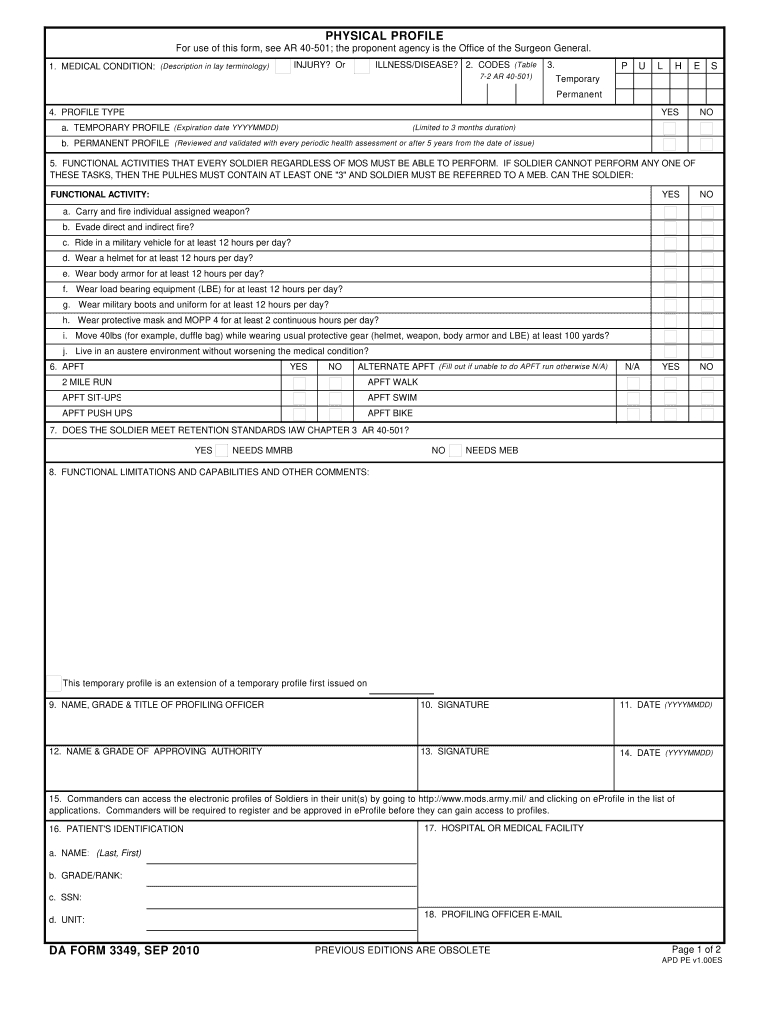
Da form 3349-2026

Get Form
da form 3349 Preview on Page 1

Here's how it works

01. Edit your da form 3349 online
Type text, add images, blackout confidential details, add comments, highlights and more.
02. Sign it in a few clicks
Draw your signature, type it, upload its image, or use your mobile device as a signature pad.
03. Share your form with others
Send da 3349 via email, link, or fax. You can also download it, export it or print it out.

How to use or fill out DA Form 3349 with our platform

Form edit decoration
9.5
Ease of Setup
DocHub User Ratings on G2
9.0
Ease of Use
DocHub User Ratings on G2
  1. Click ‘Get Form’ to open DA Form 3349 in the editor.
  2. Begin by entering the medical condition in lay terminology in the designated field. This is crucial for clarity.
  3. Indicate whether the profile is temporary or permanent by selecting the appropriate option. If temporary, provide an expiration date.
  4. Review the functional activities section carefully. For each activity listed, mark 'YES' or 'NO' based on the soldier's capabilities.
  5. Complete the APFT section if applicable, indicating whether the soldier can perform standard physical tests or requires alternatives.
  6. Fill in any functional limitations and capabilities in the comments section to provide additional context.
  7. Finally, ensure that all signatures and dates are completed at the bottom of the form before saving your changes.

Start using our platform today to streamline your form completion process for free!

See more da form 3349 versions

We've got more versions of the da form 3349 form. Select the right da form 3349 version from the list and start editing it straight away!
Versions Form popularity Fillable & printable
2010 4.9 Satisfied (412 Votes)
2004 4 Satisfied (46 Votes)
1986 4 Satisfied (53 Votes)
be ready to get more

Complete this form in 5 minutes or less

Get form

Got questions?

We have answers to the most popular questions from our customers. If you can't find an answer to your question, please contact us.
Contact us
Shaving profiles are the exception (see below). Leaders can validate a profile by engaging with medical personnel, or the Soldiers supervisor or commander. Note: Requesting verification of a profile does not violate the Health Insurance Portability and Accountability Act of 1996 (HIPAA).
If no date is specified, the profile will automatically expire at the end of 30 days from issuance of the profile. In no case will Soldiers carry a temporary profile which has been extended for more than 12 months.
Obtain a copy of DA Form 3349 from your unit administration office or download it from the official military website. Fill in the personal information section with your name, rank, and unit information. Specify the type of profile being requested, such as a temporary or permanent profile.
The DA Form 3349 is a document used by the U.S. Army to assess and record the physical profile of its service members. This form is crucial for determining the medical fitness and limitations of an individual, ensuring they are assigned duties that match their physical capabilities.
8. Official Photographs. Effective 1 Aug 20, the requirement for officer, warrant officer, and enlisted selection boards to include the DA photo as part of the board file is suspended (reference I). CHECK BOARD MILPERS FOR THIS MESSAGE AND INFORMATION.

Security and compliance

At DocHub, your data security is our priority. We follow HIPAA, SOC2, GDPR, and other standards, so you can work on your documents with confidence.

Learn more
ccpa2
pci-dss
gdpr-compliance
hipaa
soc-compliance

People also ask

DA form 3349 is a profile. You should definitely get one, but that doctors note is definitely sufficient for you to refuse and not suffer any repercussions for not performing physical activity.May 16, 2018

army profile